
All programs › BMPFast › BMPFast 2 sample problems
Sizing a wet detention pond
All sites non-exempted cannot be met by a pond alone; the pool for 40 / 75 %.
Help: Sizing (help page 4637) · Download the .bmpf · Link to Solution in BMPFast Version 1
1The problem
A 10-acre subdivision in Zone 2 (All sites non-exempted) starts with a 2.0 ac-ft permanent pool. Can a pond alone meet the standard? Then find the pool for 40 % TN and 75 % TP.
| Input | Value | Source |
|---|---|---|
| Project (General Site Information) | ||
| Meteorological zone | Florida Zone 2 | Zone map (help page 815) |
| Mean annual rainfall | 50 in | Mean annual rainfall map (help page 815) |
| Performance standard (analysis type) | All sites non-exempted | Site (illustrative) |
| Catchment 1: Subdivision (Watershed Characteristics) | ||
| Land use, pre / post | Agricultural - Pasture / Single-Family | Site (illustrative) |
| Area, pre / post | 10 / 10 ac | Site (illustrative) |
| Non-DCIA curve number, pre / post | 61 / 75 | Site (illustrative) |
| DCIA, pre / post | 0 / 25 % | Site (illustrative) |
| EMC TN, pre / post | 3.030 / 1.770 mg/L | BMPFast land use table (AH Vol I Table 9.2) |
| EMC TP, pre / post | 0.593 / 0.327 mg/L | BMPFast land use table (AH Vol I Table 9.2) |
Find: the Permanent Pool Volume that meets the removal targets: first the targets of the performance standard, then the new targets named, and apply it.
2Steps in BMPFast 2
Start BMPFast 2, choose File ▸ Open and open
sizing-wet-detention.bmpf(under Files below). The tree on the left opens on the project, General Site Information: Florida Zone 2, 50.0 in of rainfall, and the type of analysis All sites non-exempted. The file was saved as this problem ends, with the wet detention already sized; the next step puts it back to where the problem starts.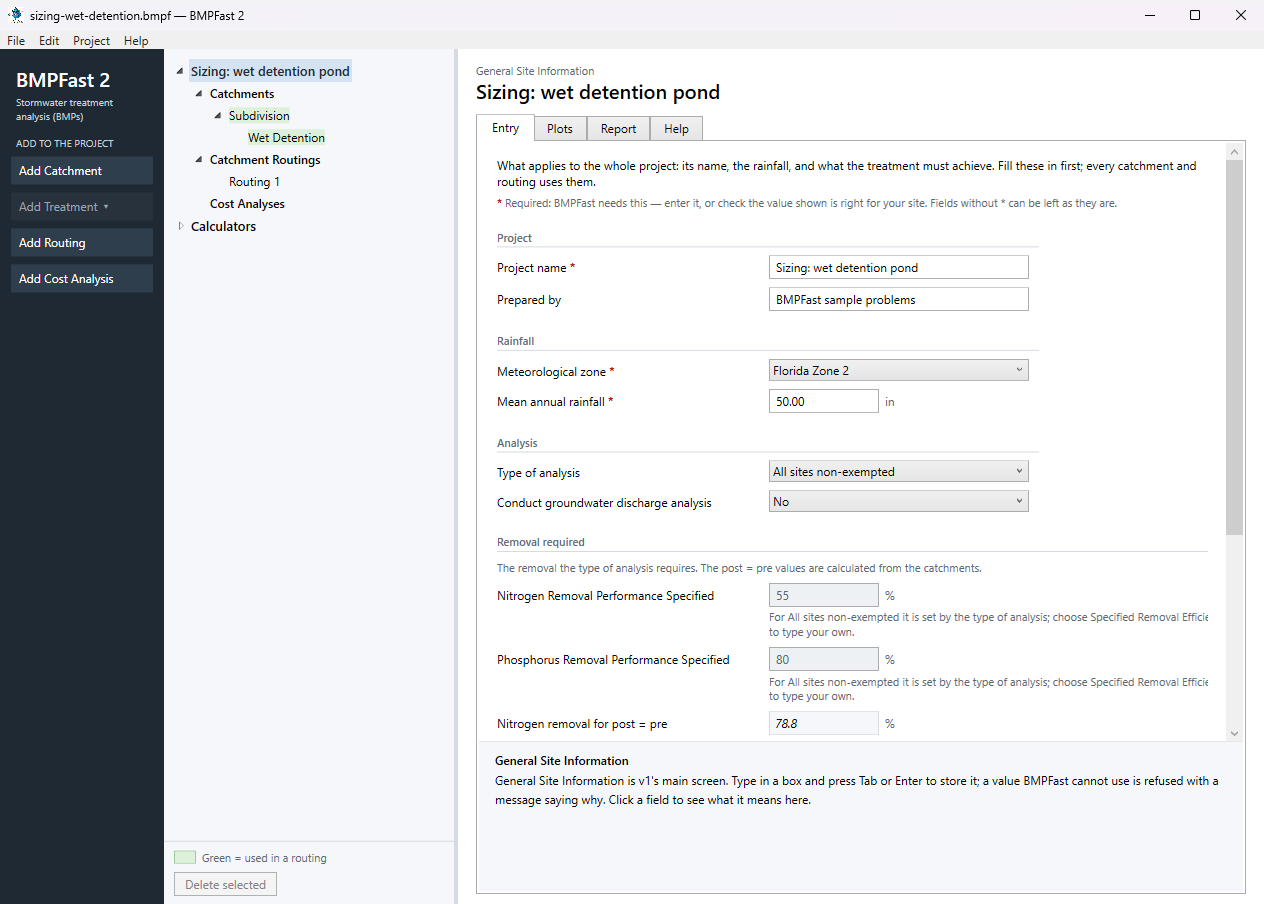
General Site Information: the project’s Entry tab. In the tree open Catchments ▸ Subdivision, select the treatment Wet Detention and open its Sizing tab. Under Wet Detention dimensions type 2 in Permanent Pool Volume (ac-ft) and press Enter: the design the problem starts from. The Targets are the project’s requirement, the greater of the type of analysis’s percentage and the removal that keeps post-development loads at pre-development: Nitrogen removal to meet 78.8 %, Phosphorus removal to meet 80.0 %. Under Results: Removal now nitrogen 51.1 %, phosphorus 80.7 %; Meets both targets No: nitrogen 51.1 % of 78.8 %; Average residence time 66.87 days.
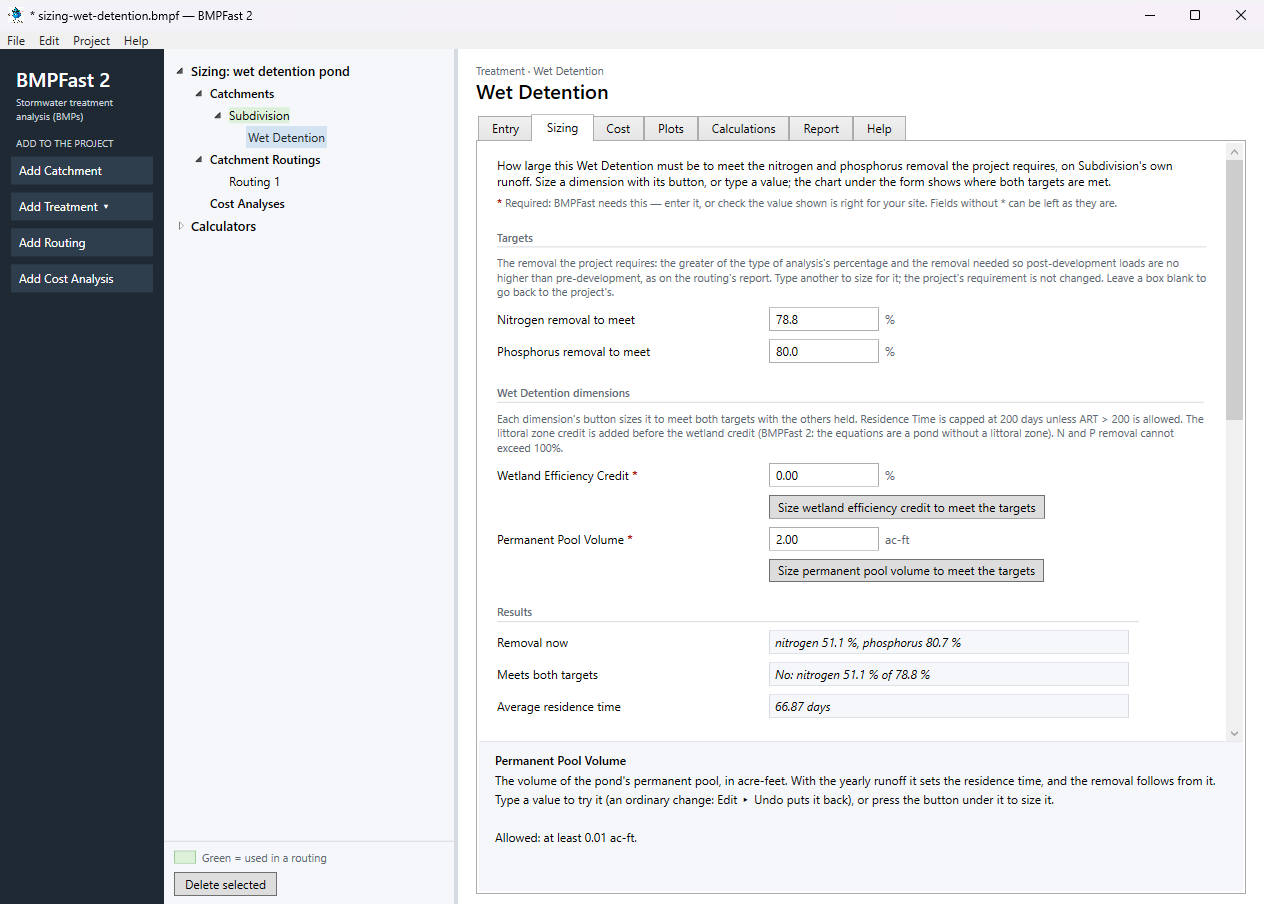
The Sizing tab at the starting design, with the project’s targets. Scroll down. Under Chart, the chart plots the nitrogen and phosphorus removal against permanent pool volume (0.01 to 5.01 ac-ft (automatic)), with the targets dashed and this design marked. Where both targets are met: Not in the charted range (widen it, or chart another dimension).
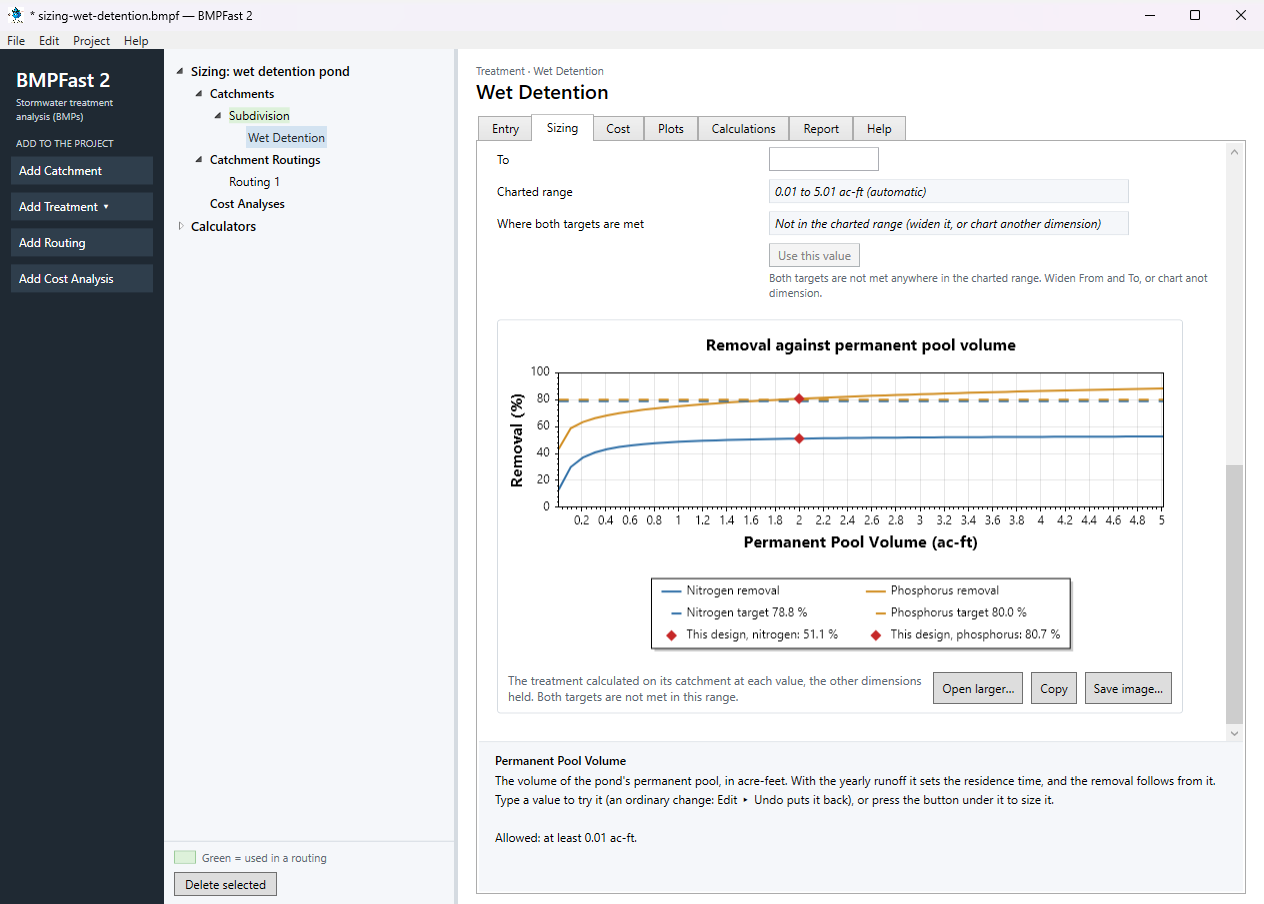
The chart under the Sizing tab: removal against the dimension, the targets dashed. Scroll back up and type the new targets: 40 in Nitrogen removal to meet and 75 in Phosphorus removal to meet. Meets both targets now reads Yes, and Where both targets are met moves to Permanent Pool Volume = 0.99. Press Use this value. BMPFast 2 sets permanent pool volume to 0.99 ac-ft (0.9862 ac-ft before rounding) and calculates the treatment again: Removal now nitrogen 48.6 %, phosphorus 75.0 %; Meets both targets Yes; Average residence time 32.97 days. (The button Size permanent pool volume to meet the targets, under the box, sizes the same way without the chart.) Targets typed here are for this tab only and change nothing in the project; the new size is an ordinary change to the treatment, and Edit ▸ Undo puts it back.
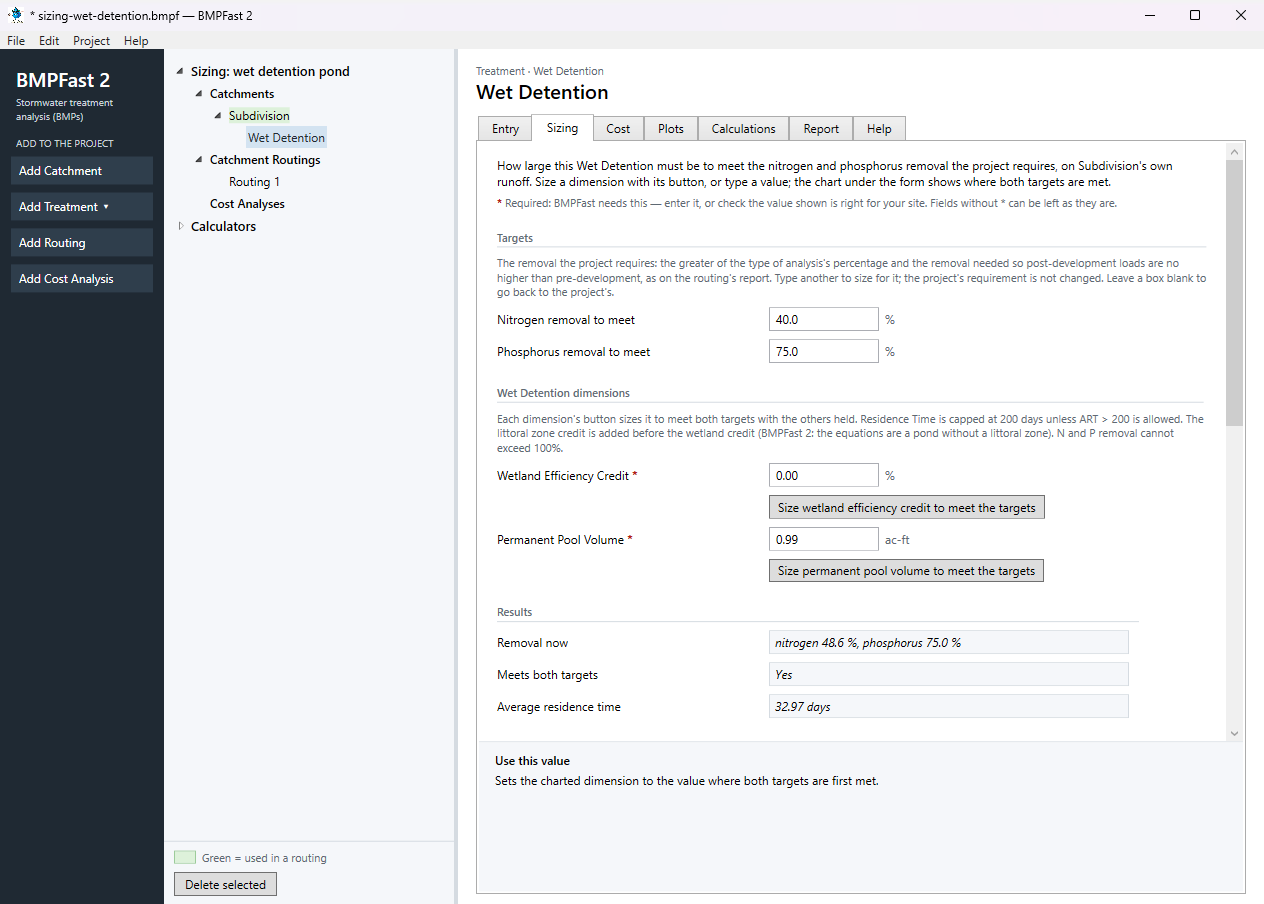
The Sizing tab after the new targets were typed and Use this value pressed. Scroll down again: the chart is drawn for the new targets (0.01 to 5.01 ac-ft (automatic)), and this design now sits where both targets are met.
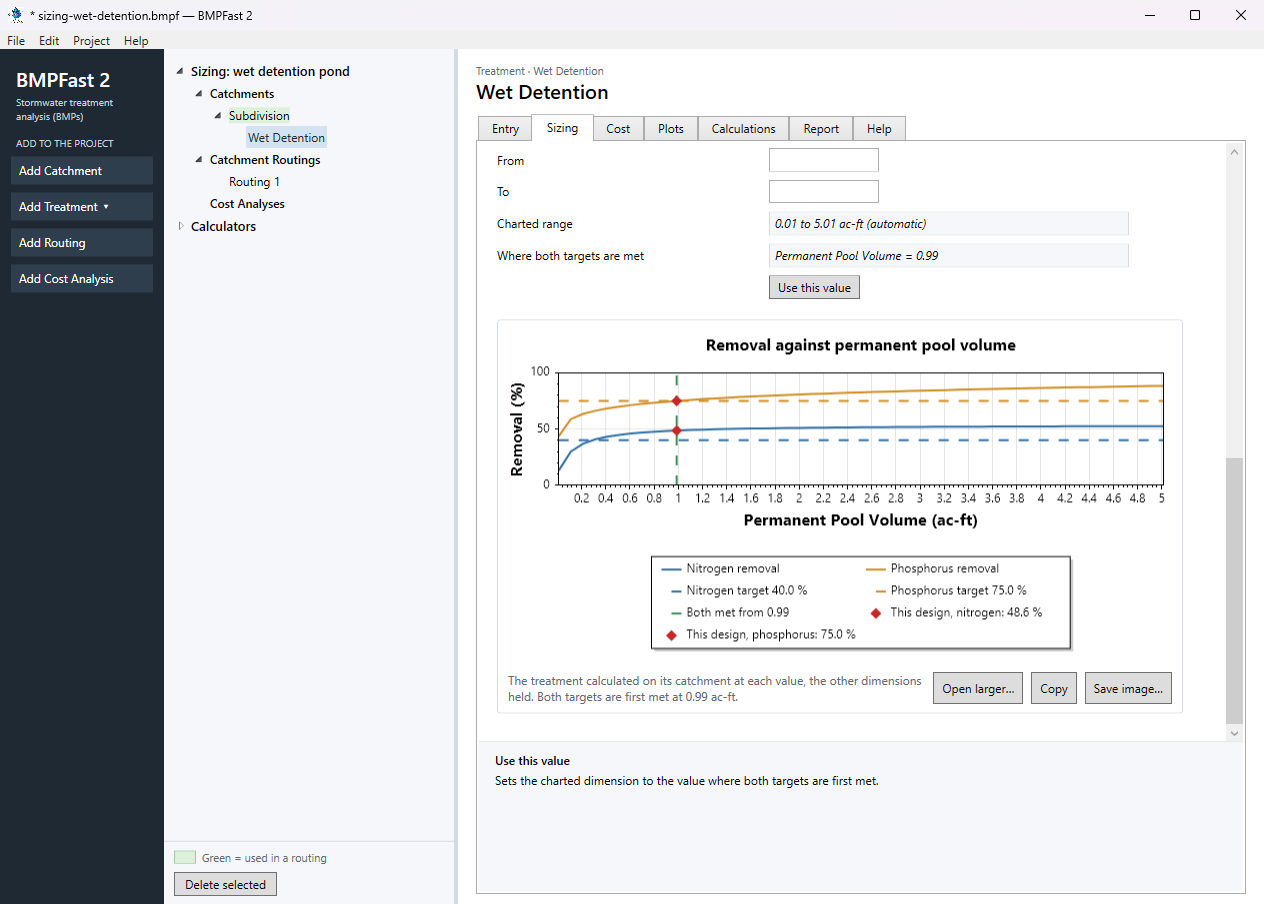
The chart for the new targets. Open the treatment’s Entry tab: Permanent pool volume holds the new size and the results at the bottom are calculated with it.
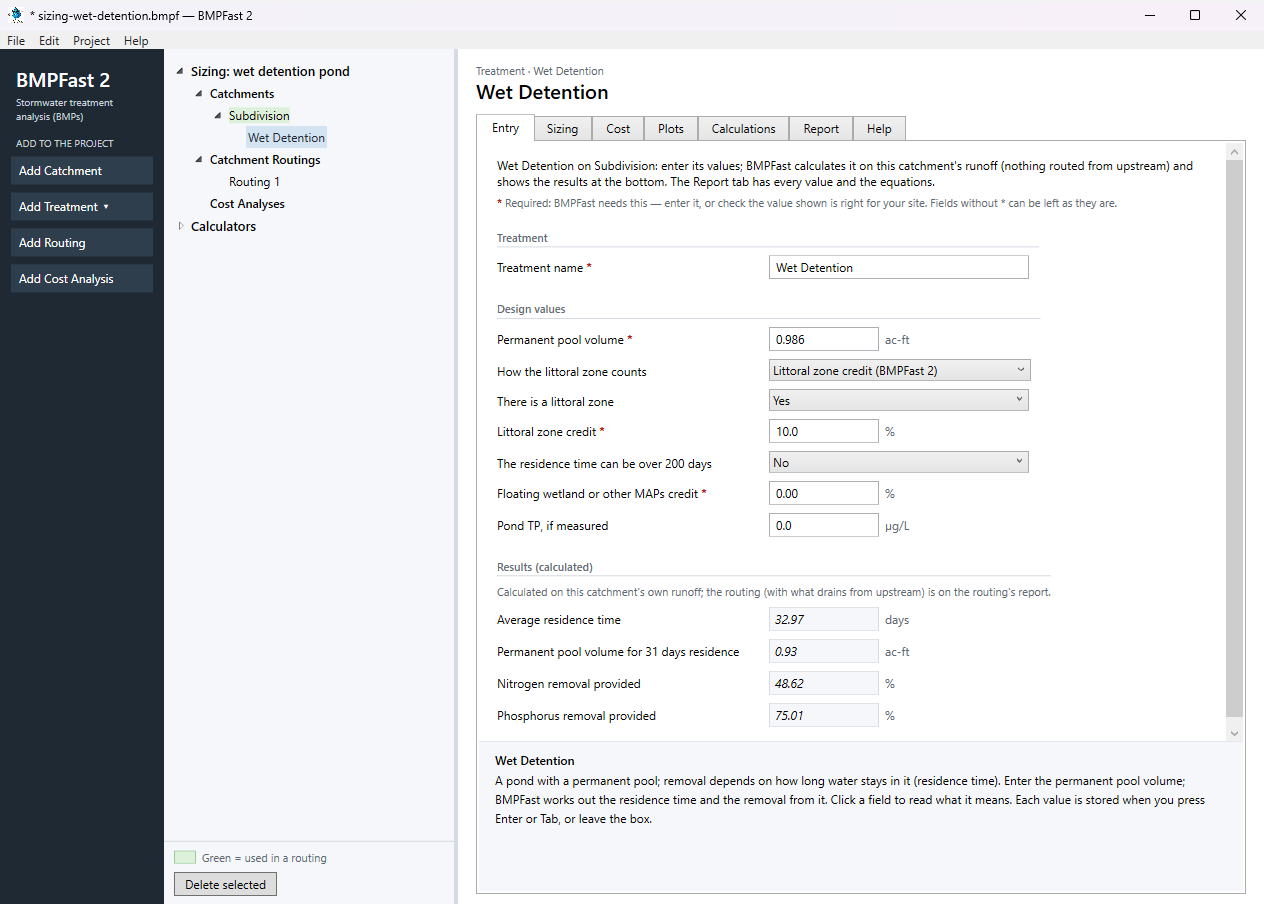
The treatment’s Entry tab with the new size. Under Catchment Routings select Routing 1 and open its Report tab. Results shows the loads leaving the site, the removal provided and required, and whether the performance standard is met. Save the project with File ▸ Save.
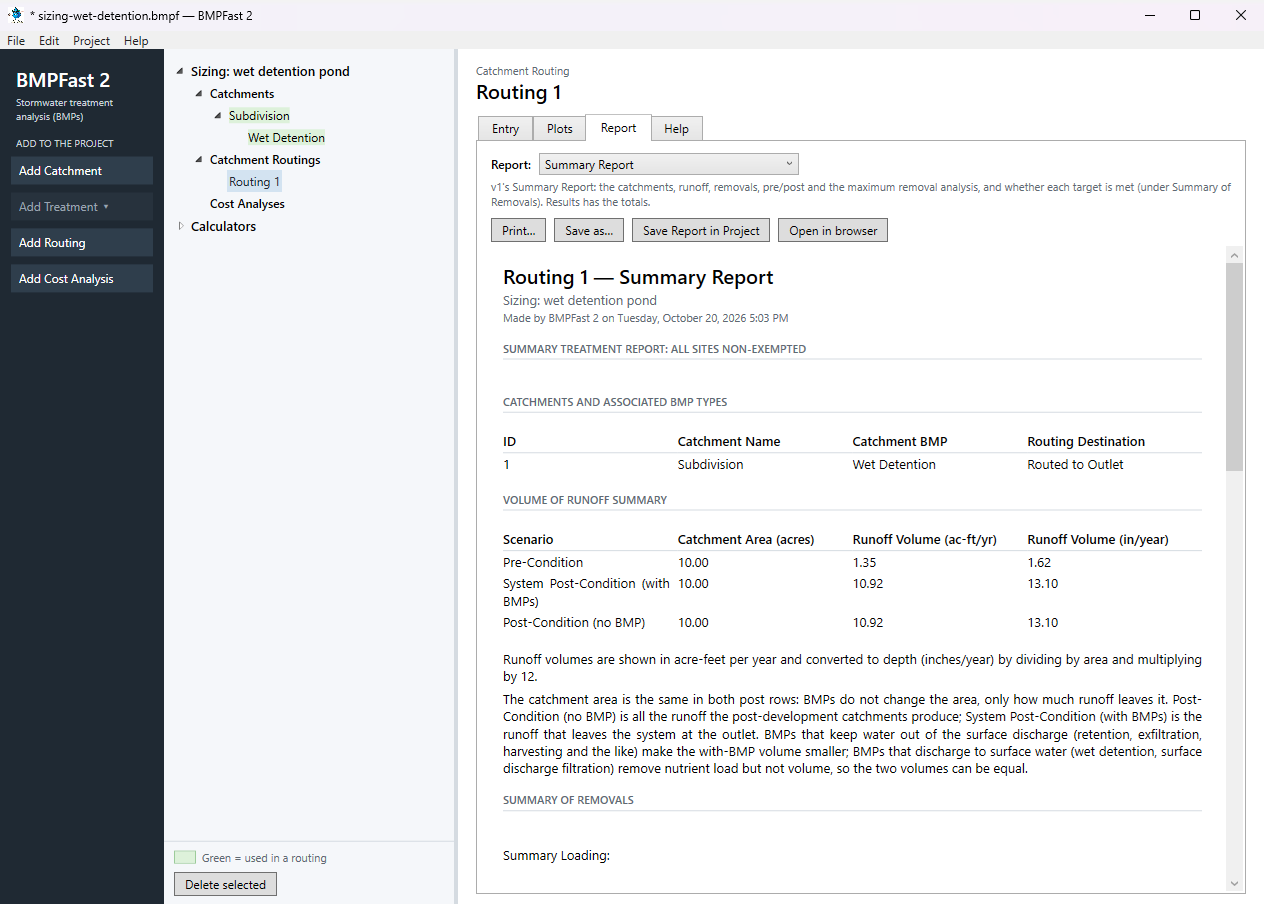
The routing’s Report tab: Results.
3Results
The Sizing tab, before and after:
| The Sizing tab | At the project’s targets | At 40 / 75 %, after Use this value |
|---|---|---|
| Nitrogen removal to meet / Phosphorus removal to meet | 78.8 % / 80.0 % | 40.0 % / 75.0 % |
| Permanent Pool Volume | 2.00 ac-ft | 0.99 ac-ft |
| Removal now | nitrogen 51.1 %, phosphorus 80.7 % | nitrogen 48.6 %, phosphorus 75.0 % |
| Meets both targets | No: nitrogen 51.1 % of 78.8 % | Yes |
| Average residence time | 66.87 days | 32.97 days |
| Where both targets are met | Not in the charted range (widen it, or chart another dimension) | Permanent Pool Volume = 0.99 |
The treatment and the site, with the new size:
| Result | Value |
|---|---|
| Wet Detention: computed by BMPFast | |
| Annual residence time | 33.0 days |
| Hydraulic capture efficiency | 71.00 % |
| Provided TN / TP removal | 48.62 % / 75.01 % |
| TN load in → out | 23.825 → 12.241 kg/yr |
| TP load in → out | 4.402 → 1.100 kg/yr |
| Site (all catchments, at the outlet) | |
| TN load: catchments → outlet | 23.825 → 12.241 kg/yr |
| TP load: catchments → outlet | 4.402 → 1.100 kg/yr |
| Provided removal TN / TP | 48.6 % / 75.0 % |
| Required removal TN / TP (Maximum % Removal) | 78.8 % (not met) / 80.0 % (not met) |
Against v1’s Sizing window:
- Permanent Pool Volume after Use this value: BMPFast 2 0.9862 ac-ft; BMPFast (v1) applied 3.3745 ac-ft (a difference of 2.3884 ac-ft: each program finds the crossing on its own sweep of the chart’s range)
- At the project’s targets both programs say the targets are not met anywhere in the charted range (BMPFast 2: Not in the charted range (widen it, or chart another dimension)).
The routing’s Results report
Open this report on its own page.
The Summary Report (v1’s, for this routing)
Open this report on its own page.
BMPFast 2 and BMPFast (v1)
| Result | BMPFast 2 | BMPFast (v1), its page | |
|---|---|---|---|
| Nitrogen leaving the site | 12.241 kg/yr | 13.791 kg/yr | differs |
| Phosphorus leaving the site | 1.100 kg/yr | 1.100 kg/yr | same |
| Site removal, nitrogen | 48.620 % | 42.115 % | differs |
| Site removal, phosphorus | 75.007 % | 75.001 % | differs |
| Subdivision: Wet Detention removal, nitrogen | 48.620 % | 42.115 % | differs |
| Subdivision: Wet Detention removal, phosphorus | 75.007 % | 75.001 % | differs |
BMPFast 2 gives a different number for: Nitrogen leaving the site, Site removal, nitrogen, Site removal, phosphorus, Subdivision: Wet Detention removal, nitrogen, Subdivision: Wet Detention removal, phosphorus. See the notes below the table.
When BMPFast 2 opened the v1 file it said:
- Subdivision, Wet Detention: BMPFast 2 takes the wet pond equations as a pond without a littoral zone, and adds a littoral zone credit of 10 percentage points (Appendix O's maximum) to this pond's removal, so it is higher than v1 shows; lower Littoral zone credit if your permit reviewer allows less. To calculate as v1, choose "Reduce without a littoral zone (v1)" in How the littoral zone counts (Design values) on the treatment's Entry tab.
4Check
Runoff and loads (Equations 9-1 and 9-2 of AH Vol I).
| Runoff | = ROC × area × rainfall / 12 |
| = 0.262 × 10.00 ac × 50.0 in / 12 | |
| = 10.917 ac-ft/yr (program 10.917). |
| TN load | = EMC × runoff × 1.233 |
| = 1.770 × 10.917 × 1.233 | |
| = 23.825 kg/yr (program 23.825) |
| TP load | = 0.327 × 10.917 × 1.233 |
| = 4.402 kg/yr (program 4.402). |
1.233 kg is 1 mg/L in 1 ac-ft.
Annual residence time.
| ART | = permanent pool × 365 / annual runoff |
| = 0.986 ac-ft × 365 / 10.917 ac-ft/yr | |
| = 33.0 days (program 33.0). |
Removal. The wet detention equations of AH Vol I Appendix O at 33.0 days (TN 38.62 %, TP 65.01 %), with the littoral zone credit of 10 percentage points added to each because the pond has a littoral zone (BMPFast 2 takes the equations as a pond without one), give TN 48.62 % and TP 75.01 %. The worksheet’s Equations page shows each equation with these numbers; the Wet Detention Methodology explains them.
Load out.
| TN out | = load in × (1 − removal) |
| = 23.825 × (1 − 48.62 / 100) | |
| = 12.241 kg/yr (program 12.241) |
| TP out | = 4.402 × (1 − 75.01 / 100) |
| = 1.100 kg/yr (program 1.100). |
5Files
- sizing-wet-detention.bmpf: the project, saved by BMPFast 2. Save it (your browser puts it in Downloads), then in BMPFast 2 choose File ▸ Open and open it. Opened again and calculated, it gives the numbers on this page.
- sizing-wet-detention.bmpt: the same project as BMPFast (v1) saved it. BMPFast 2 opens it too (File ▸ Open); saving it then makes a .bmpf and leaves the .bmpt as it was.
- Routing 1 (BMPFast 2’s report, as Open in browser on its Report tab gives it)
- Routing 1 — Summary Report (BMPFast 2’s report, as Open in browser on its Report tab gives it)
- Wet Detention (BMPFast 2’s report, as Open in browser on its Report tab gives it)
- Wet Detention — calculations (BMPFast 2’s report, as Open in browser on its Report tab gives it)
6Help and methodology
Calculated with BMPFast 2 version 2.0.0 (2026-10-20), which opens the problem’s v1 project as it is. Screen captures are of BMPFast 2’s own window and are for demonstration only.