
All programs › BMPFast › BMPFast 2 sample problems
Tree wells along a street (retention)
Ten 8 × 8 ft tree wells; BMP Analysis, Zone 2.
Help: Tree Well (help page 807) · Download the .bmpf · Link to Solution in BMPFast Version 1
1The problem
A half-acre street and sidewalk drain to ten 8 ft × 8 ft tree wells, 3 ft deep, that infiltrate.
| Input | Value | Source |
|---|---|---|
| Project (General Site Information) | ||
| Meteorological zone | Florida Zone 2 | Zone map (help page 815) |
| Mean annual rainfall | 50 in | Mean annual rainfall map (help page 815) |
| Performance standard (analysis type) | BMP Analysis | Site (illustrative) |
| Catchment 1: Street (Watershed Characteristics) | ||
| Land use, pre / post | Undeveloped - Mesic Flatwoods / Low-Intensity Commercial | Site (illustrative) |
| Area, pre / post | 0.5 / 0.5 ac | Site (illustrative) |
| Non-DCIA curve number, pre / post | 70 / 80 | Site (illustrative) |
| DCIA, pre / post | 0 / 85 % | Site (illustrative) |
| EMC TN, pre / post | 1.087 / 0.930 mg/L | BMPFast land use table (AH Vol I Table 9.2) |
| EMC TP, pre / post | 0.043 / 0.190 mg/L | BMPFast land use table (AH Vol I Table 9.2) |
| Tree Well (worksheet) | ||
| Retention or Detention | Retention | Design (illustrative) |
| Vegetated area (tree well) depth | 3 ft | Design (illustrative) |
| Tree well storage (above media + canopy capture) | 0.5 ft | Design (illustrative) |
| Vegetated area width | 8 ft | Design (illustrative) |
| Vegetated area length | 8 ft | Design (illustrative) |
| Number of tree well areas | 10 | Design (illustrative) |
| Sustainable water storage capacity of the soil | 0.20 | Design (illustrative) |
Find: the TN and TP removal of the BMP, the loads leaving the site, and whether the performance standard is met.
2Steps in BMPFast 2
Start BMPFast 2 and choose File ▸ New project. The tree on the left opens on the project (General Site Information). On its Entry tab enter: Project name Tree wells: retention, streetscape; Meteorological zone Florida Zone 2; Mean annual rainfall 50.00 in; Type of analysis BMP Analysis. (To follow along with the finished project instead, choose File ▸ Open and open
tree-well-retention.bmpffrom Files below.)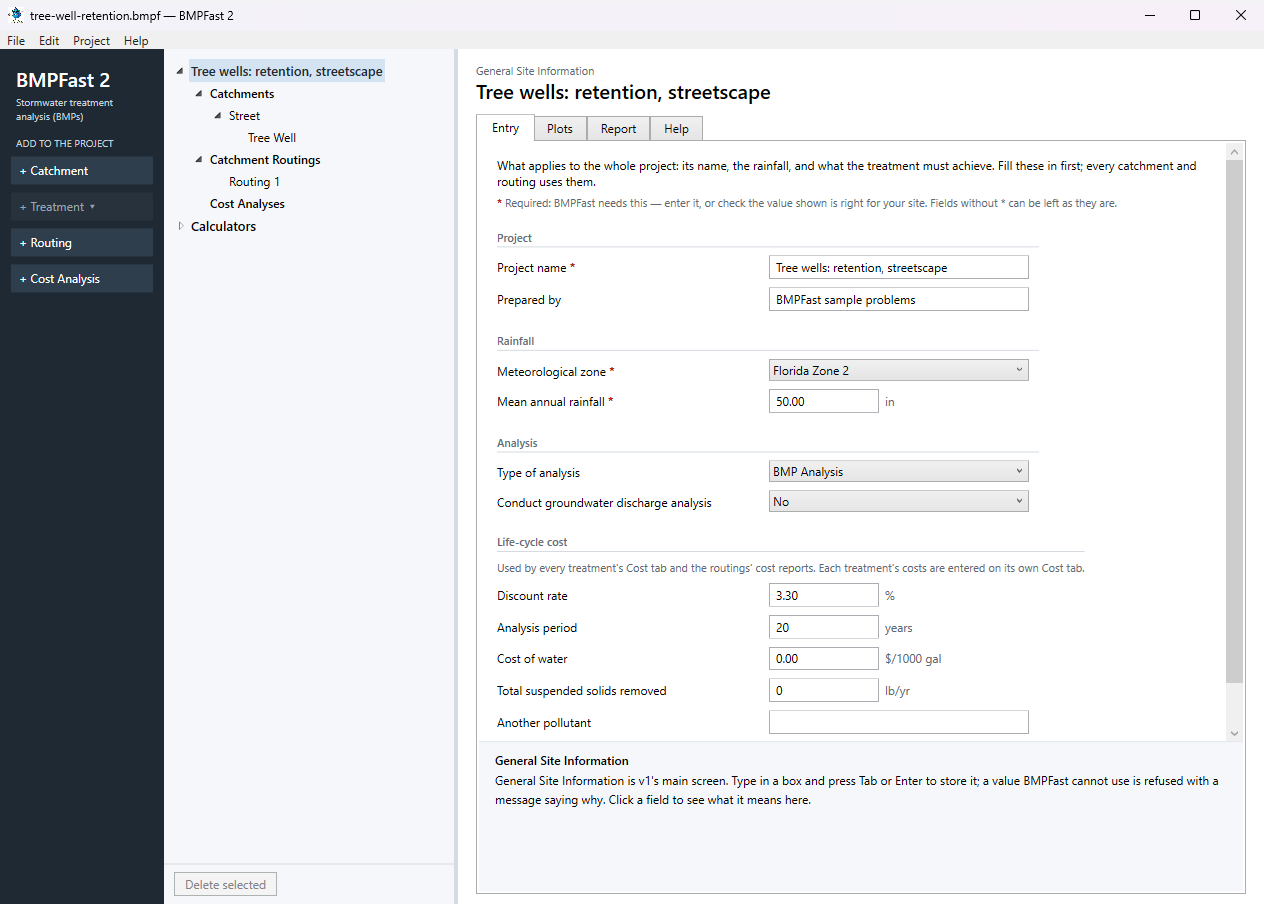
General Site Information: the project’s Entry tab. Press Add Catchment (left). Select the new catchment in the tree; on its Entry tab type the name Street and enter: Land use (pre) Undeveloped - Mesic Flatwoods; Land use (post) Low-Intensity Commercial; Area (pre) 0.50 ac; Area (post) 0.50 ac; Non-DCIA curve number (pre) 70.00; Non-DCIA curve number (post) 80.00; DCIA (post) 85.00 %. Leave the other boxes as they are (0 or blank). BMPFast 2 calculates as you type; scroll down to Calculated for the results after development: Annual runoff coefficient (ROC) (post) 0.705; Runoff volume (post) 1.469 ac-ft/yr; Nitrogen load (post) 1.684 kg/yr; Phosphorus load (post) 0.344 kg/yr.
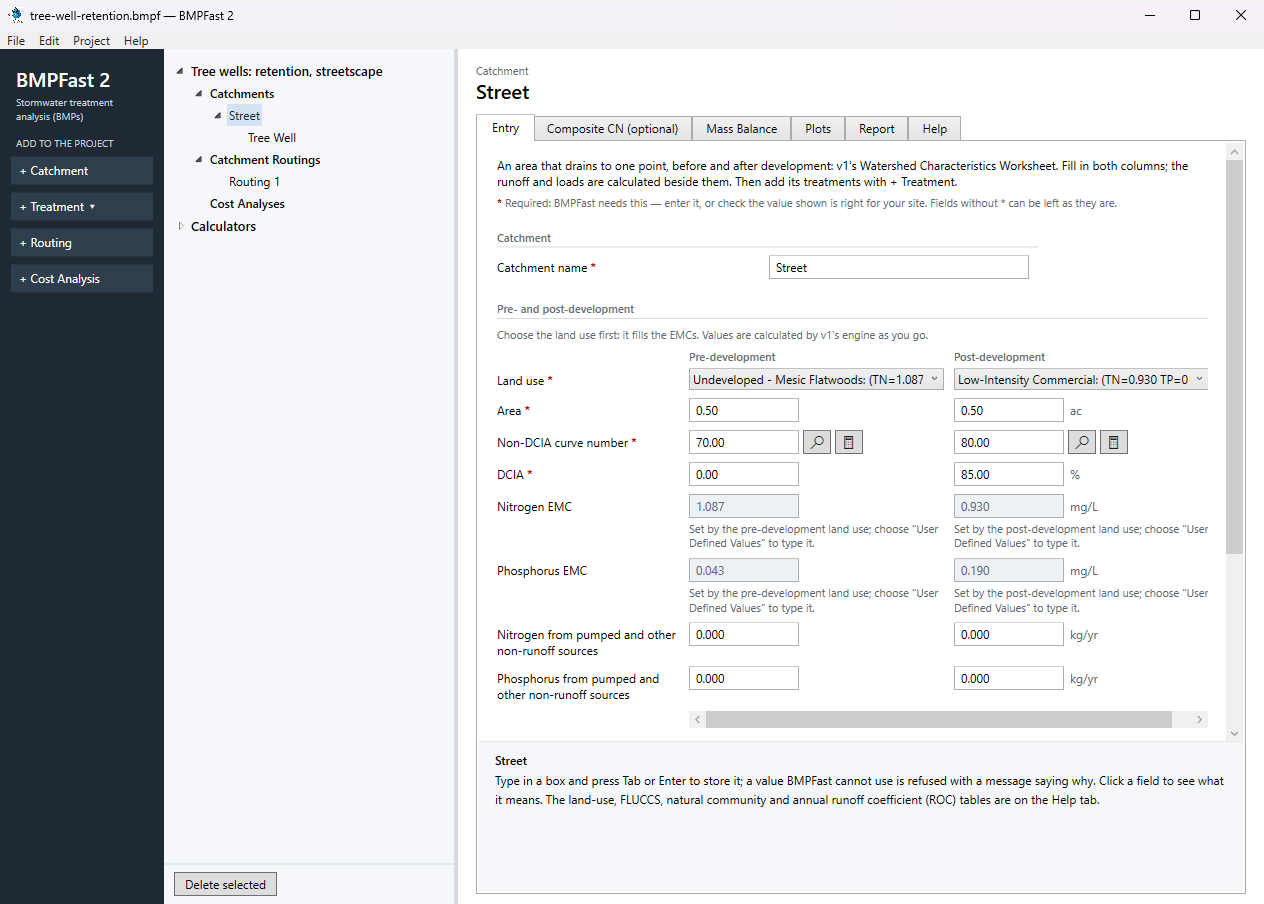
The catchment Street: its Entry tab. With Street selected, press Add Treatment and choose Tree Well. On its Entry tab type the Treatment name Tree Well (BMPFast 2 starts it as “Tree Well 1”) and enter: Tree well length 8.00 ft; Tree well width 8.00 ft; Tree well depth 3.00 ft; Tree well storage (above media + canopy capture) 0.50 ft; Sustainable water storage capacity of the soil 0.20; Number of tree well areas in the catchment 10; Retention or detention Retention. The results are calculated as you type: Retention volume 0.047 ac-ft; Treatment depth 1.128 in; Nitrogen removal provided 75.99 %; Phosphorus removal provided 75.99 %.
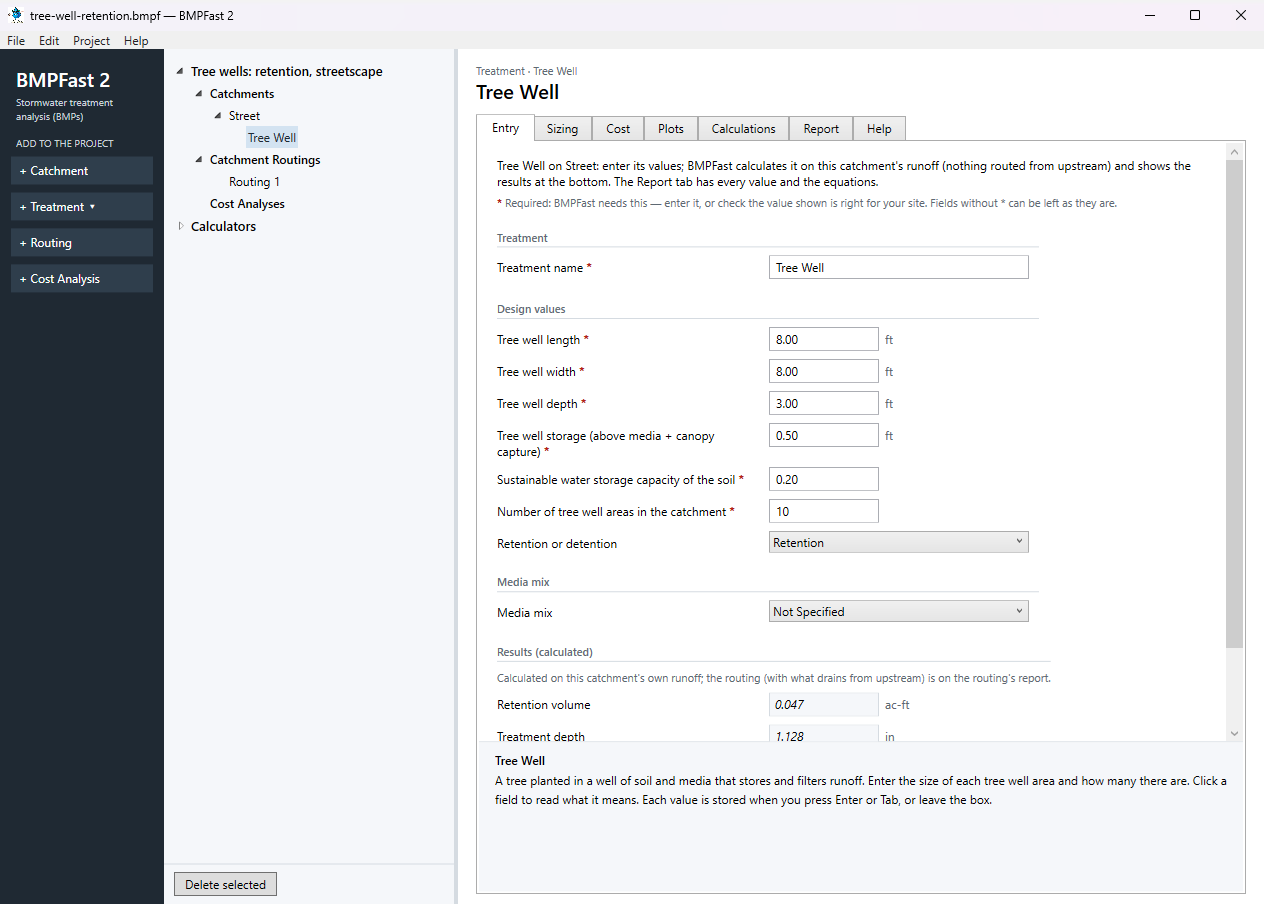
The treatment Tree Well: its Entry tab. Open the treatment’s Report tab: its inputs and removal, as a report to print or save.
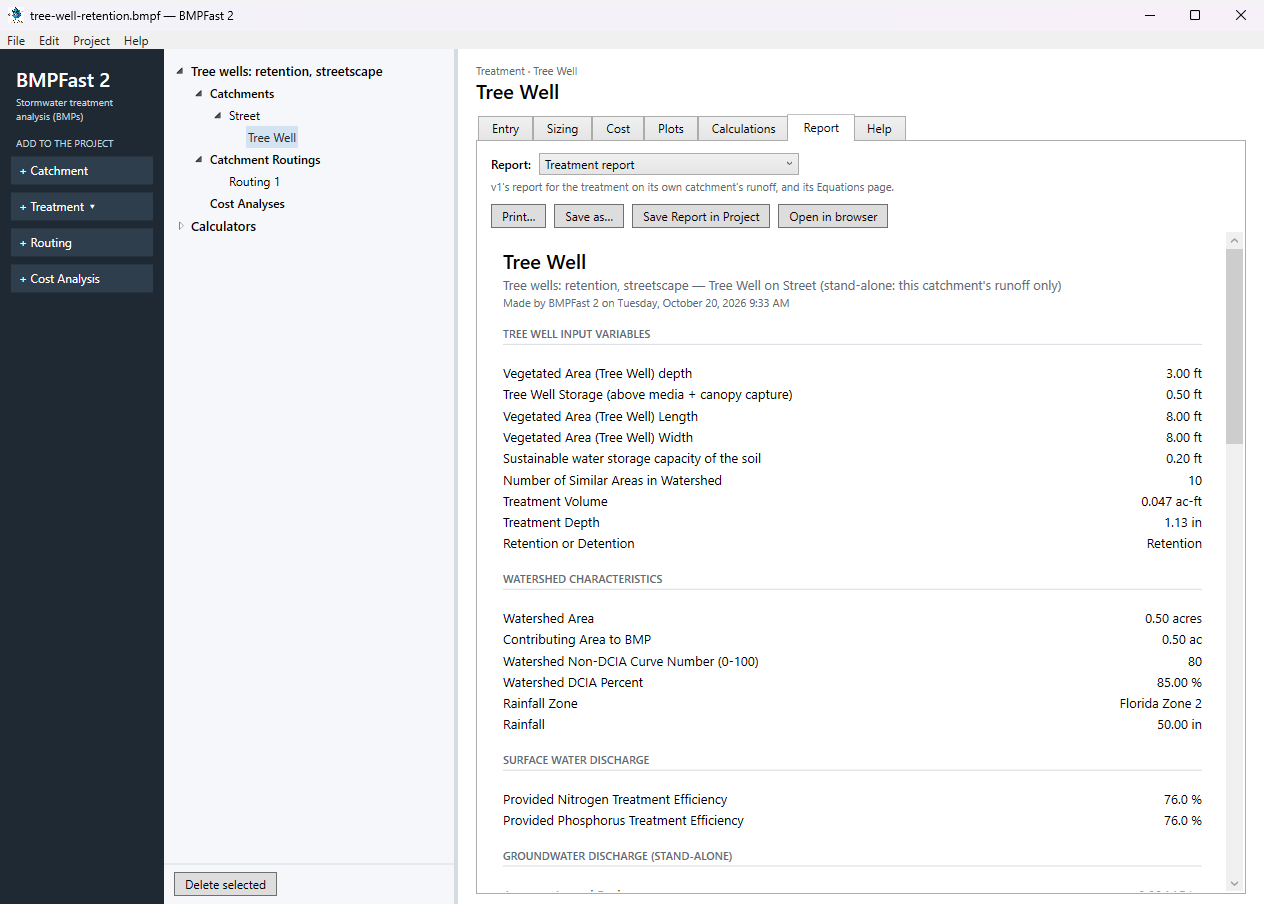
The treatment Tree Well: its Report tab. Press Add Routing (left). BMPFast 2 adds Routing 1 under Catchment Routings, with every catchment draining to the outlet and no treatment; a project can have several routings, compared side by side. On its Entry tab (How the routing is calculated Strand routing (v1's routing; use this for permits)) set each catchment as in this table:
Catchment Drains to Treatment used Street Outlet Tree Well A catchment is treated only by the treatment its routing uses.
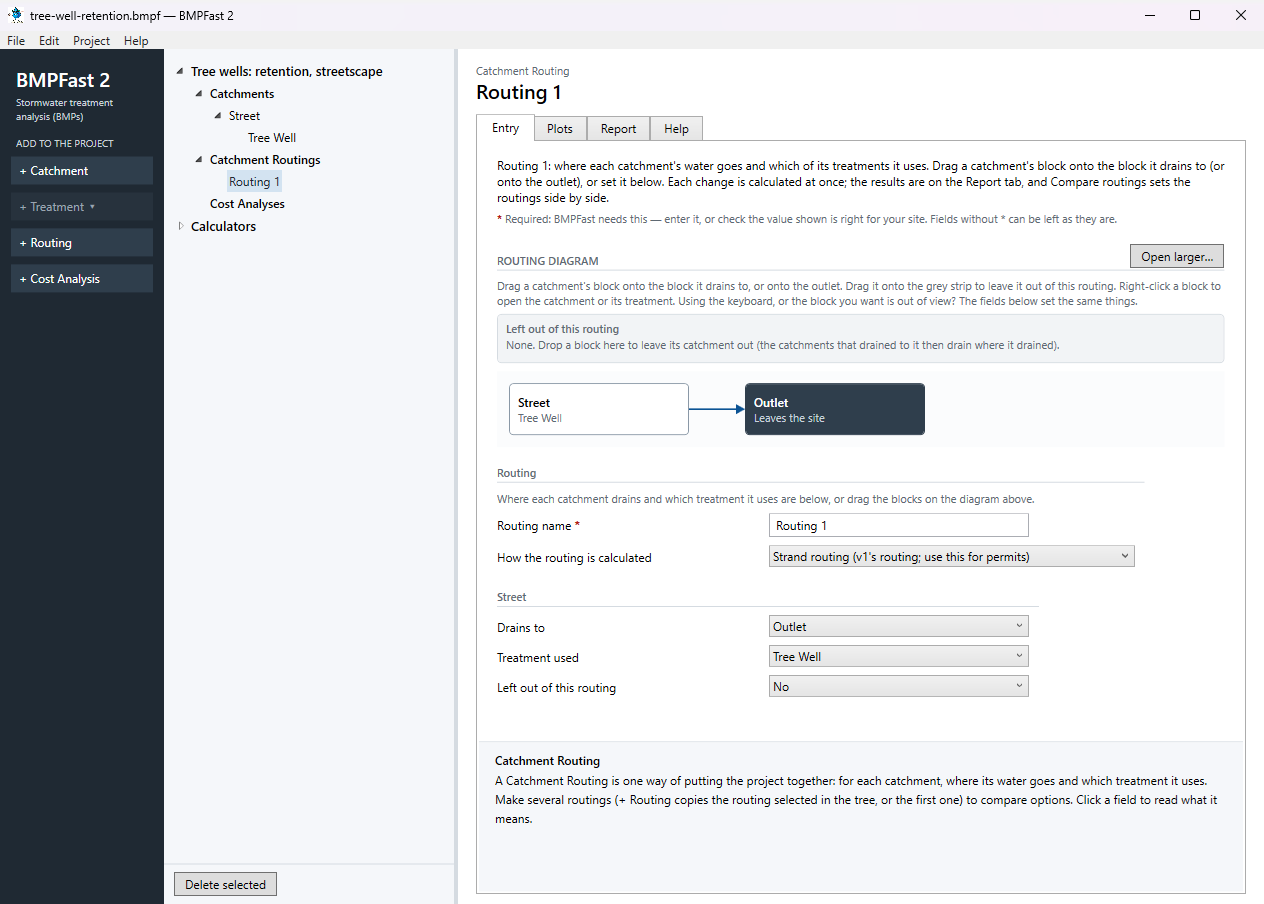
The routing’s Entry tab: where each catchment drains and the treatment it uses. Open the routing’s Report tab. Results shows the loads leaving the site, the removal provided and required, and whether the performance standard is met; the list at the top of the tab has v1’s reports for the same routing (Summary, Complete, Flow Balance, AH Vol I Sec 9 compliance). Save the project with File ▸ Save; compare it with the .bmpf under Files.
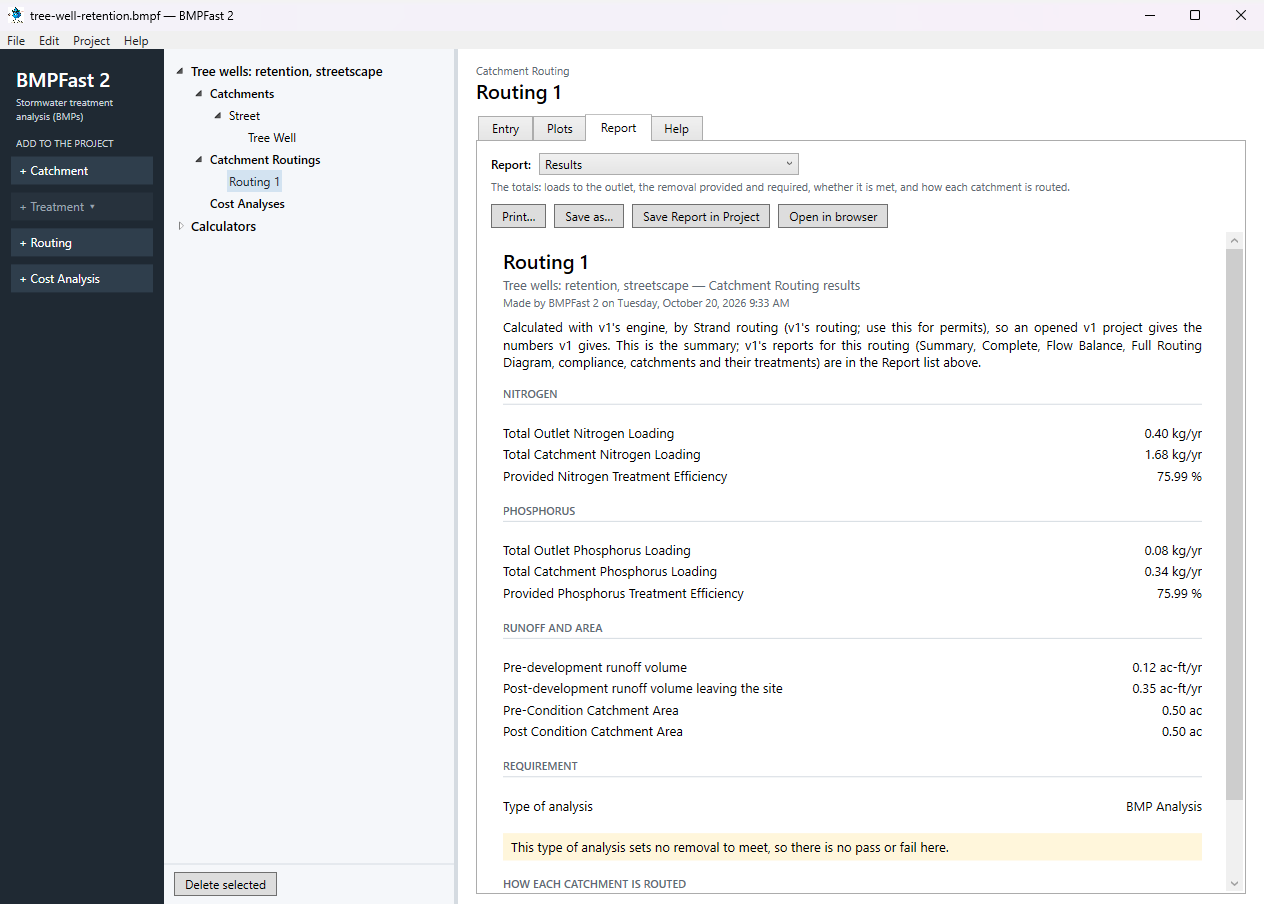
The routing’s Report tab: Results.
3Results
| Result | Value |
|---|---|
| Catchment 1: computed by BMPFast | |
| Annual runoff coefficient (ROC), pre / post | 0.057 / 0.705 |
| Runoff, pre / post | 0.119 / 1.469 ac-ft/yr |
| TN load, pre / post | 0.159 / 1.684 kg/yr |
| TP load, pre / post | 0.006 / 0.344 kg/yr |
| Tree Well: computed by BMPFast | |
| Treatment depth | 1.128 in |
| Hydraulic capture efficiency | 75.99 % |
| Provided TN / TP removal | 75.99 % / 75.99 % |
| TN load in → out | 1.684 → 0.404 kg/yr |
| TP load in → out | 0.344 → 0.083 kg/yr |
| Site (all catchments, at the outlet) | |
| TN load: catchments → outlet | 1.684 → 0.404 kg/yr |
| TP load: catchments → outlet | 0.344 → 0.083 kg/yr |
| Provided removal TN / TP | 76.0 % / 76.0 % |
The BMP report
Open this report on its own page.
The Summary Report
Open this report on its own page.
BMPFast 2 and BMPFast (v1)
| Result | BMPFast 2 | BMPFast (v1), its page | |
|---|---|---|---|
| Nitrogen leaving the site | 0.404 kg/yr | 0.404 kg/yr | same |
| Phosphorus leaving the site | 0.083 kg/yr | 0.083 kg/yr | same |
| Site removal, nitrogen | 75.992 % | 75.992 % | same |
| Site removal, phosphorus | 75.992 % | 75.992 % | same |
| Street: Tree Well removal, nitrogen | 75.992 % | 75.992 % | same |
| Street: Tree Well removal, phosphorus | 75.992 % | 75.992 % | same |
Every number BMPFast 2 gives for this problem is the same as BMPFast (v1)’s, to three decimals.
4Check
Runoff and loads (Equations 9-1 and 9-2 of AH Vol I).
| Runoff | = ROC × area × rainfall / 12 |
| = 0.705 × 0.50 ac × 50.0 in / 12 | |
| = 1.469 ac-ft/yr (program 1.469). |
| TN load | = EMC × runoff × 1.233 |
| = 0.930 × 1.469 × 1.233 | |
| = 1.684 kg/yr (program 1.684) |
| TP load | = 0.190 × 1.469 × 1.233 |
| = 0.344 kg/yr (program 0.344). |
1.233 kg is 1 mg/L in 1 ac-ft.
Storage (as the program calculates it).
| Storage per area | = length × width × (depth + soil storage capacity) / 43,560 |
| = 8 × 8 × (3.00 + 0.20) / 43,560, times 10 areas | |
| = 0.0470 ac-ft (program 0.0470). |
The Tree Well Storage entered (0.50 ft) is not part of this equation; it is listed for review.
Treatment depth.
| Depth | = storage × 12 / area |
| = 0.0470 ac-ft × 12 / 0.50 ac | |
| = 1.128 in (program 1.128). |
Capture. The retention efficiency tables for Florida Zone 2 at a treatment depth of 1.128 in, non-DCIA CN 80.00 and DCIA 85.0 % give a hydraulic capture of 75.99 % (AH Vol I Appendix O; read the same tables with Calculators ▸ Retention Efficiency Tables, help page 4325). A retention tree well keeps what it captures: the removal equals the capture.
Load out.
| TN out | = load in × (1 − removal) |
| = 1.684 × (1 − 75.99 / 100) | |
| = 0.404 kg/yr (program 0.404) |
| TP out | = 0.344 × (1 − 75.99 / 100) |
| = 0.083 kg/yr (program 0.083). |
The program’s Equations page
5Files
- tree-well-retention.bmpf: the project, saved by BMPFast 2. Save it (your browser puts it in Downloads), then in BMPFast 2 choose File ▸ Open and open it. Opened again and calculated, it gives the numbers on this page.
- tree-well-retention.bmpt: the same project as BMPFast (v1) saved it. BMPFast 2 opens it too (File ▸ Open); saving it then makes a .bmpf and leaves the .bmpt as it was.
- Routing 1 (BMPFast 2’s report, as Open in browser on its Report tab gives it)
- Routing 1 — Summary Report (BMPFast 2’s report, as Open in browser on its Report tab gives it)
- Tree Well (BMPFast 2’s report, as Open in browser on its Report tab gives it)
- Tree Well — calculations (BMPFast 2’s report, as Open in browser on its Report tab gives it)
6Help and methodology
Calculated with BMPFast 2 version 2.0.0 (2026-10-20), which opens the problem’s v1 project as it is. Screen captures are of BMPFast 2’s own window and are for demonstration only.