
All programs › BMPFast › Sample problems
Sizing a filter after a retention basin
Example Problem 3: B&G CTS12 after the basin, targets 85 / 90 %.
Help: Sizing (help page 4637) · Download the .bmpt · Link to Solution in BMPFast Version 2
1The problem
The BMPFast sample project Example Problem 3: the retention basin (75 %) is followed by a surface discharge filter with B&G CTS12 media. Size the filter for 85 % TN and 90 % TP.
| Input | Value | Source |
|---|---|---|
| Project (General Site Information) | ||
| Meteorological zone | Florida Zone 4 | Zone map (help page 815) |
| Mean annual rainfall | 50 in | Mean annual rainfall map (help page 815) |
| Performance standard (analysis type) | Specified Removal Efficiency | BMPFast sample project |
| Specified removal: TN / TP | 75 % / 75 % | BMPFast sample project |
| Catchment 1: catchment 1 (Watershed Characteristics) | ||
| Land use, pre / post | Agricultural - Pasture / Single-Family | BMPFast sample project |
| Area, pre / post | 11 / 11 ac | BMPFast sample project |
| Non-DCIA curve number, pre / post | 50 / 65 | BMPFast sample project |
| DCIA, pre / post | 0 / 25 % | BMPFast sample project |
| EMC TN, pre / post | 3.030 / 1.770 mg/L | BMPFast land use table (AH Vol I Table 9.2) |
| EMC TP, pre / post | 0.593 / 0.327 mg/L | BMPFast land use table (AH Vol I Table 9.2) |
Find: the filter surface area that meets the removal targets with the upstream BMP, and the treatment depth it gives the filter.
2Steps in BMPFast
Press Open Project and open
filter-sizing-after-retention.bmpt(the file under Files; it is the BMPFast sample project Example Problem 3.bmpt). General Site Information (the main window; its title bar reads General Site Information and your license key) shows Florida Zone 4, 50.0 in of rainfall and the performance standard Specified Removal Efficiency.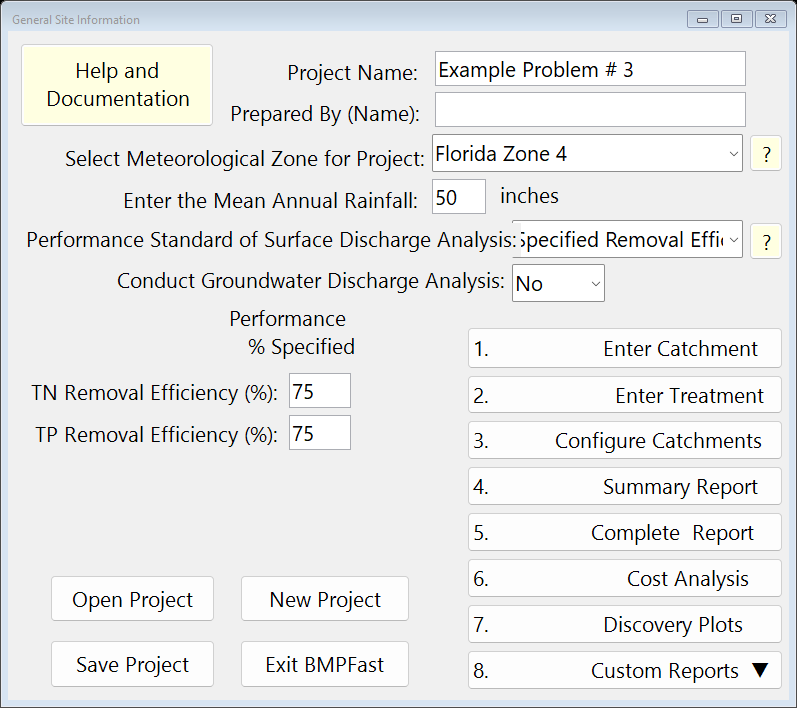
General Site Information (the main window). Open Surface Discharge Filter and press Sizing (or Tools › Surface Discharge Filter Sizing). Choose the upstream BMP and the filter media, and the targets. The chart shows the filter removal and the total removal against the filter surface area; the box opens on the area where both targets are met. Press Apply.
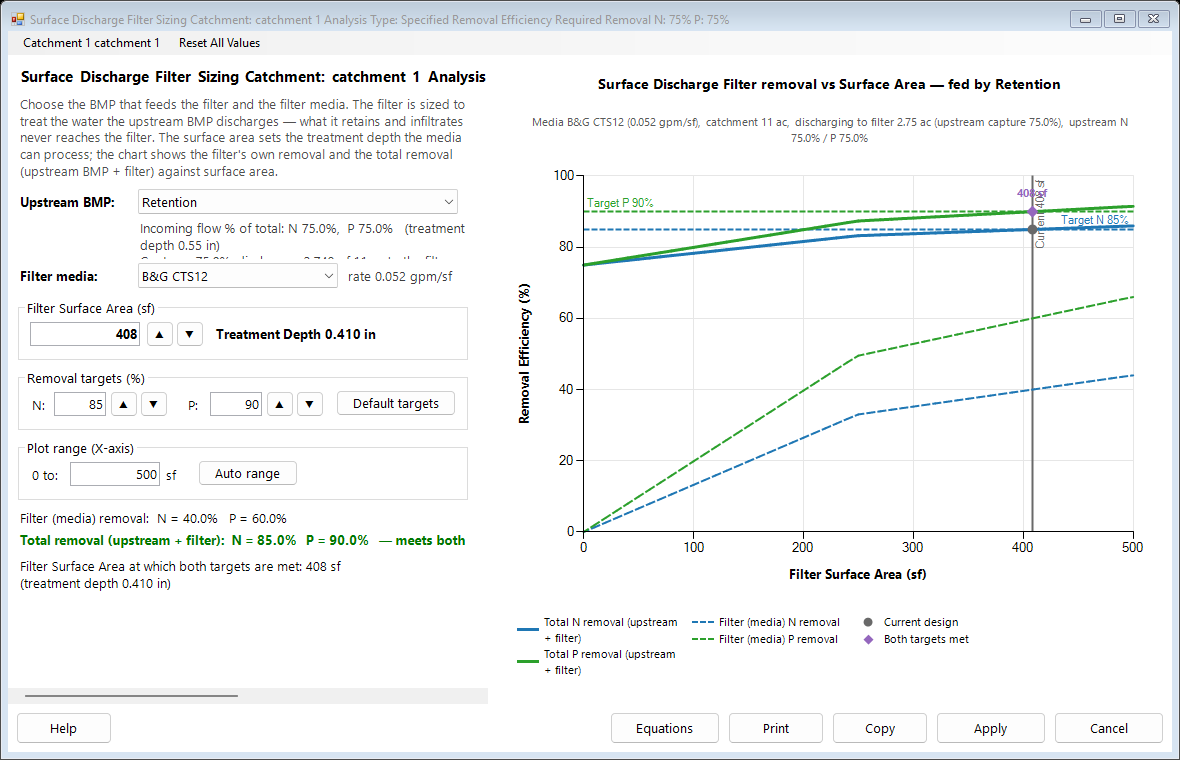
Surface Discharge Filter Sizing. The Surface Discharge Filter worksheet now has the treatment depth and media from Sizing. Press Save Project to keep your copy; compare it with the .bmpt under Files.
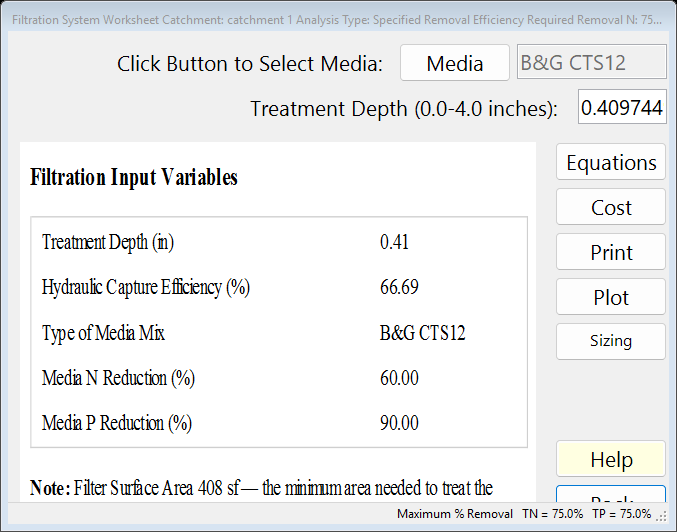
The BMP worksheet after Calculate: the report on the left.
3Results
The Sizing window says:
- Surface Discharge Filter Sizing Catchment: catchment 1 Analysis Type: Specified Removal Efficiency Required Removal N: 75% P: 75%
- Incoming flow % of total: N 75.0%, P 75.0% (treatment depth 0.55 in) Captures 75.0%; discharges 2.749 of 11 ac to the filter
- rate 0.052 gpm/sf
- Treatment Depth 0.410 in
- Filter (media) removal: N = 40.0% P = 60.0%
- Total removal (upstream + filter): N = 85.0% P = 90.0% — meets both targets
- Filter Surface Area at which both targets are met: 408 sf (treatment depth 0.410 in)
| Result | Value |
|---|---|
| Filter surface area (applied) | 408 sf |
| Area where both targets are met | 408 sf |
| Filter treatment depth | 0.410 in |
| Filter media | B&G CTS12 |
| Filter removal TN / TP (stand-alone) | 40.02 % / 60.02 % |
4Check
Treatment depth. The filter’s depth is the volume it can filter, spread over the area that drains to it. Applied, the worksheet shows 0.410 in; the retention tables at that depth give a capture of 66.69 %, and × media 60 % / 90 % gives the filter’s own TN 40.02 % and TP 60.02 %.
Total. With the upstream BMP removing e, the total is e + f (1 − e/100), the treatment train of AH Vol I 9.5.1; the Equations button on the Sizing window shows it with these numbers (Media and Filtration Methodology).
5Files
- filter-sizing-after-retention.bmpt: the project, saved by BMPFast. Save it (your browser puts it in Downloads). In BMPFast press Open Project, then Open Project again in the Open BMPFast Project dialog (below its Recent Projects list), and choose the file.
- Summary Report (as BMPFast shows it)
- BMP report (worksheet) (as BMPFast shows it)
6Help and methodology
Calculated with BMPFast 1.1.9 (build 6.0.0, 2026-10-16). Older versions may not have the Equations button or may give slightly different results; download the latest at bmpfast.com. Screen captures are for demonstration only.