
All programs › BMPFast › Sample problems
Retention efficiency between two tables: Zone 4, 0.8 in
CN 80, DCIA 70 %, 0.8 in in Zone 4: interpolated between table depths.
Help: Retention Efficiency Lookup Tables (help page 4325) · Download the .bmpt · Link to Solution in BMPFast Version 2
1The problem
A 5-acre commercial site in Zone 4 (CN 80, DCIA 70 %). Read the capture of a 0.8-inch depth, which falls between two tabulated depths.
| Input | Value | Source |
|---|---|---|
| Project (General Site Information) | ||
| Meteorological zone | Florida Zone 4 | Zone map (help page 815) |
| Mean annual rainfall | 52 in | Mean annual rainfall map (help page 815) |
| Performance standard (analysis type) | BMP Analysis | Site (illustrative) |
| Catchment 1: Commercial site (Watershed Characteristics) | ||
| Land use, pre / post | Undeveloped - Mesic Flatwoods / High-Intensity Commercial | Site (illustrative) |
| Area, pre / post | 5 / 5 ac | Site (illustrative) |
| Non-DCIA curve number, pre / post | 70 / 80 | Site (illustrative) |
| DCIA, pre / post | 0 / 70 % | Site (illustrative) |
| EMC TN, pre / post | 1.087 / 2.400 mg/L | BMPFast land use table (AH Vol I Table 9.2) |
| EMC TP, pre / post | 0.043 / 0.345 mg/L | BMPFast land use table (AH Vol I Table 9.2) |
Find: the capture efficiency from the tables, and the same value from the Retention worksheet.
2Steps in BMPFast
Open Tools › Retention Efficiency Lookup Tables. Choose the zone, type the non-DCIA CN, the DCIA and the treatment depth, and press Find (the table button). The box shows the efficiency read from the tables, interpolated between the depths that bound the one typed.
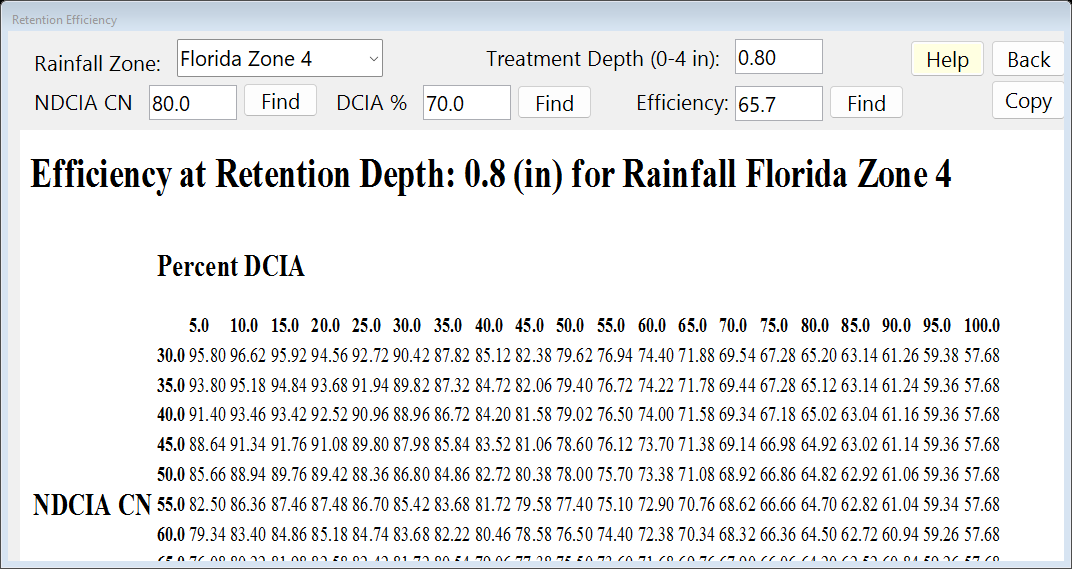
Retention Efficiency Lookup Tables (Tools). On the Retention worksheet of a catchment with the same CN and DCIA, type the volume that gives that depth (0.333 ac-ft) and press Calculate. Press Save Project to keep your copy; compare it with the .bmpt under Files.
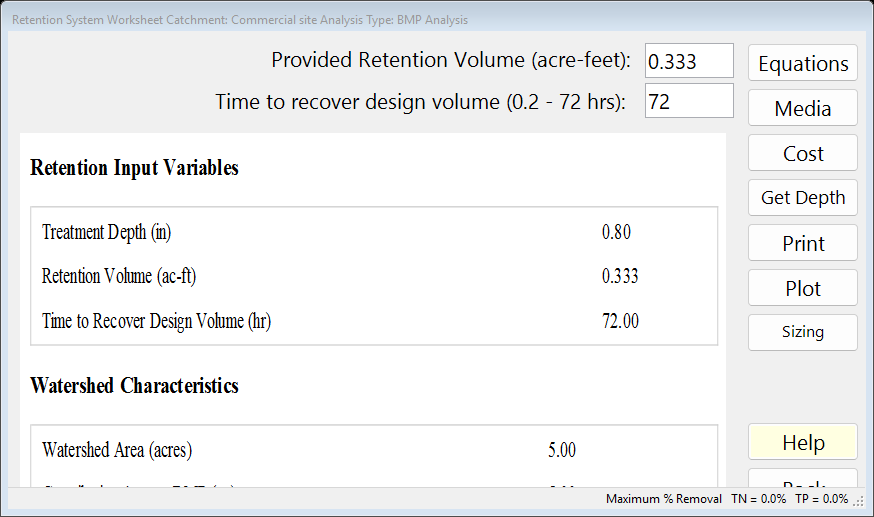
The BMP worksheet after Calculate: the report on the left.
3Results
| Result | Value |
|---|---|
| Efficiency from the lookup tables | 65.7 % |
| Retention worksheet: treatment depth | 0.799 in |
| Retention worksheet: capture | 65.65 % |
The table the window shows
4Check
Same tables, same answer. The lookup window gives 65.7 % and the worksheet, at 0.799 in, gives 65.65 %. Between two tabulated depths the program interpolates linearly; between CN and DCIA rows and columns it interpolates too (AH Vol I Appendix O; help page 4325).
5Files
- lookup-table-zone4-between.bmpt: the project, saved by BMPFast. Save it (your browser puts it in Downloads). In BMPFast press Open Project, then Open Project again in the Open BMPFast Project dialog (below its Recent Projects list), and choose the file.
- Lookup table (as BMPFast shows it)
- Summary Report (as BMPFast shows it)
- BMP report (worksheet) (as BMPFast shows it)
6Help and methodology
Calculated with BMPFast 1.1.9 (build 6.0.0, 2026-10-16). Older versions may not have the Equations button or may give slightly different results; download the latest at bmpfast.com. Screen captures are for demonstration only.