
All programs › BMPFast › BMPFast 2 sample problems
Sizing a filter after a wet pond
Example Problem 5: B&G CTS24 after the wet detention pond.
Help: Sizing (help page 4637) · Download the .bmpf · Link to Solution in BMPFast Version 1
1The problem
The BMPFast sample project Example Problem 5: the wet detention pond is followed by a surface discharge filter with B&G CTS24 media. Size the filter for the project’s targets.
| Input | Value | Source |
|---|---|---|
| Project (General Site Information) | ||
| Meteorological zone | Florida Zone 5 | Zone map (help page 815) |
| Mean annual rainfall | 61 in | Mean annual rainfall map (help page 815) |
| Performance standard (analysis type) | Specified Removal Efficiency | BMPFast sample project |
| Specified removal: TN / TP | 70 % / 80 % | BMPFast sample project |
| Catchment 1: Highway Section 206 (Watershed Characteristics) | ||
| Land use, pre / post | Undeveloped - Wet Flatwoods / Highway | BMPFast sample project |
| Area, pre / post | 6 / 6 ac | BMPFast sample project |
| Non-DCIA curve number, pre / post | 80 / 80 | BMPFast sample project |
| DCIA, pre / post | 0 / 60 % | BMPFast sample project |
| EMC TN, pre / post | 1.213 / 1.250 mg/L | BMPFast land use table (AH Vol I Table 9.2) |
| EMC TP, pre / post | 0.021 / 0.173 mg/L | BMPFast land use table (AH Vol I Table 9.2) |
| Wet pond area (no loading) | 1.00 ac | BMPFast sample project |
Find: the filter surface area that meets the removal targets with the upstream BMP, and the treatment depth it gives the filter.
2Steps in BMPFast 2
Start BMPFast 2, choose File ▸ Open and open
filter-sizing-after-pond.bmpf(under Files below; it is the BMPFast sample project this problem starts from, saved by BMPFast 2). The tree on the left shows the project, its catchments and their treatments, its routing, and the Calculators. The project’s Entry tab (General Site Information) shows the zone, the rainfall and the type of analysis.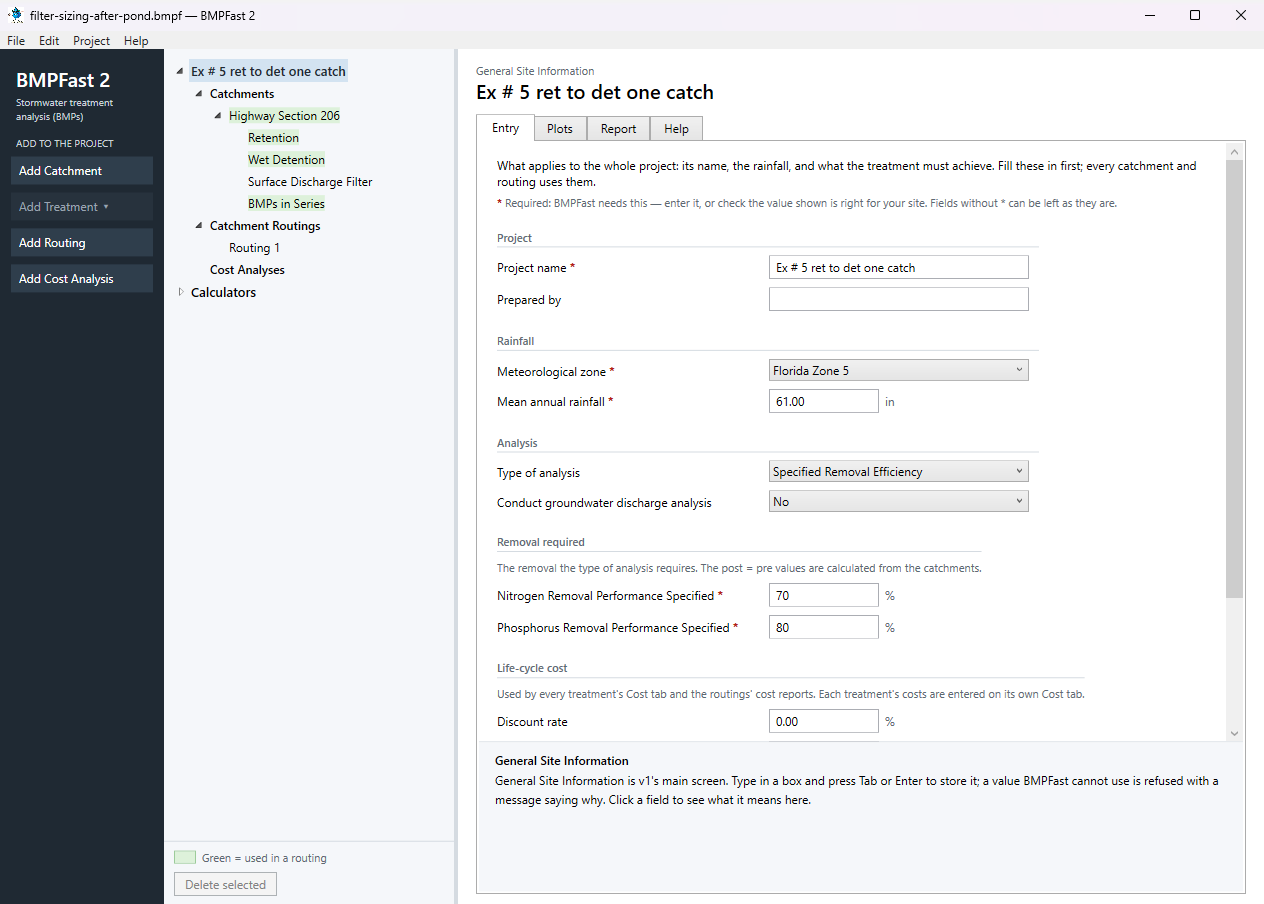
General Site Information: the project’s Entry tab. In the tree open Calculators and select Surface Discharge Filter Sizing. On its Entry tab, under Filter and what feeds it, choose the Catchment Highway Section 206, the Surface Discharge Filter Surface Discharge Filter, the Upstream treatment Wet Detention and the Filter media B&G CTS24. BMPFast 2 says what the upstream treatment passes on: “Removes nitrogen 51.9 %, phosphorus 84.0 %; captures 0.0 %, so 6.000 of 6.000 ac drains to the filter.” Under Targets, leave the targets as they are: they start on the project’s requirement (70.0 % nitrogen, 80.0 % phosphorus).
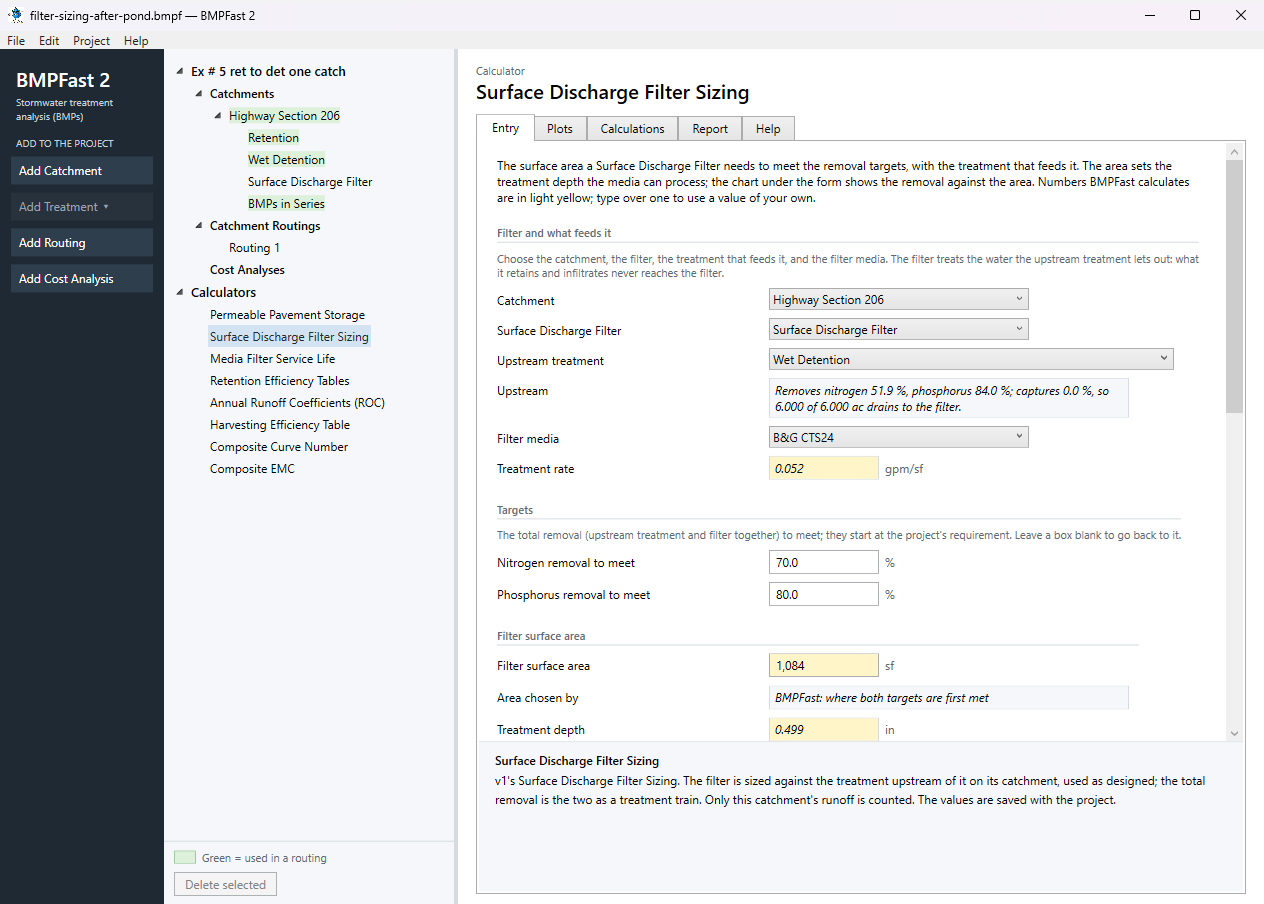
Surface Discharge Filter Sizing: the filter, what feeds it, and the targets. Further down the tab, Filter surface area follows the area where both targets are first met: 1,084 sf, a treatment depth of 0.499 in (the light yellow boxes are worked out by BMPFast 2; type an area of your own to try it). Results gives the filter’s own removal (nitrogen 37.6 %, phosphorus 47.7 %) and the total with the upstream treatment (nitrogen 70.0 %, phosphorus 91.6 % — meets both targets).
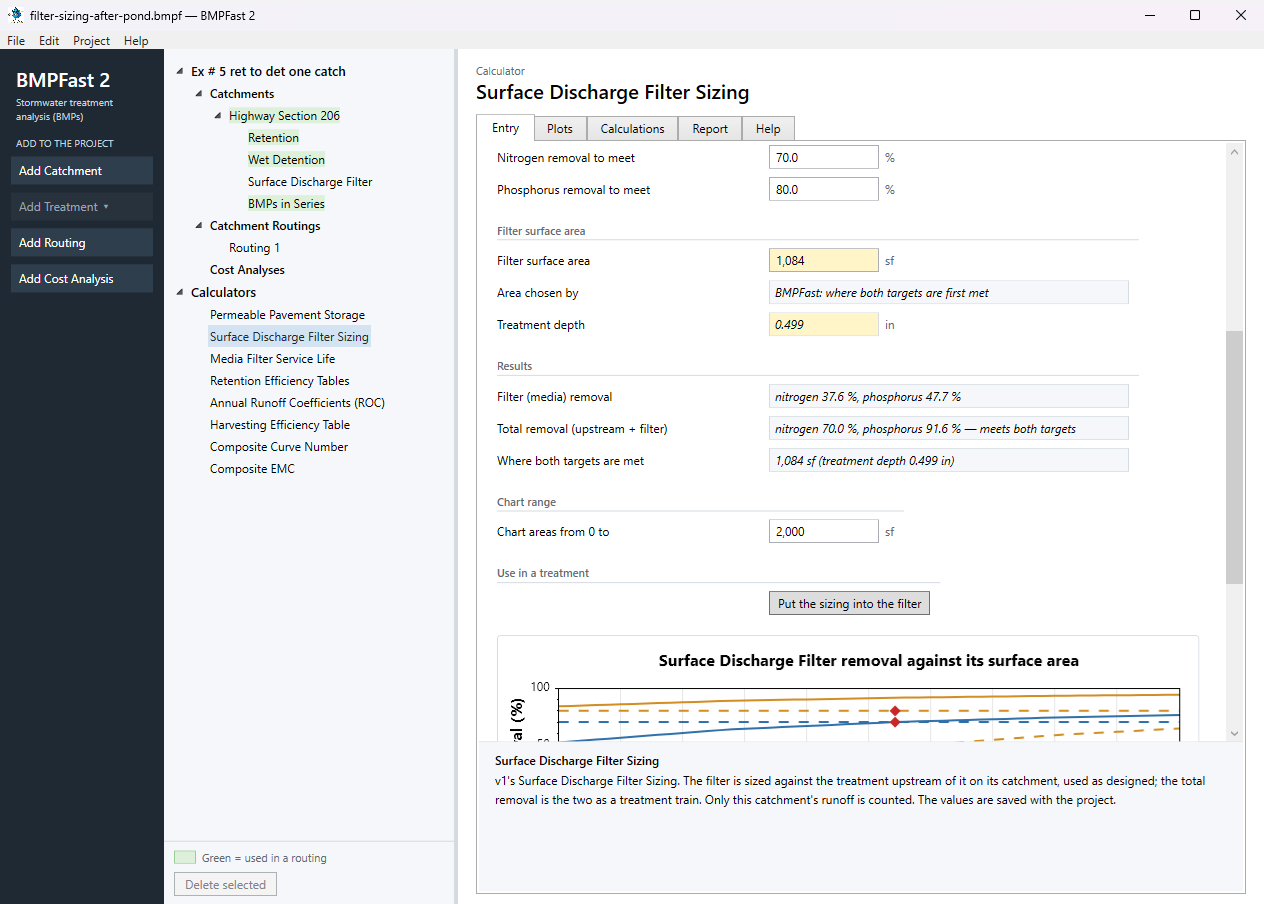
Surface Discharge Filter Sizing: the surface area and the results. At the bottom of the tab the chart plots the removal against the surface area, with the targets and the area where both are met. Press Put the sizing into the filter (v1’s Apply). BMPFast 2 says: “Surface Discharge Filter is sized: 1,084 sf, treatment depth 0.499 in. Total removal: nitrogen 70.0 %, phosphorus 91.6 %, meeting both targets.” Edit ▸ Undo puts the filter back.
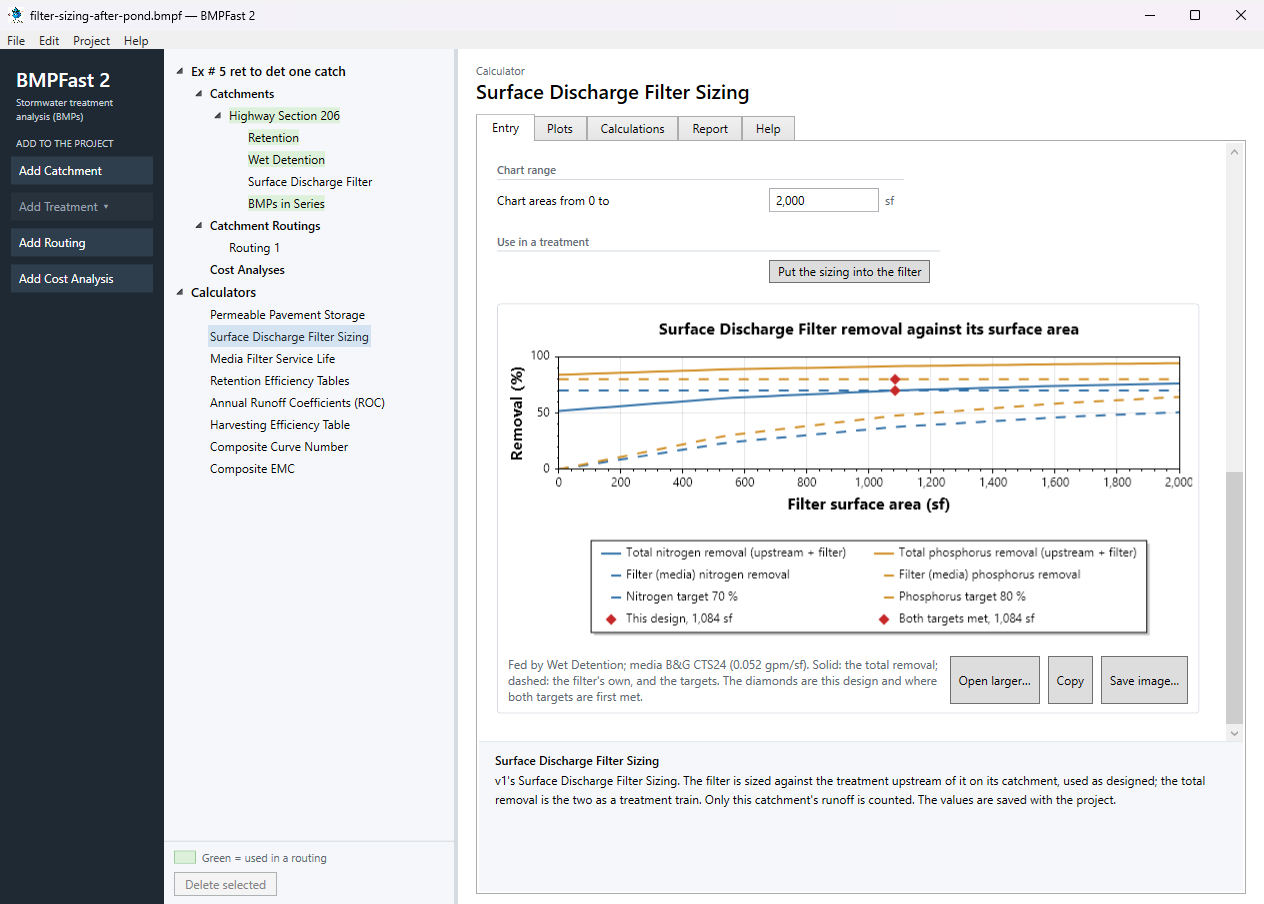
Surface Discharge Filter Sizing: the chart and the button that puts the sizing into the filter. The Calculations tab shows the equations (v1’s Equations button) with this problem’s values.
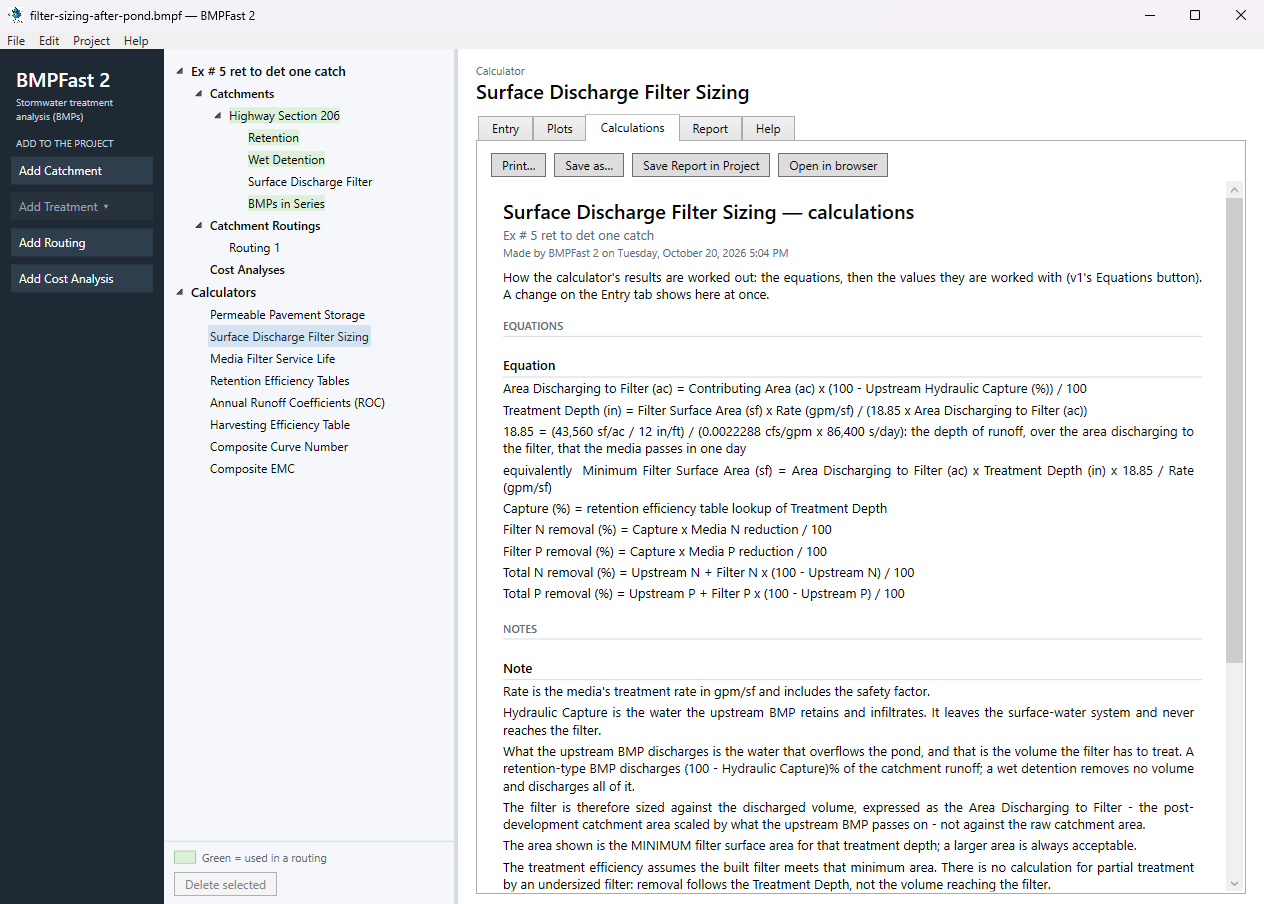
Surface Discharge Filter Sizing: the Calculations tab. Select the filter treatment, Surface Discharge Filter, under Highway Section 206 in the tree: its Entry tab now has the treatment depth (0.499 in) and the media (B&G CTS24) from the sizing. Save with File ▸ Save.
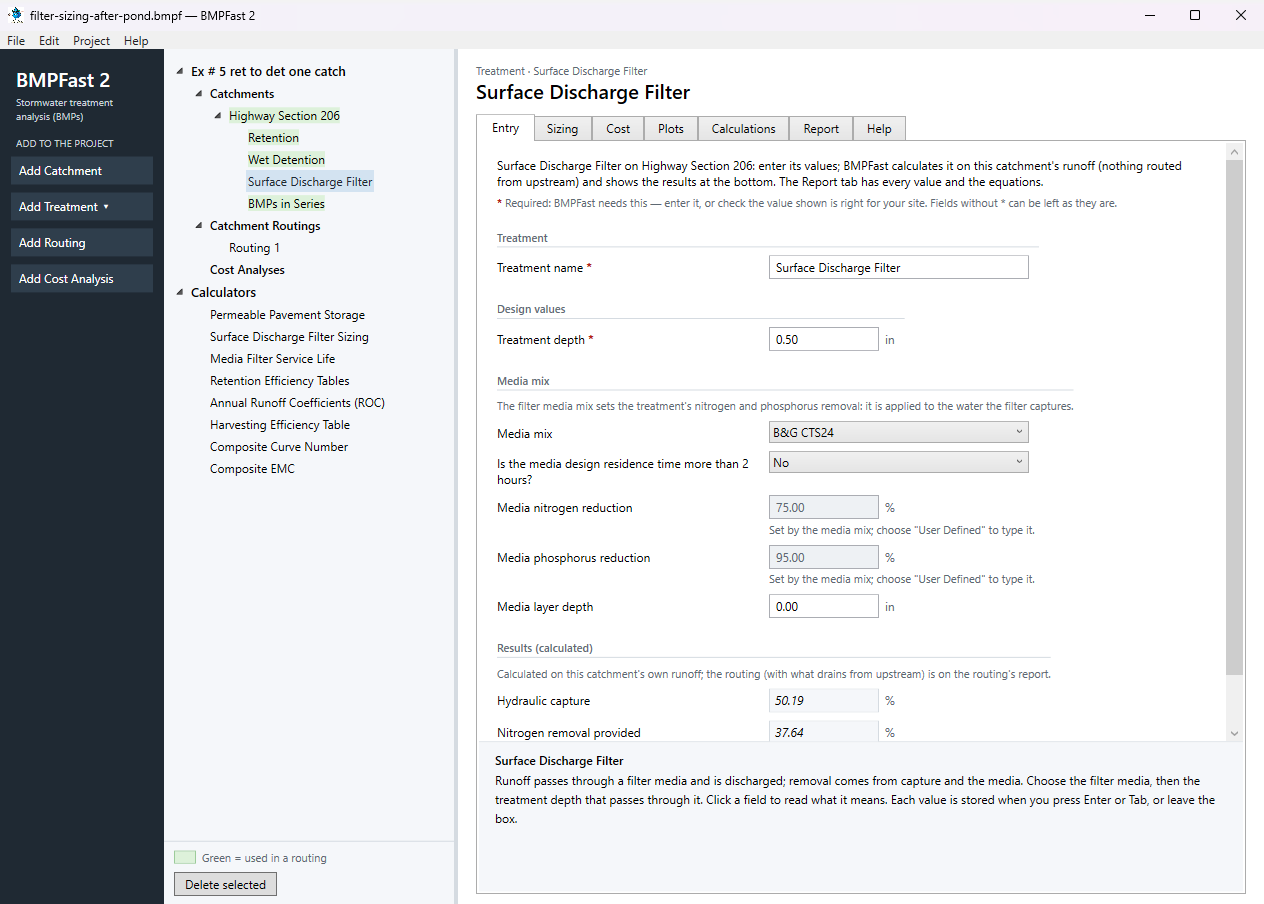
The Surface Discharge Filter treatment after the sizing was put into it.
3Results
The calculator
| On the screen | Value |
|---|---|
| Upstream treatment | Wet Detention |
| Upstream | Removes nitrogen 51.9 %, phosphorus 84.0 %; captures 0.0 %, so 6.000 of 6.000 ac drains to the filter. |
| Filter media | B&G CTS24 |
| Treatment rate | 0.052 gpm/sf |
| Nitrogen removal to meet | 70.0 % |
| Phosphorus removal to meet | 80.0 % |
| Filter surface area | 1,084 sf |
| Treatment depth | 0.499 in |
| Filter (media) removal | nitrogen 37.6 %, phosphorus 47.7 % |
| Total removal (upstream + filter) | nitrogen 70.0 %, phosphorus 91.6 % — meets both targets |
| Where both targets are met | 1,084 sf (treatment depth 0.499 in) |
The filter treatment
| The filter after Put the sizing into the filter | Value |
|---|---|
| Filter surface area | 1,084 sf |
| Treatment depth | 0.499 in |
| Filter media | B&G CTS24 |
| Capture at that depth | 50.19 % |
| Filter removal, nitrogen / phosphorus (on its own) | 37.64 % / 47.68 % |
BMPFast (v1) gave 1,788.4 sf for the area where both targets are met; BMPFast 2 gives 1,084.4 sf. Both read the crossing off a 50-step sweep of the chart, by straight lines between its points; v1 drew its chart over a different range, so the points fall elsewhere and the answers differ by 704.0 sf (39.37 %). Neither is a different method.
The calculator’s report
Open this report on its own page · The Calculations tab.
BMPFast 2 and BMPFast (v1)
| Result | BMPFast 2 | BMPFast (v1), its page | |
|---|---|---|---|
| Nitrogen leaving the site | 4.314 kg/yr | 5.125 kg/yr | differs |
| Phosphorus leaving the site | 0.226 kg/yr | 0.338 kg/yr | differs |
| Site removal, nitrogen | 79.867 % | 76.081 % | differs |
| Site removal, phosphorus | 92.374 % | 88.588 % | differs |
| Highway Section 206: Multiple BMP removal, nitrogen | 79.867 % | 76.081 % | differs |
| Highway Section 206: Multiple BMP removal, phosphorus | 92.374 % | 88.588 % | differs |
BMPFast 2 gives a different number for: Nitrogen leaving the site, Phosphorus leaving the site, Site removal, nitrogen, Site removal, phosphorus, Highway Section 206: Multiple BMP removal, nitrogen, Highway Section 206: Multiple BMP removal, phosphorus. See the notes below the table.
When BMPFast 2 opened the v1 file it said:
- Highway Section 206, Wet Detention: BMPFast 2 takes the wet pond equations as a pond without a littoral zone, and adds a littoral zone credit of 10 percentage points (Appendix O's maximum) to this pond's removal, so it is higher than v1 shows; lower Littoral zone credit if your permit reviewer allows less. To calculate as v1, choose "Reduce without a littoral zone (v1)" in How the littoral zone counts (Design values) on the treatment's Entry tab.
4Check
Treatment depth.
The filter’s depth is the volume it can filter, spread over the area that drains to it. Put into the filter, its Entry tab shows 0.499 in; the retention tables at that depth give a capture of 50.19 %, and × the media’s 75 % / 95 % that gives the filter’s own nitrogen 37.64 % and phosphorus 47.68 %:
| 50.19 × 0.75 | = 37.64 %. |
Total. The upstream treatment: Removes nitrogen 51.9 %, phosphorus 84.0 %; captures 0.0 %, so 6.000 of 6.000 ac drains to the filter. With it removing e, the total is e + f (1 − e/100), the treatment train of AH Vol I 9.5.1; the Calculations tab shows it with these numbers (Media and Filtration Methodology).
5Files
- filter-sizing-after-pond.bmpf: the project, saved by BMPFast 2. Save it (your browser puts it in Downloads), then in BMPFast 2 choose File ▸ Open and open it. Opened again and calculated, it gives the numbers on this page.
- filter-sizing-after-pond.bmpt: the same project as BMPFast (v1) saved it. BMPFast 2 opens it too (File ▸ Open); saving it then makes a .bmpf and leaves the .bmpt as it was.
- Routing 1 (BMPFast 2’s report, as Open in browser on its Report tab gives it)
- Routing 1 — Summary Report (BMPFast 2’s report, as Open in browser on its Report tab gives it)
- BMPs in Series (BMPFast 2’s report, as Open in browser on its Report tab gives it)
- BMPs in Series — calculations (BMPFast 2’s report, as Open in browser on its Report tab gives it)
- Surface Discharge Filter Sizing (BMPFast 2’s report, as Open in browser on its Report tab gives it)
- Surface Discharge Filter Sizing — calculations (BMPFast 2’s report, as Open in browser on its Report tab gives it)
6Help and methodology
Calculated with BMPFast 2 version 2.0.0 (2026-10-20), which opens the problem’s v1 project as it is. Screen captures are of BMPFast 2’s own window and are for demonstration only.