
All programs › BMPFast › Sample problems
Composite CN: post-development lots
Lawns, unconnected roofs and open space in a 10-acre subdivision.
Help: Composite CN Calculator (help page 811) · Download the .bmpt · Link to Solution in BMPFast Version 2
1The problem
A 10-acre subdivision has 25 % DCIA. Its other 7.5 ac are lawns (5.0 ac, CN 61), roofs and driveways that do not connect (1.5 ac, CN 98) and open space (1.0 ac, CN 69).
| Input | Value | Source |
|---|---|---|
| Project (General Site Information) | ||
| Meteorological zone | Florida Zone 2 | Zone map (help page 815) |
| Mean annual rainfall | 50 in | Mean annual rainfall map (help page 815) |
| Performance standard (analysis type) | BMP Analysis | Site (illustrative) |
| Catchment 1: Subdivision (Watershed Characteristics) | ||
| Land use, pre / post | Agricultural - Pasture / Single-Family | Site (illustrative) |
| Area, pre / post | 10 / 10 ac | Site (illustrative) |
| Non-DCIA curve number, pre / post | 61 / 83.81 | Site (illustrative) |
| DCIA, pre / post | 0 / 25 % | Site (illustrative) |
| EMC TN, pre / post | 3.030 / 1.770 mg/L | BMPFast land use table (AH Vol I Table 9.2) |
| EMC TP, pre / post | 0.593 / 0.327 mg/L | BMPFast land use table (AH Vol I Table 9.2) |
| Parts of the non-DCIA area | ||
| 5 ac | CN 61 | Site (illustrative) |
| 1.5 ac | CN 98 | Site (illustrative) |
| 1 ac | CN 69 | Site (illustrative) |
Find: the composite non-DCIA curve number and its effect on the runoff.
2Steps in BMPFast
Open 1. Enter Catchment: the catchment as entered so far.
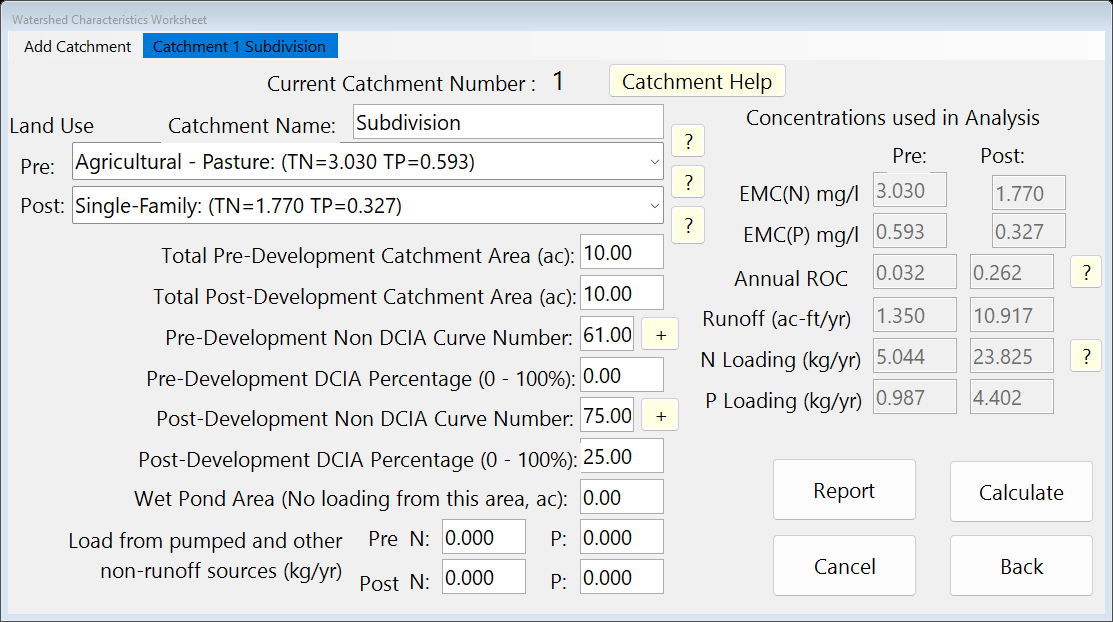
Watershed Characteristics before the calculator. Press + beside the post-development non-DCIA curve number. Type each part’s area and CN and press Calculate. Press Back and answer Yes to use the composite CN.
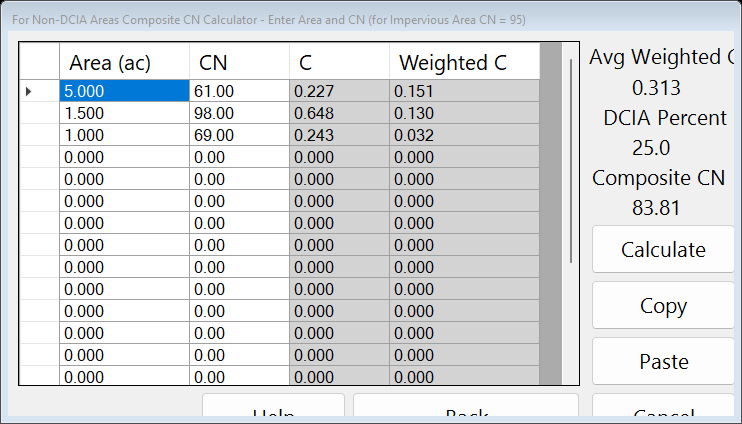
The Composite CN calculator after Calculate. The catchment with the composite CN, after Calculate. Press Save Project to keep your copy; compare it with the .bmpt under Files.
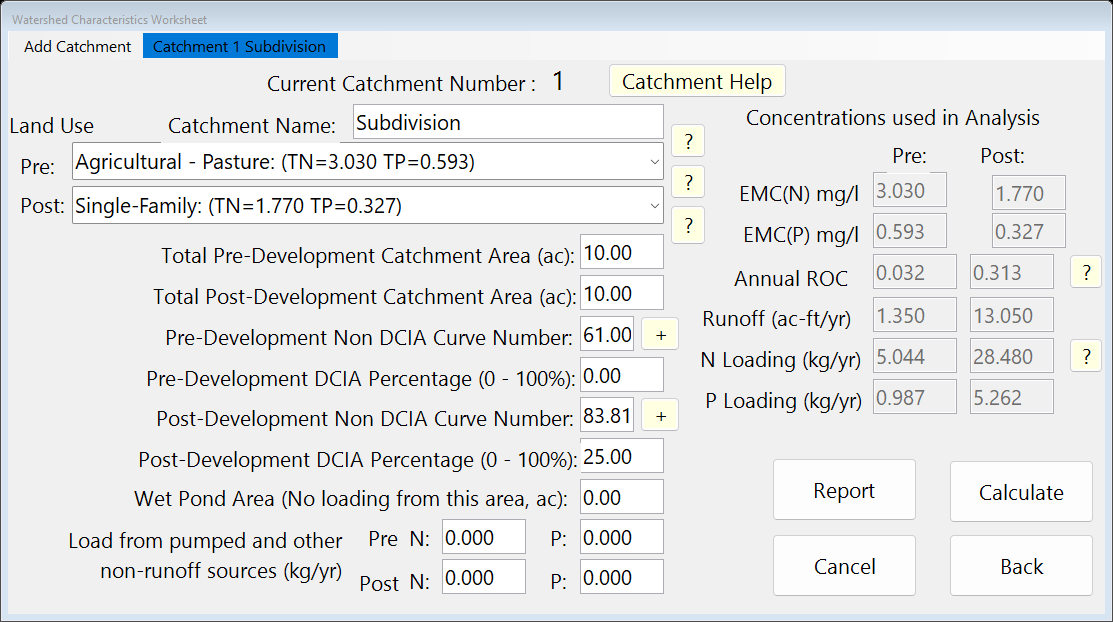
Watershed Characteristics Worksheet (1. Enter Catchment).
3Results
| Result | Value |
|---|---|
| Composite CN | 83.81 |
| Area-weighted C | 0.313 |
| ROC, pre / post | 0.032 / 0.313 |
| Runoff, pre / post | 1.350 / 13.050 ac-ft/yr |
4Check
Method.
BMPFast does not average the curve numbers. It finds each part’s annual runoff coefficient C (Appendix N, at that CN and the catchment’s DCIA), weights C by area, and then finds the CN that gives the weighted C.
| Weighted C | = (5 × 0.227 + 1.5 × 0.648 + 1 × 0.243) / 7.5 |
| = 0.313 (program 0.313) |
the CN with that C is 83.81. A plain area-weighted CN would be 69.47, which does not give the same annual runoff (help page 811).
5Files
- composite-cn-post.bmpt: the project, saved by BMPFast. Save it (your browser puts it in Downloads). In BMPFast press Open Project, then Open Project again in the Open BMPFast Project dialog (below its Recent Projects list), and choose the file.
- Summary Report (as BMPFast shows it)
- BMP report (worksheet) (as BMPFast shows it)
6Help and methodology
Calculated with BMPFast 1.1.9 (build 6.0.0, 2026-10-16). Older versions may not have the Equations button or may give slightly different results; download the latest at bmpfast.com. Screen captures are for demonstration only.