
All programs › BMPFast › Sample problems
Retention rain garden in a parking island
A rain garden that infiltrates, with B&G ECT media; BMP Analysis, Zone 2.
Help: Rain Garden (help page 312) · Download the .bmpt · Link to Solution in BMPFast Version 2
1The problem
A half-acre parking lot drains to a rain garden in a parking island that infiltrates (retention). It holds 600 cf above the media and 1,200 cf of native soil with a void fraction of 0.3.
| Input | Value | Source |
|---|---|---|
| Project (General Site Information) | ||
| Meteorological zone | Florida Zone 2 | Zone map (help page 815) |
| Mean annual rainfall | 50 in | Mean annual rainfall map (help page 815) |
| Performance standard (analysis type) | BMP Analysis | Site (illustrative) |
| Catchment 1: Parking lot (Watershed Characteristics) | ||
| Land use, pre / post | Undeveloped - Mesic Flatwoods / Low-Intensity Commercial | Site (illustrative) |
| Area, pre / post | 0.5 / 0.5 ac | Site (illustrative) |
| Non-DCIA curve number, pre / post | 70 / 80 | Site (illustrative) |
| DCIA, pre / post | 0 / 80 % | Site (illustrative) |
| EMC TN, pre / post | 1.087 / 0.930 mg/L | BMPFast land use table (AH Vol I Table 9.2) |
| EMC TP, pre / post | 0.043 / 0.190 mg/L | BMPFast land use table (AH Vol I Table 9.2) |
| Media mix | B&G ECT Mixes (TN 45 %, TP 45 %) | BMPFast media table (help page 817) |
| Rain Garden Analysis (worksheet) | ||
| System Type | Retention | Design (illustrative) |
| Sustainable Void Fraction | 0.3 | Design (illustrative) |
| Native Soil Volume | 1200 cubic feet | Design (illustrative) |
| Water Storage above Media | 600 cubic feet | Design (illustrative) |
| Credit for Native Soil and Cover Crop | 0 % | Design (illustrative) |
Find: the TN and TP removal of the BMP, the loads leaving the site, and whether the performance standard is met.
2Steps in BMPFast
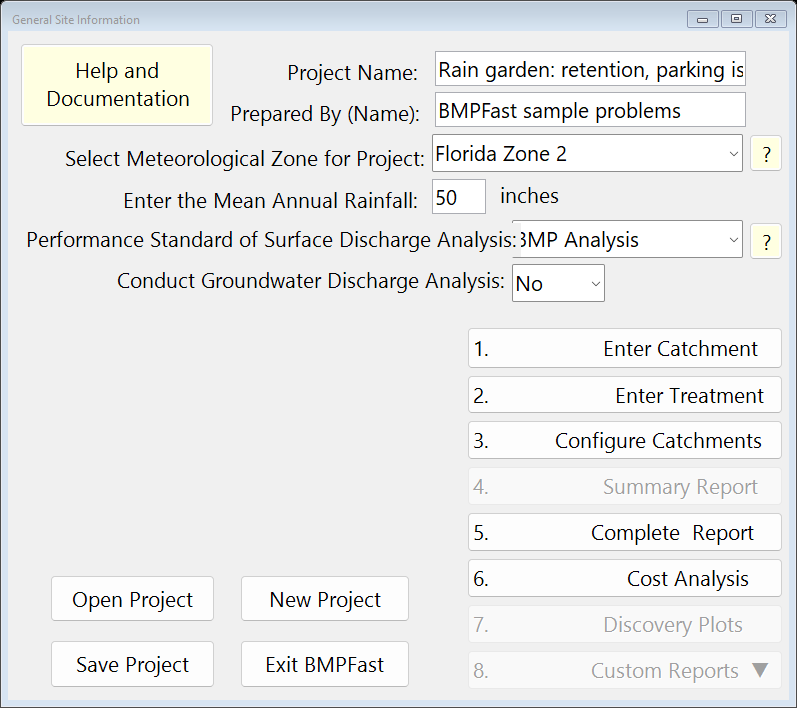
Press New Project. On General Site Information (the main window; its title bar reads General Site Information and your license key) type the project name Rain garden: retention, parking island, choose Florida Zone 2, enter 50 in of mean annual rainfall and choose the performance standard BMP Analysis.
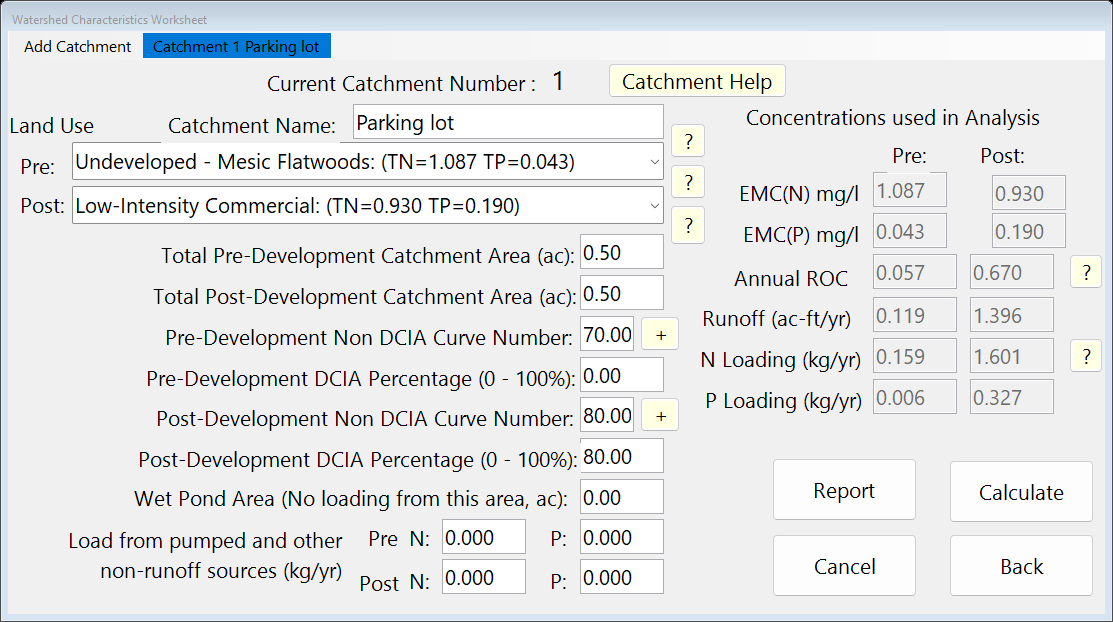
General Site Information (the main window). Press 1. Enter Catchment. For Catchment 1 type the name Parking lot, choose the land uses Undeveloped - Mesic Flatwoods (pre) and Low-Intensity Commercial (post), enter the areas 0.5 and 0.5 ac, the non-DCIA curve numbers 70 and 80 and the DCIA 0 and 80 %, then press Calculate. BMPFast shows the annual runoff coefficient, the runoff and the TN and TP loads. Press Back.
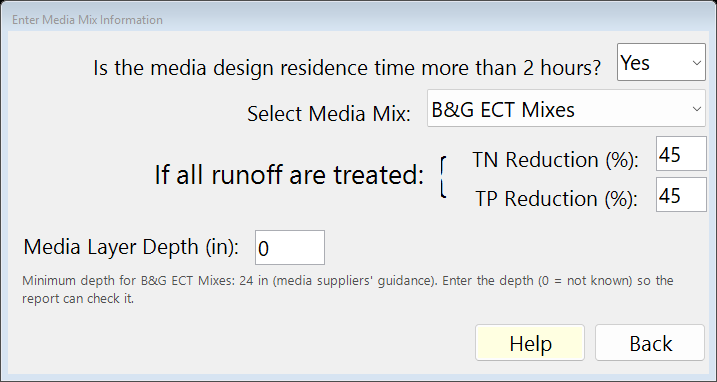
Watershed Characteristics Worksheet (1. Enter Catchment). Press 2. Enter Treatment, then Rain Garden, and on its worksheet press Media. Choose B&G ECT Mixes (TN 45 %, TP 45 % when all the runoff is treated) and press Back.
Enter Media Mix Information (the Media button). Press 2. Enter Treatment and then Rain Garden. On the Rain Garden Analysis worksheet: System Type Retention; Sustainable Void Fraction 0.3; Native Soil Volume 1200 cubic feet; Water Storage above Media 600 cubic feet; Credit for Native Soil and Cover Crop 0 %. Press Calculate. The report on the worksheet shows the inputs and the results.
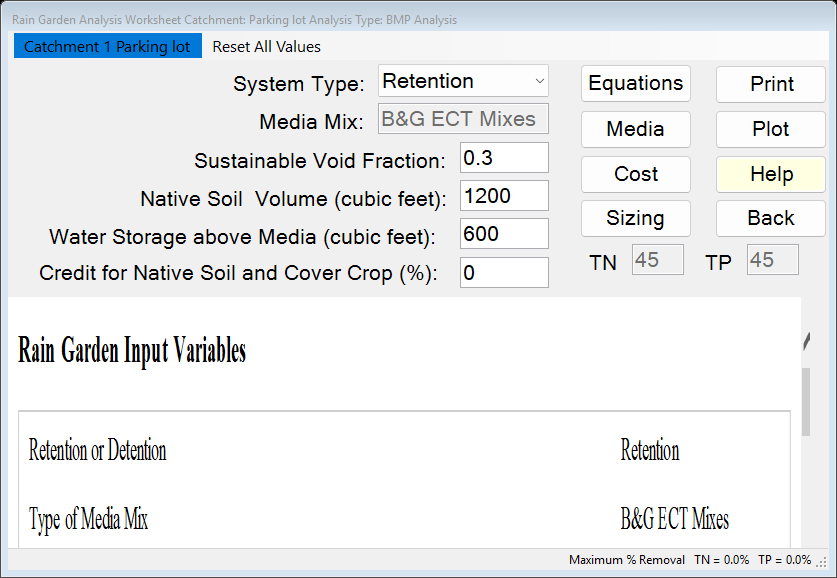
The BMP worksheet after Calculate: the report on the left. Press the same button again, now labelled Equations: the worksheet shows each equation with this problem’s values. Press Back to return to the treatment options.
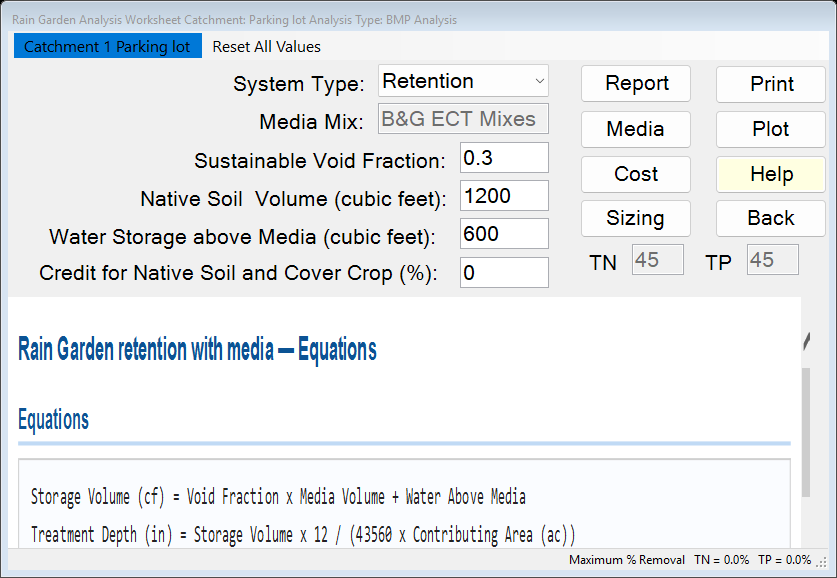
The same worksheet showing Equations: each equation with this problem’s values. On the main window press 3. Configure Catchments and double-click Catchment 1. Choose Rain Garden as the BMP used in routing and the Outlet as where it goes. Press Back twice. (A catchment’s BMP is only used once it is chosen here.)
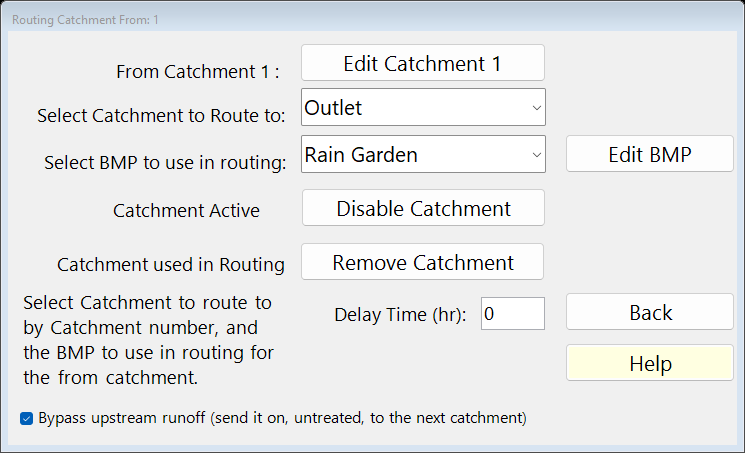
Routing for Catchment 1 (3. Configure Catchments): the BMP used and where the catchment goes. Press 4. Summary Report. The Report Viewer shows the loads, the removal and whether the performance standard is met. Press Save Project to keep your copy; compare it with the .bmpt under Files.
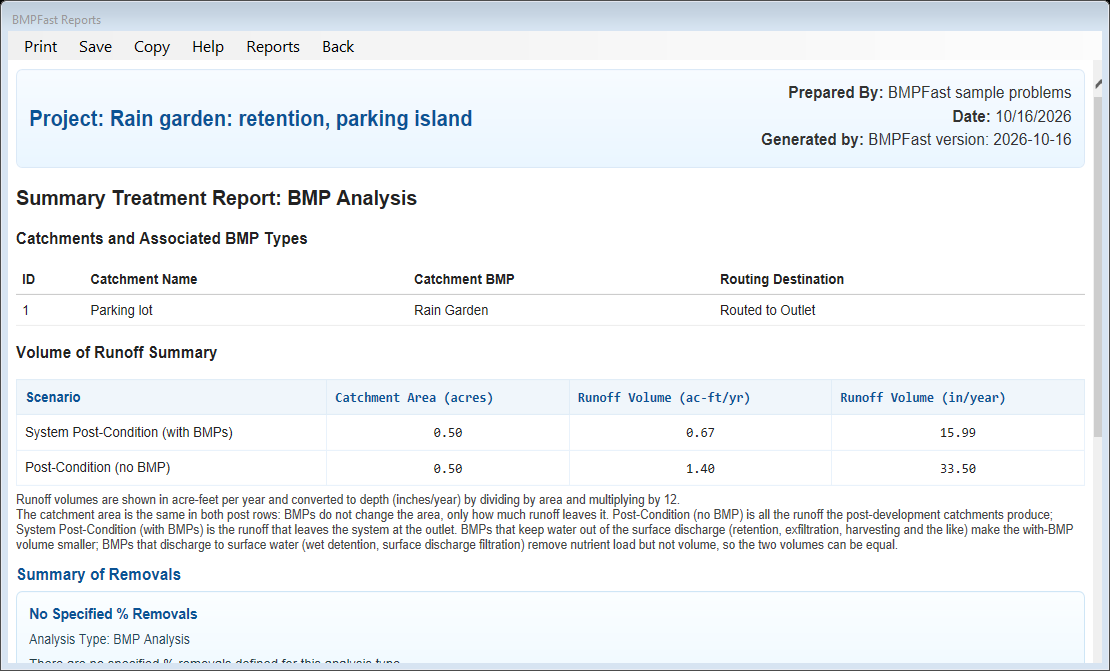
The Summary Report (4. Summary Report) in the Report Viewer.
3Results
| Result | Value |
|---|---|
| Catchment 1: computed by BMPFast | |
| Annual runoff coefficient (ROC), pre / post | 0.057 / 0.670 |
| Runoff, pre / post | 0.119 / 1.396 ac-ft/yr |
| TN load, pre / post | 0.159 / 1.601 kg/yr |
| TP load, pre / post | 0.006 / 0.327 kg/yr |
| Rain Garden: computed by BMPFast | |
| Treatment depth | 0.529 in |
| Hydraulic capture efficiency | 52.27 % |
| Provided TN / TP removal | 52.27 % / 52.27 % |
| TN load in → out | 1.601 → 0.764 kg/yr |
| TP load in → out | 0.327 → 0.156 kg/yr |
| Site (all catchments, at the outlet) | |
| TN load: catchments → outlet | 1.601 → 0.764 kg/yr |
| TP load: catchments → outlet | 0.327 → 0.156 kg/yr |
| Provided removal TN / TP | 52.3 % / 52.3 % |
The BMP report
Open this report on its own page.
The Summary Report
4Check
Runoff and loads (Equations 9-1 and 9-2 of AH Vol I).
| Runoff | = ROC × area × rainfall / 12 |
| = 0.670 × 0.50 ac × 50.0 in / 12 | |
| = 1.396 ac-ft/yr (program 1.396). |
| TN load | = EMC × runoff × 1.233 |
| = 0.930 × 1.396 × 1.233 | |
| = 1.601 kg/yr (program 1.601) |
| TP load | = 0.190 × 1.396 × 1.233 |
| = 0.327 kg/yr (program 0.327). |
1.233 kg is 1 mg/L in 1 ac-ft.
Storage.
| Storage | = native soil volume × void fraction + water above the media |
| = 1,200 × 0.30 + 600 | |
| = 960 cf (program 960). |
Treatment depth.
| Depth | = storage × 12 / area |
| = 0.0220 ac-ft × 12 / 0.50 ac | |
| = 0.529 in (program 0.529). |
Capture. The retention efficiency tables for Florida Zone 2 at a treatment depth of 0.529 in, non-DCIA CN 80.00 and DCIA 80.0 % give a hydraulic capture of 52.27 % (AH Vol I Appendix O; read the same tables with Tools › Retention Efficiency Lookup Tables, help page 4325). A retention rain garden keeps what it captures: the removal equals the capture. The media then treat the water going to the groundwater (post-media groundwater removal 32.15 %).
Load out.
| TN out | = load in × (1 − removal) |
| = 1.601 × (1 − 52.27 / 100) | |
| = 0.764 kg/yr (program 0.764) |
| TP out | = 0.327 × (1 − 52.27 / 100) |
| = 0.156 kg/yr (program 0.156). |
The program’s Equations page
5Files
- rain-garden-retention.bmpt: the project, saved by BMPFast. Save it (your browser puts it in Downloads). In BMPFast press Open Project, then Open Project again in the Open BMPFast Project dialog (below its Recent Projects list), and choose the file.
- Equations page (worksheet) (as BMPFast shows it)
- Summary Report (as BMPFast shows it)
- BMP report (worksheet) (as BMPFast shows it)
6Help and methodology
Calculated with BMPFast 1.1.9 (build 6.0.0, 2026-10-16). Older versions may not have the Equations button or may give slightly different results; download the latest at bmpfast.com. Screen captures are for demonstration only.