
All programs › BMPFast › Sample problems
Routing: two subdivisions joining at a wet pond
Two catchments with retention join a third with a wet pond; All sites non-exempted.
Help: Routing (help page 220) · Download the .bmpt · Link to Solution in BMPFast Version 2
1The problem
Two subdivisions (8 and 6 ac), each with a small retention basin, drain to a 4-acre town center whose wet pond treats everything before the outlet.
| Input | Value | Source |
|---|---|---|
| Project (General Site Information) | ||
| Meteorological zone | Florida Zone 2 | Zone map (help page 815) |
| Mean annual rainfall | 50 in | Mean annual rainfall map (help page 815) |
| Performance standard (analysis type) | All sites non-exempted | Site (illustrative) |
| Catchment 1: North subdivision (Watershed Characteristics) | ||
| Land use, pre / post | Agricultural - Pasture / Single-Family | Site (illustrative) |
| Area, pre / post | 8 / 8 ac | Site (illustrative) |
| Non-DCIA curve number, pre / post | 61 / 75 | Site (illustrative) |
| DCIA, pre / post | 0 / 25 % | Site (illustrative) |
| EMC TN, pre / post | 3.030 / 1.770 mg/L | BMPFast land use table (AH Vol I Table 9.2) |
| EMC TP, pre / post | 0.593 / 0.327 mg/L | BMPFast land use table (AH Vol I Table 9.2) |
| BMP used in routing | Retention: Provided Retention Volume 0.5 ac-ft; Time to recover design volume 72 hr | Design (illustrative) |
| Routes to | Catchment 3 | Site (illustrative) |
| Catchment 2: South subdivision (Watershed Characteristics) | ||
| Land use, pre / post | Agricultural - Pasture / Single-Family | Site (illustrative) |
| Area, pre / post | 6 / 6 ac | Site (illustrative) |
| Non-DCIA curve number, pre / post | 61 / 75 | Site (illustrative) |
| DCIA, pre / post | 0 / 25 % | Site (illustrative) |
| EMC TN, pre / post | 3.030 / 1.770 mg/L | BMPFast land use table (AH Vol I Table 9.2) |
| EMC TP, pre / post | 0.593 / 0.327 mg/L | BMPFast land use table (AH Vol I Table 9.2) |
| BMP used in routing | Retention: Provided Retention Volume 0.4 ac-ft; Time to recover design volume 72 hr | Design (illustrative) |
| Routes to | Catchment 3 | Site (illustrative) |
| Catchment 3: Town center (Watershed Characteristics) | ||
| Land use, pre / post | Agricultural - Pasture / High-Intensity Commercial | Site (illustrative) |
| Area, pre / post | 4 / 4 ac | Site (illustrative) |
| Non-DCIA curve number, pre / post | 61 / 80 | Site (illustrative) |
| DCIA, pre / post | 0 / 70 % | Site (illustrative) |
| EMC TN, pre / post | 3.030 / 2.400 mg/L | BMPFast land use table (AH Vol I Table 9.2) |
| EMC TP, pre / post | 0.593 / 0.345 mg/L | BMPFast land use table (AH Vol I Table 9.2) |
| BMP used in routing | Wet Detention: Permanent Pool Volume 3.0 ac-ft; tick Check if there is a littoral zone; Floating Wetland or other MAPs Credit 0 % | Design (illustrative) |
| Routes to | the Outlet | Site (illustrative) |
Find: the loads leaving the site when the catchments are routed through each other, and how BMPFast treats the chain.
2Steps in BMPFast
Press New Project. On General Site Information (the main window; its title bar reads General Site Information and your license key) type the project name Routing: two catchments joining at a pond, choose Florida Zone 2, enter 50 in of mean annual rainfall and choose the performance standard All sites non-exempted.
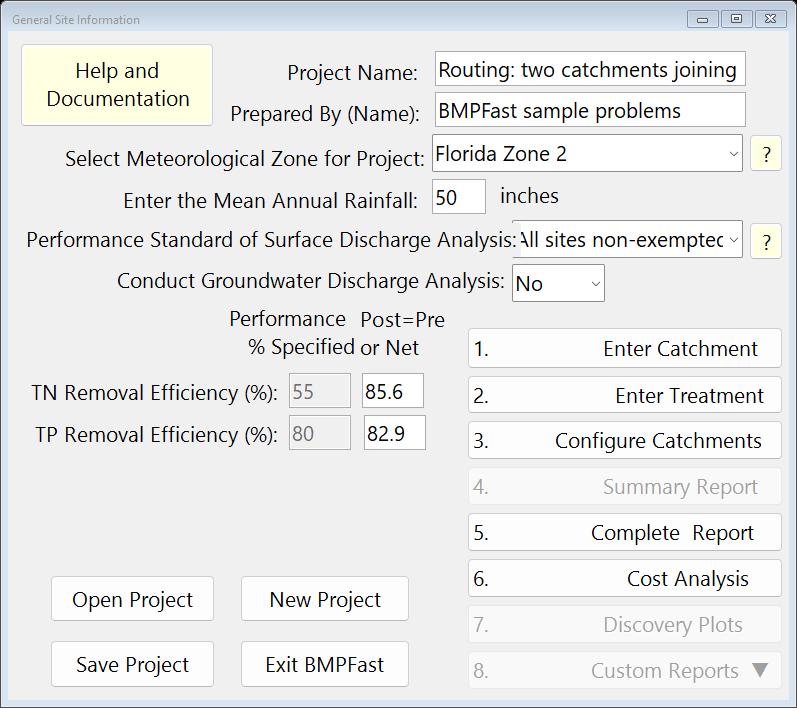
General Site Information (the main window). Press 1. Enter Catchment. For Catchment 1 type the name North subdivision; land uses Agricultural - Pasture (pre) and Single-Family (post); areas 8 and 8 ac; non-DCIA CN 61 and 75; DCIA 0 and 25 %, and press Calculate.
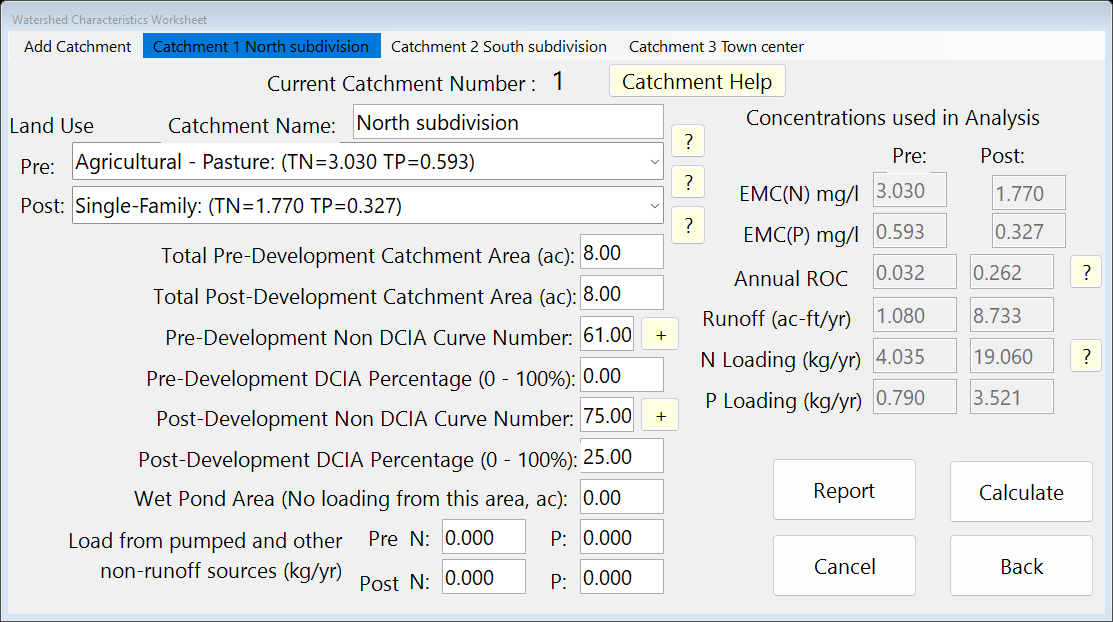
Watershed Characteristics, Catchment 1. Still on the Watershed Characteristics Worksheet, click Add Catchment in the menu bar. In Create New Catchment press Create (under “Create a new blank Catchment”); Catchment 2 opens. Type the name South subdivision; land uses Agricultural - Pasture (pre) and Single-Family (post); areas 6 and 6 ac; non-DCIA CN 61 and 75; DCIA 0 and 25 %, and press Calculate.
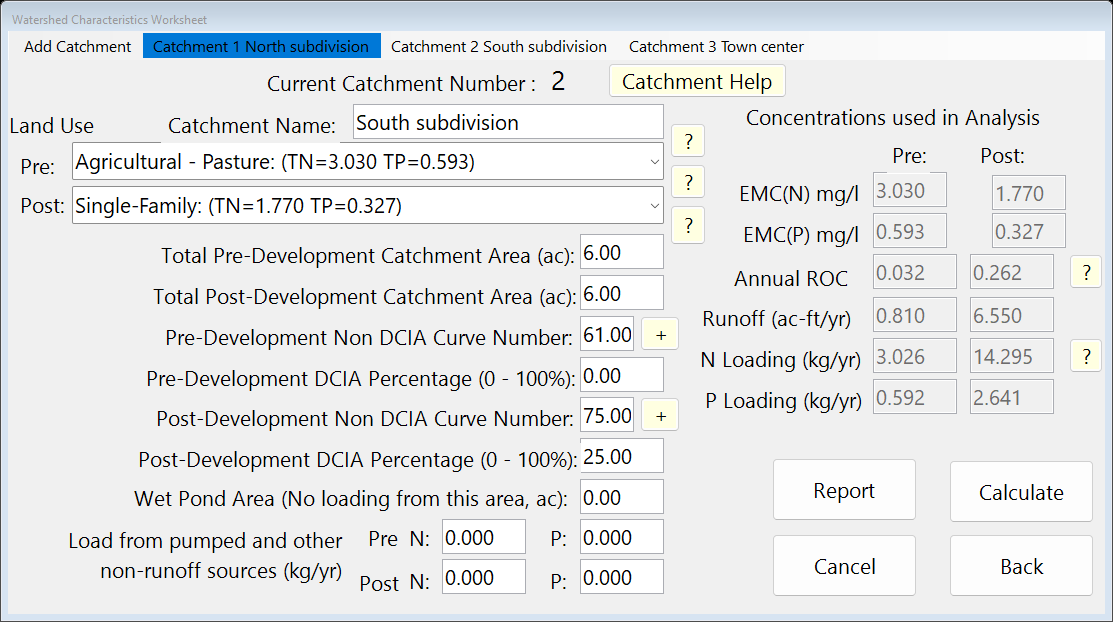
Watershed Characteristics, Catchment 2. The Create New Catchment window (Add Catchment).
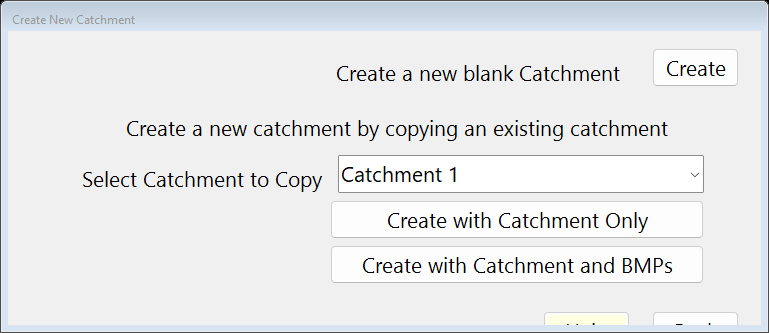
Create New Catchment (Add Catchment). Still on the Watershed Characteristics Worksheet, click Add Catchment in the menu bar. In Create New Catchment press Create (under “Create a new blank Catchment”); Catchment 3 opens. Type the name Town center; land uses Agricultural - Pasture (pre) and High-Intensity Commercial (post); areas 4 and 4 ac; non-DCIA CN 61 and 80; DCIA 0 and 70 %, and press Calculate. Press Back when the last catchment is entered. (Add Catchment on 3. Configure Catchments opens the same worksheet.)
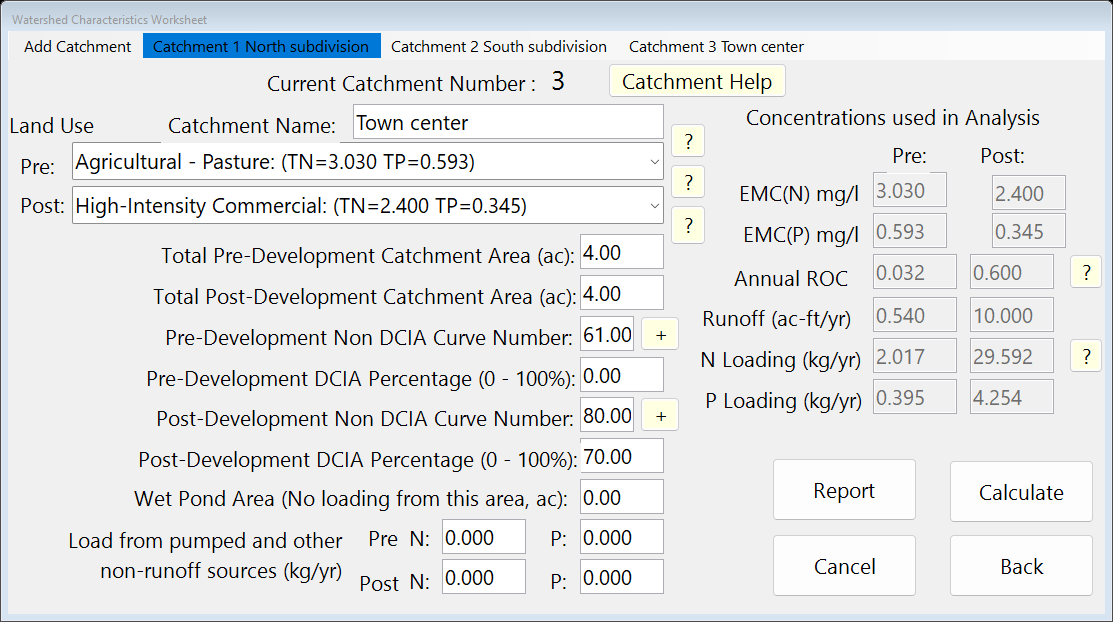
Watershed Characteristics, Catchment 3. 2. Enter Treatment. In the menu bar at the top of Treatment Options click Catchment 1 to make it current (the window then reads “Catchment: 1 North subdivision”), and press Retention Basin. Enter: Provided Retention Volume 0.5 ac-ft; Time to recover design volume 72 hr. Press Calculate, then Back.
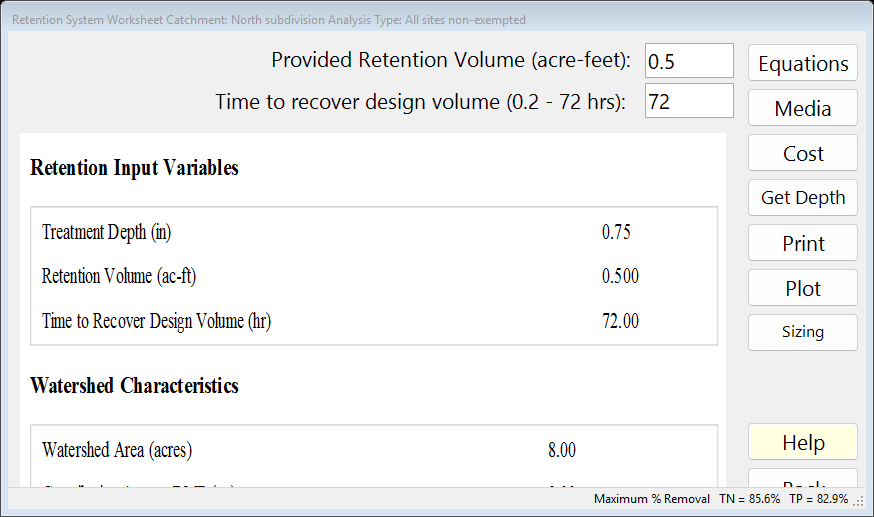
Worksheet of Catchment 1. Treatment Options lists the catchments in its menu bar; the one highlighted is current (in this capture, Catchment 3).
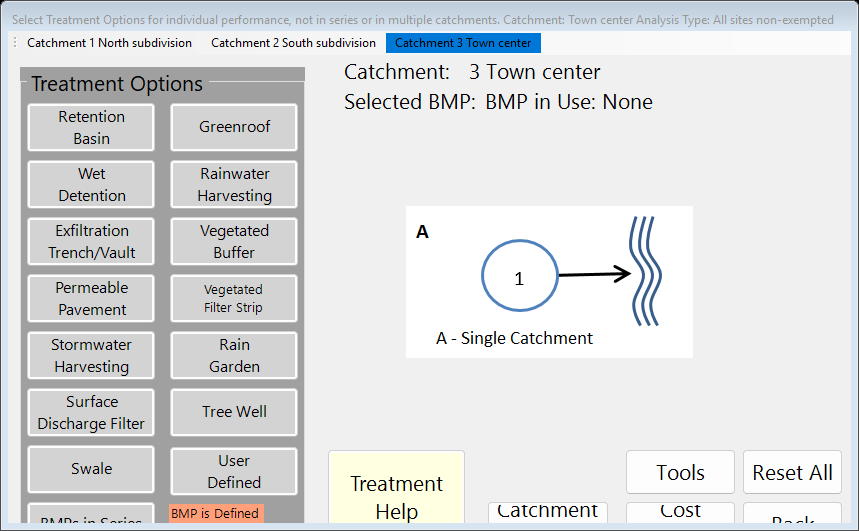
Treatment Options, with the catchment menu bar at the top. In the menu bar at the top of Treatment Options click Catchment 2 to make it current (the window then reads “Catchment: 2 South subdivision”), and press Retention Basin. Enter: Provided Retention Volume 0.4 ac-ft; Time to recover design volume 72 hr. Press Calculate, then Back.
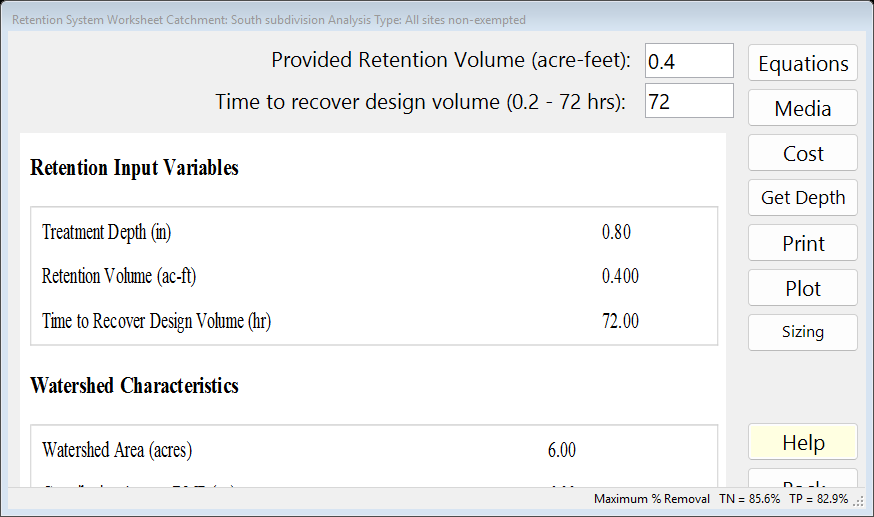
Worksheet of Catchment 2. In the menu bar at the top of Treatment Options click Catchment 3 to make it current (the window then reads “Catchment: 3 Town center”), and press Wet Detention. Enter: Permanent Pool Volume 3.0 ac-ft; tick Check if there is a littoral zone; Floating Wetland or other MAPs Credit 0 %. Press Calculate, then Back.
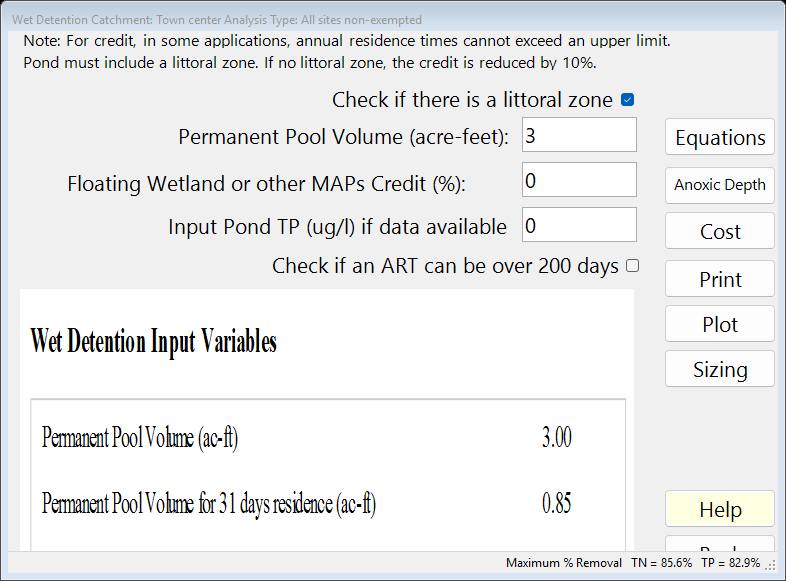
Worksheet of Catchment 3. On the main window press 3. Configure Catchments. in the row of Catchment 1 press Edit (the Routing Catchment From: 1 window opens). In Select BMP to use in routing choose Retention; in Select Catchment to Route to choose Catchment 3. Press Back.
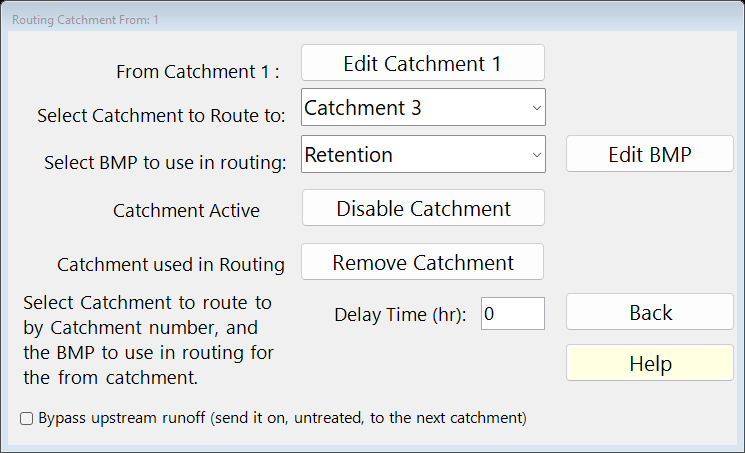
Routing for Catchment 1. Back on Select Catchment Configuration, in the row of Catchment 2 press Edit (the Routing Catchment From: 2 window opens). In Select BMP to use in routing choose Retention; in Select Catchment to Route to choose Catchment 3. Press Back.
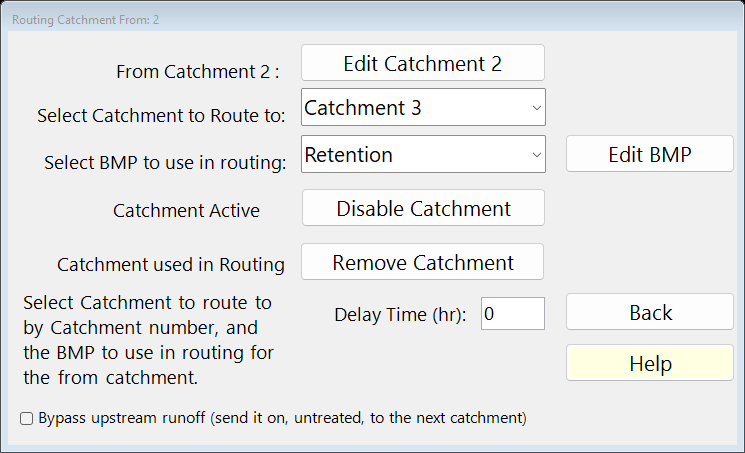
Routing for Catchment 2. Back on Select Catchment Configuration, in the row of Catchment 3 press Edit (the Routing Catchment From: 3 window opens). In Select BMP to use in routing choose Wet Detention; in Select Catchment to Route to choose the Outlet. Press Back (Back again closes Select Catchment Configuration).
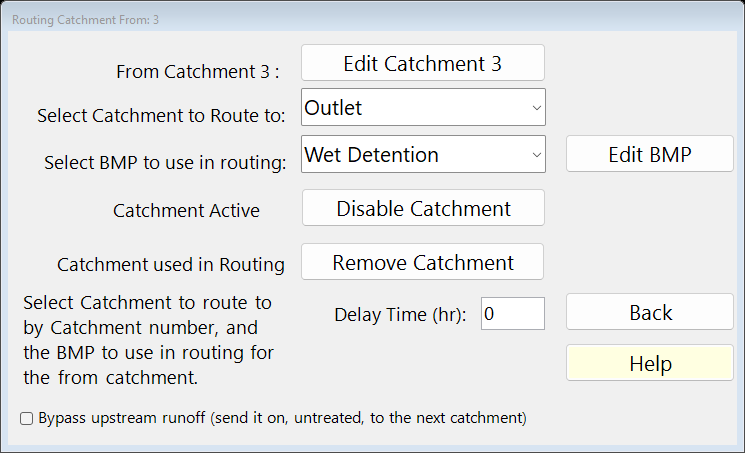
Routing for Catchment 3. Select Catchment Configuration now lists every catchment: From, To (0 is the Outlet), area and the BMP used.
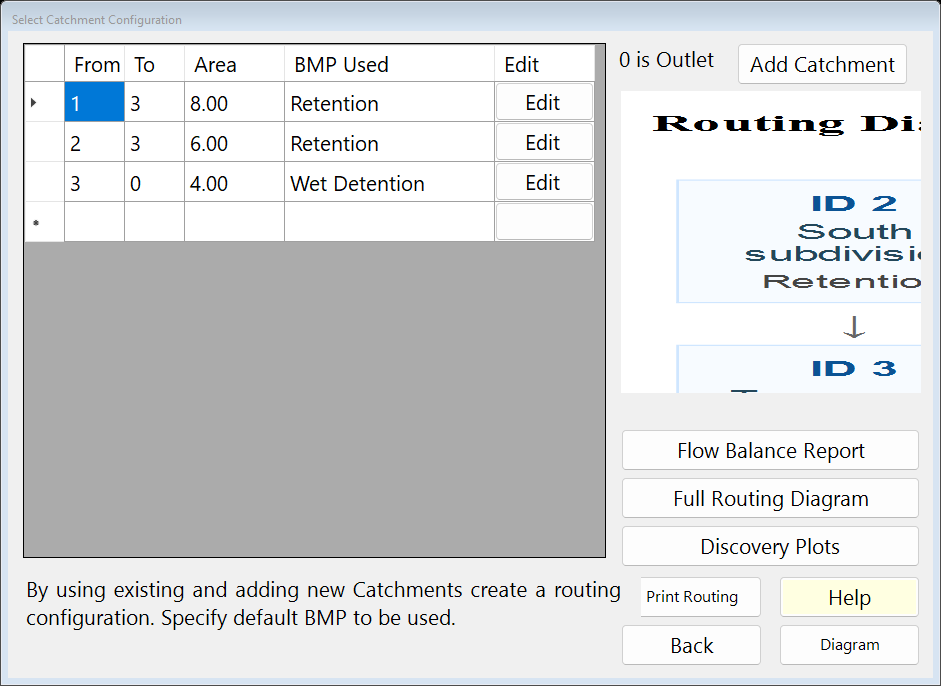
Select Catchment Configuration (3. Configure Catchments). Press Diagram to see the network.
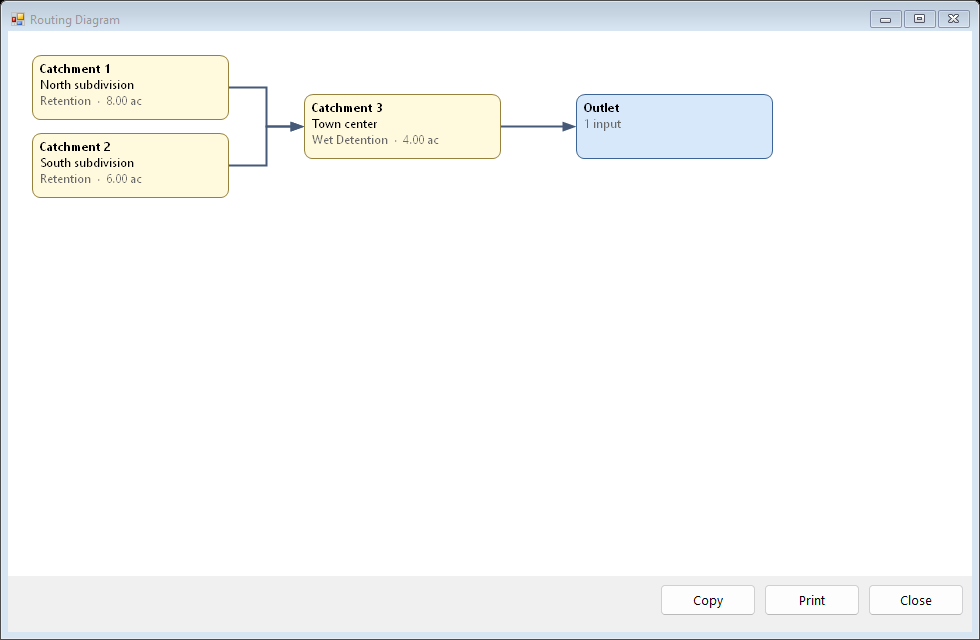
The routing Diagram. Press Full Routing Diagram for the routing report: each strand and the method used. Press Back.
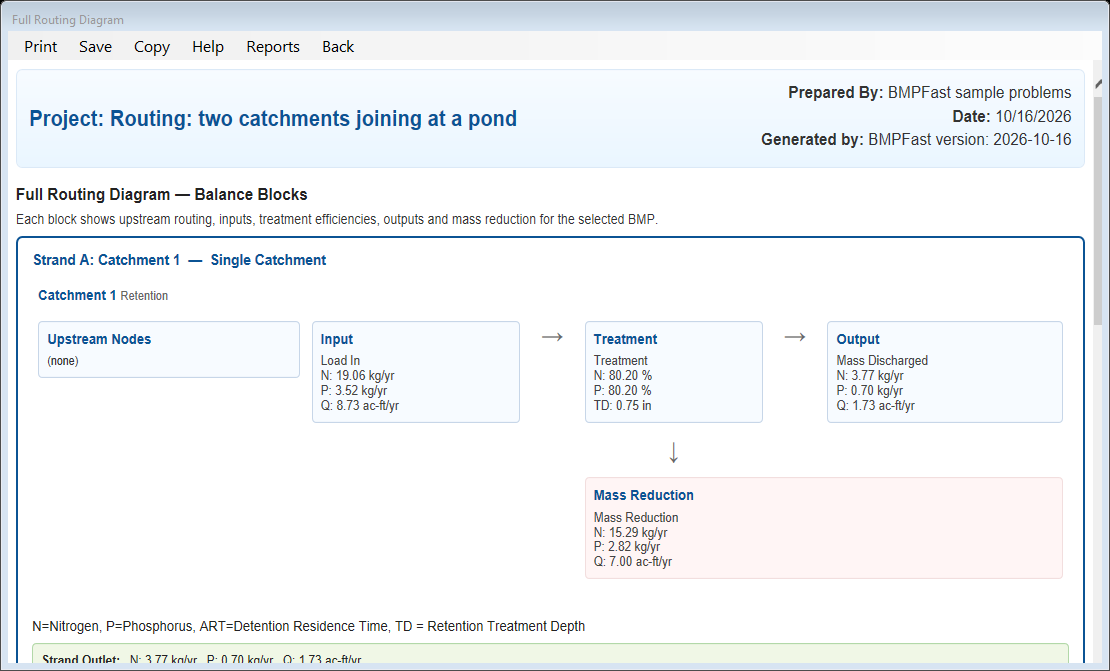
The Full Routing Diagram report. Press 5. Complete Report: the routing table node by node, then every catchment.
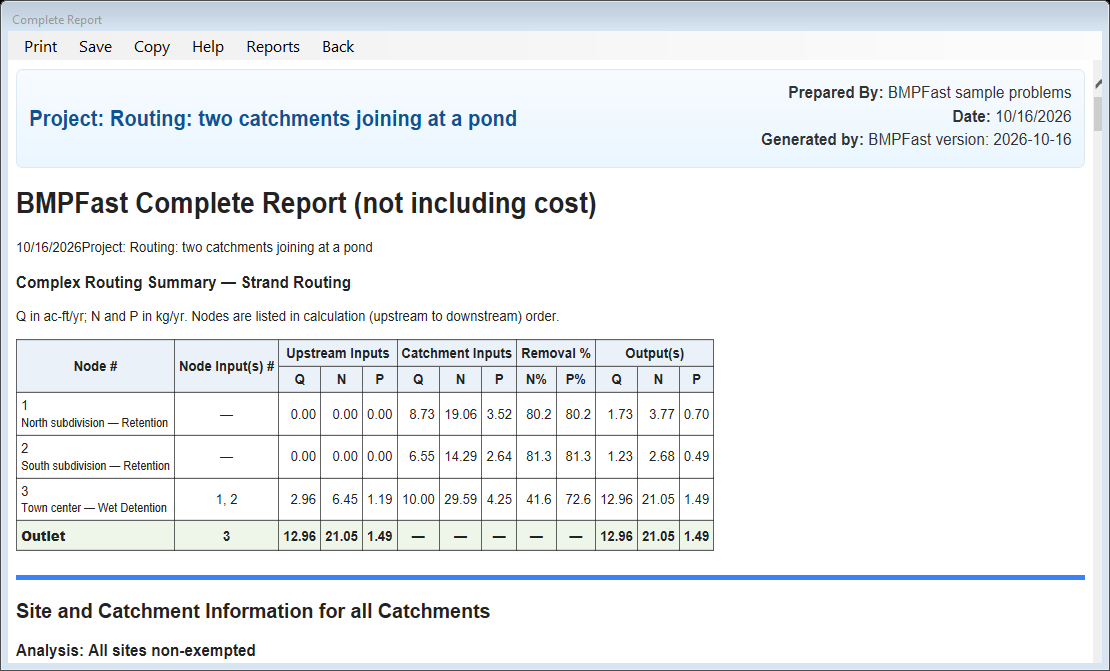
The Complete Report (5. Complete Report). Press 4. Summary Report. The Report Viewer shows the loads, the removal and whether the performance standard is met. Press Save Project to keep your copy; compare it with the .bmpt under Files.
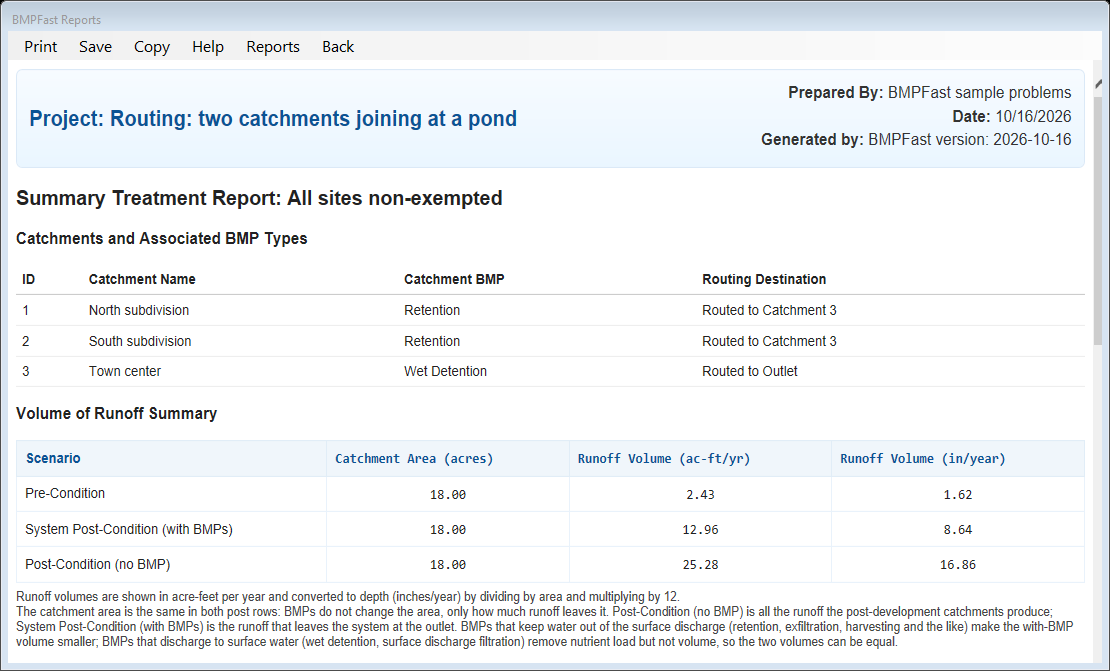
The Summary Report (4. Summary Report) in the Report Viewer.
3Results
| Catchment | Runoff (ac-ft/yr) | TN load (kg/yr) | TP load (kg/yr) | BMP → routes to |
|---|---|---|---|---|
| 1. North subdivision | 8.733 | 19.060 | 3.521 | Retention → Catchment 3 |
| 2. South subdivision | 6.550 | 14.295 | 2.641 | Retention → Catchment 3 |
| 3. Town center | 10.000 | 29.592 | 4.254 | Wet Detention → the Outlet |
| Result | Value |
|---|---|
| Site (all catchments, at the outlet) | |
| TN load: catchments → outlet | 62.946 → 21.050 kg/yr |
| TP load: catchments → outlet | 10.416 → 1.492 kg/yr |
| Provided removal TN / TP | 66.6 % / 85.7 % |
| Required removal TN / TP (Maximum % Removal) | 85.6 % (not met) / 82.9 % (met) |
Strands found by BMPFast (a strand is a run of catchments in series that BMPFast may calculate as one system):
- Catchment 1 is its own strand (1→1 starts and ends at Catchment 1) because it feeds a junction (Catchment 3), where strands end.
- Catchment 2 is its own strand (2→2 starts and ends at Catchment 2) because it feeds a junction (Catchment 3), where strands end.
- Catchment 3 is its own strand (3→3 starts and ends at Catchment 3) because it has more than one input (Catchments 1, 2), so BMPFast routes node by node at this junction: it adds what each input passes on to its own load and treats the total.
The Full Routing Diagram report
Open this report on its own page.
The Summary Report
4Check
Loads.
Each catchment’s load is EMC × runoff × 1.233 (Equation 9-2). Together:
| TN 19.060 + 14.295 + 29.592 | = 62.946 kg/yr (program 62.946) |
TP 10.416 kg/yr (program 10.416).
A junction. Catchment 1 sends on 19.8 % of its TN and Catchment 2 sends on 18.7 % of its TN to Catchment 3 (what its basin does not capture). At a junction BMPFast adds what every input sends on to the node’s own load and runoff, recalculates the node’s BMP on that total, and passes the rest downstream (ComplexRouting; help page 220).
Node by node, upstream first (the junction rule).
- Catchment 1 (Retention): TN in = its own load, 19.060 kg/yr; its BMP, calculated on everything that reaches it, removes 80.20 %, so TN out = 19.060 × (1 − 80.20 / 100) = 3.774 kg/yr (program 3.774).
- Catchment 2 (Retention): TN in = its own load, 14.295 kg/yr; its BMP, calculated on everything that reaches it, removes 81.28 %, so TN out = 14.295 × (1 − 81.28 / 100) = 2.676 kg/yr (program 2.676).
- Catchment 3 (Wet Detention): TN in = own load 29.592 + 3.774 from Catchment 1 + 2.676 from Catchment 2 = 36.042 kg/yr; its BMP, calculated on everything that reaches it, removes 41.59 %, so TN out = 36.042 × (1 − 41.59 / 100) = 21.050 kg/yr (program 21.050). The pond’s inflow is its own runoff 10.000 ac-ft/yr plus what each retention basin does not capture: 8.733 × (1 − 80.20 / 100) + 6.550 × (1 − 81.28 / 100) = 12.955 ac-ft/yr (program 12.955); ART = 3 × 365 / 12.955 = 84.5 days (program 84.5), and the Appendix O pond equations at that ART give the 41.59 %.
The outlet receives Catchment 3: TN 21.050 kg/yr.
The standard is not met, and that is expected. “All sites non-exempted” requires the greater of 55 % TN and 80 % TP, or the removal that keeps the post-development load at the pre-development load (Equation 9-3) (AH Vol I 8.3.2). The post = pre removal (Equation 9-3, (post load − pre load) / post load) is TN 85.6 % and TP 82.9 %. BMPFast takes the larger of the standard’s percentage and the post = pre removal as the Maximum % Removal, shown on every worksheet’s status bar and in the Summary Report: here TN 85.6 % and TP 82.9 %. This problem shows what this design removes (66.6 % / 85.7 %), which is less. To meet it, add BMPs in series or downstream catchments (see BMPs in Series and Routing), or size the BMP (see Sizing).
5Files
- routing-junction.bmpt: the project, saved by BMPFast. Save it (your browser puts it in Downloads). In BMPFast press Open Project, then Open Project again in the Open BMPFast Project dialog (below its Recent Projects list), and choose the file.
- Full Routing Diagram report (as BMPFast shows it)
- Complete Report (as BMPFast shows it)
- Summary Report (as BMPFast shows it)
6Help and methodology
- Routing (help page 220)
- Catchment Configurations (help page 196)
- Strand Based Routing for Wet Detention in Series (help page 4823)
- Strand Based Routing for Retention in Series (help page 4824)
- Strand Based Routing for No Treatment to Detention (help page 4833)
- Strand Based Routing for No Treatment to Retention (help page 4834)
- All sample problems
Calculated with BMPFast 1.1.9 (build 6.0.0, 2026-10-16). Older versions may not have the Equations button or may give slightly different results; download the latest at bmpfast.com. Screen captures are for demonstration only.