
The Open BMPFast Project window opens when you press Open Project on General Site Information. Use it to open a saved project (.bmpt file), or to reopen one of your recent projects with a double-click. To start a new project from an existing project’s site information or catchment pre-conditions, use New Project on General Site Information.
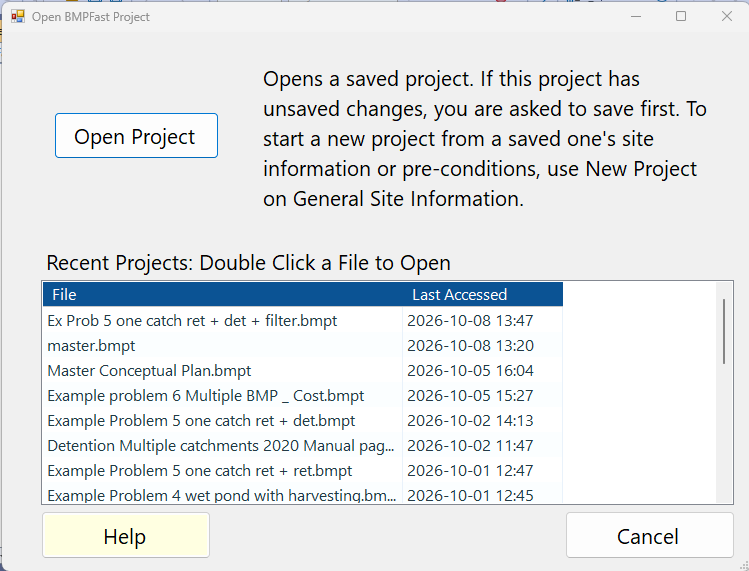
Recent Projects
The list “Recent Projects: Double Click a File to Open” shows up to 20 projects you have recently opened or saved, newest first, with two columns:
| Column | What it shows |
|---|---|
| File | The project’s file name (the full path is kept behind it). |
| Last Accessed | When the project was last opened or saved in BMPFast (yyyy-MM-dd HH:mm). |
Double-click a row to open that project. If the project you are working on has unsaved changes, BMPFast first asks whether to save them (see Notes). The window closes once a project is open; if you cancel, it stays open and General Site Information shows the project. If the file has been moved or deleted since, BMPFast says “File not found:” with the path, and nothing is opened. The list is kept in RecentFiles.xml in Documents\BMPFast.
Buttons
| Button | What it does |
|---|---|
| Open Project | “Opens a saved project. If this project has unsaved changes, you are asked to save first. To start a new project from a saved one’s site information or pre-conditions, use New Project on General Site Information.” Opens a Windows file dialog (starting in Documents\BMPFast, showing BMPFast files *.bmpt). The chosen project replaces the one you are working on, is recalculated, and is added to the recent list. |
| Help | Opens this page. |
| Cancel | Closes the window without opening anything (the Esc key does the same). |
Notes
- Before another project is opened (Open Project, or a double-click in the recent list), BMPFast checks whether the project you are working on has unsaved changes. If it has, it asks: Yes saves it first (the save window opens), No opens the other project without saving, and Cancel keeps you on the current project. New Project, Exit and closing the window with X ask the same question.
- You can also open a project by double-clicking a .bmpt file in Windows; BMPFast starts with that project loaded.
- Large projects take a moment to open and calculate; the wait cursor shows while BMPFast works.