
Filter media used to remove a pollutant has a design life expectancy, called its service life. For nutrient removal, the service life is based on how much dissolved phosphorus (ortho-phosphate, OP) the media can hold, compared with how much OP it removes each year. The Calculate Media Filter Service Life calculator estimates that life in years for a BMP that uses media. Open it from Tools (Calculators) with the Media Filter Service Life in Years button. As with all the calculators, nothing entered here is saved or changes the project.

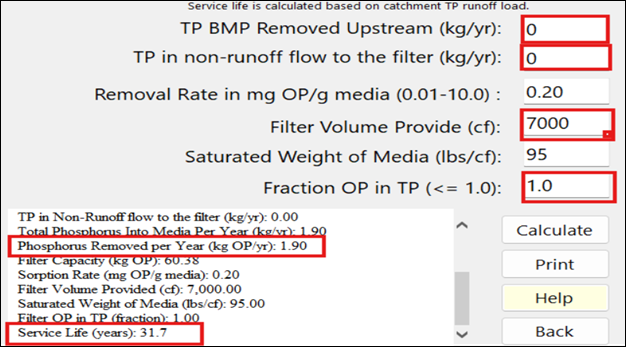
The worksheet with input decisions and output (red outline) for a filtration BMP in catchment 1:
Inputs
| Input | Units | What it means / how it is used |
|---|---|---|
| Select Catchment | — | The catchment whose BMP you are checking. |
| Select BMP | — | A BMP on that catchment that has values entered (Wet Detention and Multiple BMP are not listed). Choosing it fills the Removal Rate and Saturated Weight from its media mix, and the Filter Volume (see Filter Volume Provided below), then calculates. The phosphorus the BMP removes each year is taken from the BMP’s own calculation (see the equations). |
| TP BMP Removed Upstream (kg/yr) | kg/yr | Phosphorus removed by other BMPs upstream, which does not reach the media. It is subtracted from the phosphorus going into the media. Default blank (0). |
| TP in non-runoff flow to the filter (kg/yr) | kg/yr | Phosphorus reaching the media in base flow or other non-runoff water. It is added to the phosphorus going into the media and shortens the life. Default blank (0). |
| Removal Rate in mg OP/g media (0.01-10.0) | mg OP/g | The media’s sorption capacity: the ortho-phosphate one gram of media can hold. Filled from the media mix (for example 0.2 for B&G CTS, 0.6 for ICS). 0.00 means the BMP has no media. |
| Filter Volume Provided (cf) | cf | The volume of media in the filter. Filled in when the BMP is chosen: for a Rain Garden, its Media Volume; for a Surface Discharge Filter, Filter Surface Area (sf) × Media Layer Depth (in) / 12. The filter’s Filter Surface Area is set by its Sizing form (Apply) and its Media Layer Depth in Enter Media Mix Information (the Media button); until both are entered the box is left empty. For other BMPs, or to use a different volume for a filter, type it. Rest the mouse on the box to see where its value came from; the report says the same under Filter Volume Provided. With no volume the report says the service life is not calculated. |
| Saturated Weight of Media (lbs/cf) | lbs/cf | The in-place weight of the media. Filled from the media mix (for example 95 for B&G CTS, 105 for ICS). |
| Fraction OP in TP (<= 1.0) | fraction | The share of the phosphorus removed that is ortho-phosphate and so uses up sorption capacity. Default 1.0, the most conservative value, and likely because particulates settle in ponds and transport ditches. 0 gives no result. |
You can change any filled-in value; click Calculate to recalculate.
Results
The Media Filter Report lists: the date; the BMP’s Treatment Depth (in); Total Phosphorus removed by the selected BMP (kg/yr); TP Removed by other upstream BMPs (kg/yr); TP in Non-Runoff flow to the filter (kg/yr); Total Phosphorus Into Media Per Year (kg/yr); Phosphorus Removed per Year (kg OP/yr); Filter Capacity (kg OP); Sorption Rate (mg OP/g media); Filter Volume Provided (cf); Saturated Weight of Media (lbs/cf); Filter OP in TP (fraction); and Service Life (years), shown as “> 50” when it is more than 50 years.
Buttons
| Button | What it does |
|---|---|
| Calculate | Reads the boxes, recalculates the selected BMP and shows the report. |
| Opens the report in the Report Viewer, where its menu prints it, saves it as an HTML file, or copies the whole report to the clipboard (Copy) for pasting into a document. | |
| Help | Opens this page. |
| Back | Closes the calculator. Nothing is saved; copy the report first if you want to keep it. |
Equations
Methodology. Media and Filtration Methodology explains the service life calculation with an example.
TP removed by the BMP (kg/yr):
    Surface Discharge Filter: P load into the BMP x Provided P Treatment Efficiency / 100
    other BMPs: P retained by the BMP (P load in - P load out, less any groundwater discharge)
Total P into media (kg/yr) = TP removed by the BMP - TP removed upstream + TP in non-runoff flow
OP removed (mg/yr) = Total P into media x Fraction OP in TP x 1,000,000 mg/kg
OP capacity (mg) = Filter Volume (cf) x Saturated Weight (lbs/cf) x 454 g/lb x Removal Rate (mg OP/g)
Service Life (years) = OP capacity / OP removed
The amount removed is the sum during runoff conditions as well as during non-runoff conditions at the discharge.
Example
For the worksheet above (B&G CTS media, 7,000 cf, no upstream removal and no non-runoff flow), the filter removes 1.90 kg of phosphorus a year, all assumed to be OP (fraction 1.0):
OP capacity  = 7,000 cf x 95 lbs/cf x 454 g/lb x 0.2 mg/g = 60,382,000 mg  (60.38 kg OP)
OP removed   = 1.90 kg/yr x 1.0 x 1,000,000 mg/kg         = 1,900,000 mg/yr
Service life = 60,382,000 / 1,900,000                      = about 31.7 years
Notes
- No report appears while the BMP removes no phosphorus, or while Fraction OP in TP is 0.
- Multiple BMPs in series cannot be checked here; the list leaves them out.
- Media sorption rates and weights for each mix are on the Media Mix page, with the test data behind them in its FAQ.