
The User Defined BMP Worksheet lets you enter a treatment device that BMPFast does not calculate itself, such as a baffle box or a catch basin insert, by typing the annual nitrogen and phosphorus removal you can justify for it. You open it from the catchment’s treatment choices.
This worksheet is used when there is no acceptable BMP by convention or by regulation. However, there is a possible exemption available by reason of field testing or other methods of management. The worksheet allows you to define the name of the BMP and the annual removal expected. The user-defined BMP can be used with others in a series or parallel configuration. Credit is based on a concentration reduction.
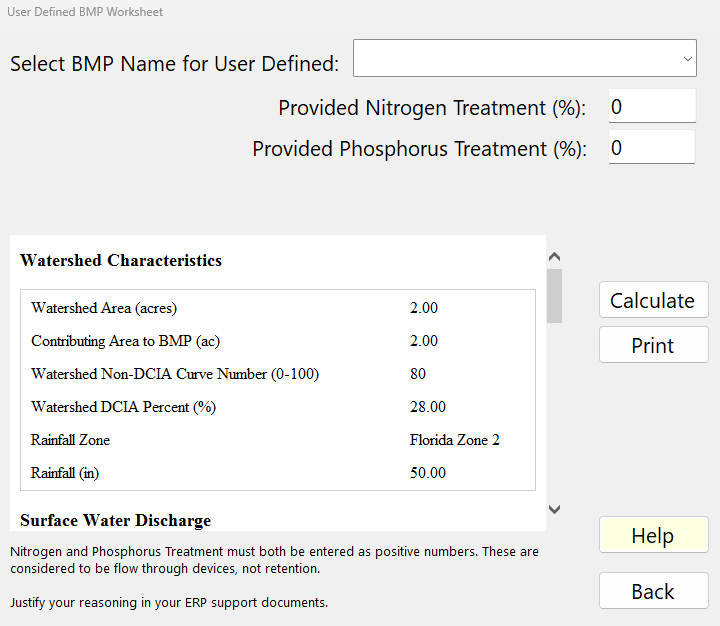
How to use this worksheet
- Choose the device from Select BMP Name for User Defined.
- Enter Provided Nitrogen Treatment (%) and Provided Phosphorus Treatment (%), the average annual removal you will justify in your ERP support documents.
- Click Calculate to see the report, then Back to keep the values.
Inputs
| Input (as on screen) | Units | What it means / how it is used |
|---|---|---|
| Choose or Type the BMP Name: | text | Name of the device: choose Baffle Boxes, Baffle Boxes 2nd Gen, Hydrodynamic Separators, Catch Basin Inserts, Alum Treating, Street Sweeping or Other from the list, or type your own name (for example the product’s name). The name is saved with the project, shown when the worksheet is reopened and printed in the report. It identifies the BMP; it does not change the calculation. |
| Provided Nitrogen Treatment (%): | % | Average annual TN removal of the device. The N load leaving the BMP = N load in × (100 − this value) / 100. The BMP counts as defined (and is used in the analysis) only when this value is greater than 0. |
| Provided Phosphorus Treatment (%): | % | Average annual TP removal of the device. The P load leaving the BMP = P load in × (100 − this value) / 100. |
The note on the worksheet reads: “Nitrogen and Phosphorus Treatment must both be entered as positive numbers. These are considered to be flow through devices, not retention. Justify your reasoning in your ERP support documents.”
Applicant’s Handbook reference
Appendix O, Table 1 (BMP Efficiencies): lists fixed removals for some of these devices: Baffle boxes, first generation, 2.30 % TP and 0.50 % TN; second generation 15.50 % TP and 19.05 % TN; Hydrodynamic separators 10 % TP; catch basin inserts from the FSA/UF MS4 BMP Toolkit; alum injection from jar-test dosage. BMPFast does not fill these in: type the value that applies.
Section 9.5.2 Alternative Designs: a BMP not in Volume II or Appendix O is an alternative design, and the applicant must show it has been tested and reviewed and will be operated and maintained; that is the justification the worksheet asks for.
Method
Methodology. Media and Filtration Methodology explains how BMPFast uses the entered removals.
There are no design equations. The removals you enter are applied to the annual N and P loads reaching the BMP, both for this catchment alone (the report) and in the routing (treatment train) calculation, where the user-defined BMP can be combined in series or in parallel with other BMPs. The Equations page states this:
N removal (%) = the Nitrogen removal efficiency entered
P removal (%) = the Phosphorus removal efficiency entered
N load out (kg/yr) = N load in x (100 - N removal) / 100
P load out (kg/yr) = P load in x (100 - P removal) / 100
The Equations page
Once the report is current, the Calculate button reads Equations. Clicking it shows the two equations above, the notes (“A user-defined BMP has no sizing equations; its removal efficiencies are entered directly. They are applied to the annual load reaching the BMP in the routing (treatment train) calculation.”), and a Values table with Hydraulic Capture, Treatment Rate (“no media mix”), N removal and P removal. Click again (Report) to return to the report.
Results (the report)
- User Defined BMP Input Variables: Contributing Area to BMP (ac) and the Calculated Nitrogen and Phosphorus Treatment Efficiency (%), which are the efficiencies you entered.
- Watershed Characteristics: Watershed Area (acres), Contributing Area to BMP (ac), Watershed Non-DCIA Curve Number, Watershed DCIA Percent, Rainfall Zone, Rainfall (in).
- Surface Water Discharge: Provided Nitrogen and Phosphorus Treatment Efficiency (%), the values you entered (a value of 100% or more is shown as 99%).
- Groundwater Discharge (Stand-Alone): Average Annual Recharge (MG/yr) and the TN and TP mass load (kg/yr) and concentration (mg/L) of the groundwater discharge.
- Surface Discharge Load Diagram: N and P loads in (kg/yr), the removals, the loads out and the mass removed, for this catchment alone.
Buttons and features
| Button | What it does |
|---|---|
| Calculate / Equations / Report | Calculate appears whenever the inputs differ from those the report was calculated with; it reads the inputs, calculates and shows the report. When the report is current the button toggles between the Equations page and the Report. |
| Opens what is shown in the lower pane in the Report Viewer, where it can be printed or copied. | |
| Help | Opens this page. |
| Back | Saves the values entered, recalculates the loads and closes the worksheet. |
The status bar at the bottom of the window shows the project’s Maximum % Removal for TN and TP. This worksheet has no Sizing, Plot, Media or Cost button.
Notes and limits
- Use this worksheet only when no BMP in BMPFast fits the device and you have a basis (field testing, published data, or an agency-accepted method) for the removals; justify them in your ERP support documents.
- A user-defined BMP is a flow-through device: it reduces concentrations, not runoff volume.
- With a nitrogen removal of 0 the BMP is not defined and is not used, even if a phosphorus removal is entered.
Sample problems
Worked problems solved in BMPFast, each with every input, the steps with screen captures, the program’s results, a hand check and the project file to download. Captures are for demonstration only. All of them: BMPFast sample problems.