Messages you may see
Statistle explains a problem instead of showing a wrong number. There are three kinds of message: a red note under a box when something you typed was not used, a red note above the form when an analysis cannot compute yet (its results show "—"), and questions and warnings in a small window. Every window Statistle opens has a title that starts "Statistle — " and says what it is about.
A red note under a box: what you typed was not used
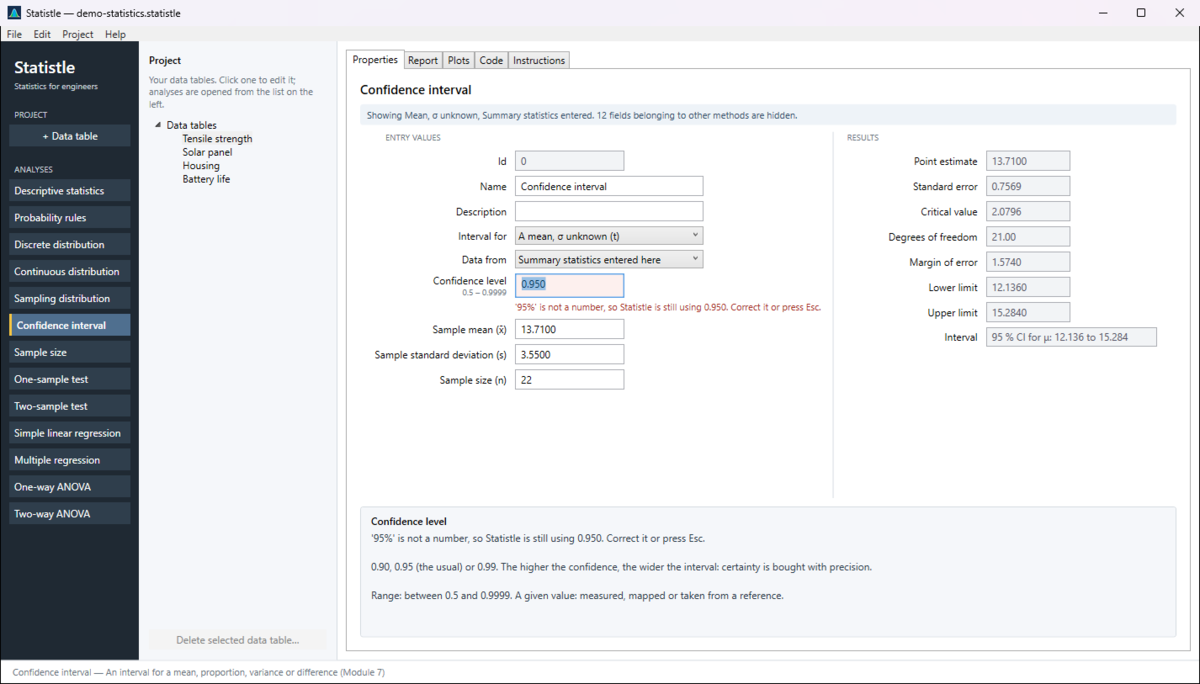
The box turns red, the note says why, and Statistle keeps calculating with the value it had. The same words appear at the top of the help panel. Correct what you typed and press Enter or Tab, or press Esc to put the value in use back in the box.
| Note | What to do |
|---|---|
| '…' is not a number, so Statistle is still using … Correct it or press Esc. | Type a plain number: 0.95, not 95%; 1250, not 1,250 kg. Use the decimal separator of your Windows settings. |
| '…' is not a whole number, so Statistle is still using … | The field counts something (n, classes, folds). Type a whole number such as 10. |
| '…' is not one of the choices … Pick one from the list. | Choose from the drop-down rather than typing. |
| '…' could not be used here (it may be too large or in the wrong form) … | Check the number; very large values and odd forms are refused. |
| Line 4, column 'AA2024': '492 MPa' is not a number. The paste was not used; your earlier data is kept. Correct that cell, or press Esc to go back to the data in use. | In a data table, one cell that is not a number means the whole paste is not used. Take units and notes out of the cells (put the unit in the column name). |
| Line 3: '…' is not a number. / Line 3: '…' is not two numbers (x, then y). The paste was not used; … | In a list of values (one per line), or of x, y pairs, fix the line named. |
A box with a red outline but no note holds a number outside the range the field allows (the range is printed under the field's name, for example 0.5 – 0.9999). Do not trust the results until you have corrected it.
A red note above the form: the analysis cannot compute yet
| Message | What to do |
|---|---|
| This analysis reads a data table, and the project has none yet. Click + Data table on the left, paste or Import your data, then come back and choose it here. | Make a table first (Data tables), or choose Summary statistics entered here / Entered below where the analysis offers it and type the numbers. |
| Choose the column holding the sample. / Choose the column holding sample 1. / Choose the data table. / Choose the response column. | Pick it in the drop-down named in the message. |
| The data table this analysis read from has been deleted, so the values shown are the ones last copied from it. Choose another column, or press Ctrl+Z to bring the table back. | As it says: pick another column, or Edit ▸ Undo the delete. |
| Enter a confidence level between 0 and 1. / Enter α between 0 and 1 and the null value. | Type levels as decimals: 0.95, not 95; α = 0.05, not 5. |
| Enter the value of interest, x. / Enter the distribution's parameters. | Fill in the empty field the message names. Blank means "not entered", never zero. |
| The upper value must not be below the value of interest. | Swap them, or clear the optional upper value. |
| P(A ∩ B) = … exceeds the smaller of P(A) and P(B) … / Mutually exclusive events cannot have P(A) + P(B) … > 1. | The probabilities you entered contradict each other. Recheck the givens and the choice in How A and B relate. |
| The rank tests need the data themselves: set Data from to columns of a data table. | Mann–Whitney and Wilcoxon cannot work from x̄ and s. Put the data in a table and choose Columns of a data table. |
| At least three usable pairs are needed for a line and its standard error. / The x values have no spread, so no line can be fitted. | Add more pairs, or check that x actually varies. With a log transform, zero and negative values are skipped. |
| The predictors are collinear (one is a combination of the others) or have no spread; drop one. | Remove one predictor from Predictor columns. |
| The table has no column named '…'. | Check the spelling in Predictor columns or Group columns against the table's header line. |
| The response and every predictor must have the same number of rows. / The factor and response columns must have the same number of rows. | Fill the gaps in the shorter column, or remove the extra rows. |
| Every group needs at least two values, and there must be some variation within the groups. | Check each group column has two or more numbers that are not all the same. |
| Selection kept no predictor: none is significant at 0.05. Fit them all to see why. | Set Variable selection back to All the predictors listed and read the coefficient p-values. |
For any message, click into the field it names: the help panel says what the field needs and its allowed range.
Not errors: a grey box you cannot type in is filled in by Statistle (a column's values, a computed summary) — change the source instead; and the blue note "Showing … fields belonging to other methods are hidden." means the fields for the choices you did not make are hidden.
Questions Statistle asks
| Question | What the answers do |
|---|---|
| Statistle — Save changes? Save changes to … before closing? (or before starting a new project, opening another project, opening the sample project, installing the new version) | Yes saves, No discards the changes, Cancel goes back with nothing changed. See Projects. |
| Statistle — Restore unsaved work? Statistle closed with unsaved work in … Restore it? | Yes opens it (save it with Ctrl+S); No throws the recovery copy away. See Getting unsaved work back. |
| Statistle — Unsaved work could not be read … Delete the damaged recovery copy? | Yes deletes it; No keeps it and Statistle asks again next time. |
| Statistle — Delete data table Delete the data table '…'? | Yes deletes it (Ctrl+Z brings it back); No, the default, keeps it. |
Files
| Message | What to do |
|---|---|
| Statistle — Could not open the project: Statistle could not open …: … The project you had open is still open. | The file is not a Statistle project (.statistle), is damaged, or is open in another program. Nothing was lost; open another file. |
| … This project was written by a newer version of Statistle … Update Statistle to open it. | Update Statistle (Check for a new version), then open it again. |
| Opened … with … warnings: … (status line) | The project opened, but part of it was skipped. Check your tables and analyses, then save. |
| Statistle — Could not save: Statistle could not save to …: … Try Save As… to a folder in Documents. | Usually the file is open in another program, or the folder cannot be written to (a read-only or full drive). Your project stays open; use Save As… somewhere in Documents. |
| Statistle — Could not open the sample project | Statistle could not put the sample in Documents\Statistle. Check that Documents is not full or read-only. |
| Statistle — Could not read the file (when importing): … Nothing was changed. | Check that it is a text, CSV, .xd2 or Excel .xlsx file and is not open in another program. |
| Statistle — Nothing to import: … holds no data to import. | The file is empty, or has no cells. Check you chose the right file. |
| The old binary Excel format (.xls) is not read. Save the sheet as .xlsx or .csv and import that. | In Excel: File ▸ Save As ▸ Excel Workbook (.xlsx) or CSV. |
| … is not an Excel workbook … / … has no readable worksheets. | The file is damaged or not really .xlsx. Open and re-save it in Excel, or save as CSV. |
| Statistle — Could not export (the XML export): … Choose a folder in Documents and try again. | As it says. |
| Statistle — Could not export (a PDF report, a CSV file, the code or the instructions): Statistle could not write … If a file of that name is open in another program (a PDF viewer, Excel), close it there. Otherwise choose a folder in Documents, then try again. | Usually the file is open in another program (close it there — a PDF viewer often holds it) or the folder cannot be written to. Try another name or folder. |
| Statistle — Could not undo | The project is as it was before you pressed Undo. Save your work under a new name and tell us (below). |
Messages about checking for a new version are on The Help menu page. Some messages end with Details for support: — that part is for us; copy it into your e-mail.
Still stuck? Write to ron.eaglin@gmail.com with the version from Help ▸ About and the message you saw.