
BMPFast estimates the life-cycle cost of each BMP — construction, replacement during the project, and operation and maintenance — as a present worth, an annualized cost, and a cost per pound of nitrogen and phosphorus removed. Every figure is given as a Low and a High estimate. The method follows the Florida Stormwater Association Educational Foundation (FSAEF) BMP Life-Cycle Costing Tool.
There are three screens:
- Cost Analysis hub — button 6. Cost Analysis on the main screen. Sets the discount rate and project duration, lists every BMP in the project with its costs, and opens the reports.
- BMP Cost Analysis — the costs of one BMP. Open it from the hub, or with the Cost button on any BMP worksheet.
- Cost Data Editor — the lists of standard cost components and maintenance items the other two screens draw from.
Specific Florida Requirements
These are found in the Applicant’s Handbook, Vol 1, Section 12.3.5
Stated in the handbook, all operation and maintenance entities shall provide a cost estimate for the perpetual operation and maintenance of the stormwater management system through the submission of the documents, partly described here as:
1. Cost estimates are required for all stormwater management systems, except those using a self-certification in accordance with the 10/2 general permit authorization, and
2. The cost estimate shall be computed in current year dollars to determine the annual operating expenses, including inspection costs, and maintenance costs for the estimated remaining useful life of the system, accounting for replacement costs or deferred maintenance expenses for non-annual expenditures, for all components of the stormwater management system, including for each BMP in the stormwater management system.
Applicant’s Handbook reference
Section 12.3.5 (operation and maintenance cost estimates): requires a cost estimate, in current year dollars, of annual operating, inspection and maintenance costs over the remaining useful life, with replacement costs, for each BMP; BMPFast’s Cost Analysis gives these costs per BMP. Its present worth, annualized cost, inflation of replacements and cost per pound are BMPFast’s own life-cycle method, not handbook requirements.
Cost Analysis hub
| Input | Units | What it means / how it is used |
|---|---|---|
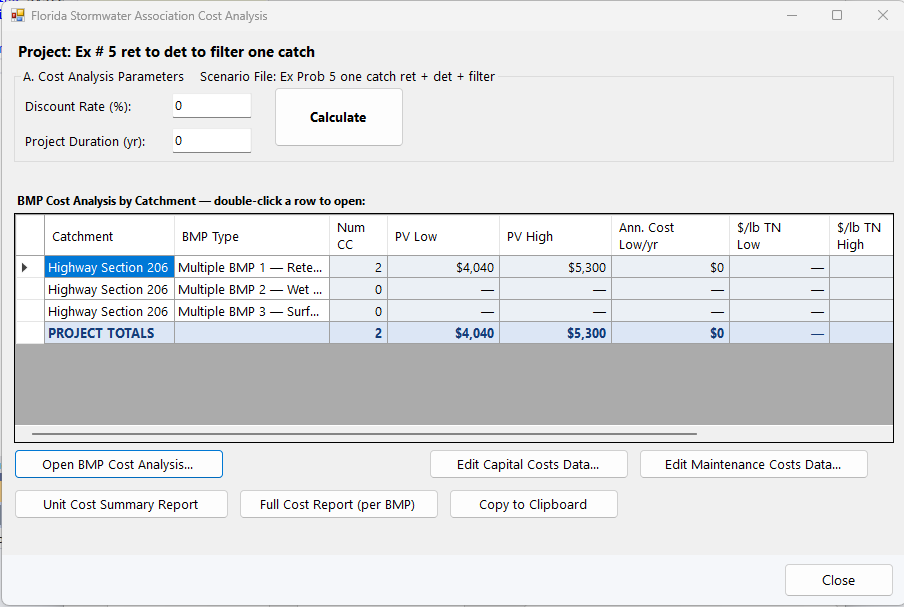
| Discount Rate (%) | % per year | The interest rate used to bring future costs to present worth and to annualize it. Default 3.3% — the FSAEF recommended default (long-term CPI average 1915–2015). Applies to the whole project; only a value greater than 0 is accepted. |
| Project Duration (yr) | years | The period of the analysis. Default 20 years. It sets how many replacements fall within the project and the period over which O&M is counted. Only a value greater than 0 is accepted. |
Source reference
Florida Stormwater Association Educational Foundation (2025). BMP Life-Cycle Costing Tool (presented by Cunningham, FSA Annual Meeting, June 2024) (link): BMPFast’s cost method, the component (IDs 1 to 18) and routine cost (IDs 100 to 160) databases in WQSystemDatabase.cs, the 3.3 % default discount rate (the long-term CPI average, 1915 to 2015), the $0.115/kWh electrical rate and the Maintenance Guide all follow this tool.
The grid, “BMP Cost Analysis by Catchment”, has one row for each catchment’s BMP. A Multiple BMP gets one row for each BMP in its series (“Multiple BMP 1 — …”). Columns:
| Column | Meaning |
|---|---|
| Catchment, BMP Type | Which BMP the row is. |
| Num CC | Number of cost items entered: cost components plus routine maintenance items. |
| PV Low, PV High | Total present worth ($). |
| Ann. Cost Low/yr | Annualized cost ($/yr), low estimate. |
| $/lb TN Low, High; $/lb TP Low, High | Cost per pound of nitrogen or phosphorus removed over the project. |
A dash (—) means no cost items have been entered. A BMP whose costs were entered on the old cost screen shows “(legacy)” in orange. The PROJECT TOTALS row adds up the items, present worth and low annualized cost of every BMP with costs.
| Button | What it does |
|---|---|
| Calculate | Saves the discount rate and duration and recalculates every BMP’s costs. |
| Open BMP Cost Analysis… (or double-click a row) | Opens the BMP Cost Analysis for the selected row. With no row selected: “Select a catchment row first.” |
| Migrate Legacy Data | Shown only when a BMP has costs from the old cost screen (land cost, fixed cost, maintenance cost, replacement cost). Converts them into cost components and routine costs. The hub also offers this when it opens. Review each BMP afterwards — the migration carries over the totals, not individual components. |
| Edit Capital Costs Data… | Opens the Cost Data Editor for the capital cost components. |
| Edit Maintenance Costs Data… | Opens the Cost Data Editor for the routine maintenance items. |
| Unit Cost Summary Report | A table of every BMP: construction, PV of replacement, PV of O&M, total PV, annualized cost and $/lb TN and TP, low and high. |
| Full Cost Report (per BMP) | For each BMP, its cost components and routine maintenance costs in detail. |
| Copy to Clipboard | Copies the Unit Cost Summary (both tables), tab-separated, for pasting into Excel. |
| Help | Opens this page. |
| Close | Saves the discount rate and duration and returns. |
BMP Cost Analysis
This screen holds the costs of one BMP. The header shows the project file, the BMP type and catchment, and the Discount Rate (%) and Duration (yrs) — the same project-wide values as on the hub; a change here changes them for the whole project when you Calculate or go Back. The costs are in four sections; click a section’s bar to open it (one section is open at a time).
B — Cost Components
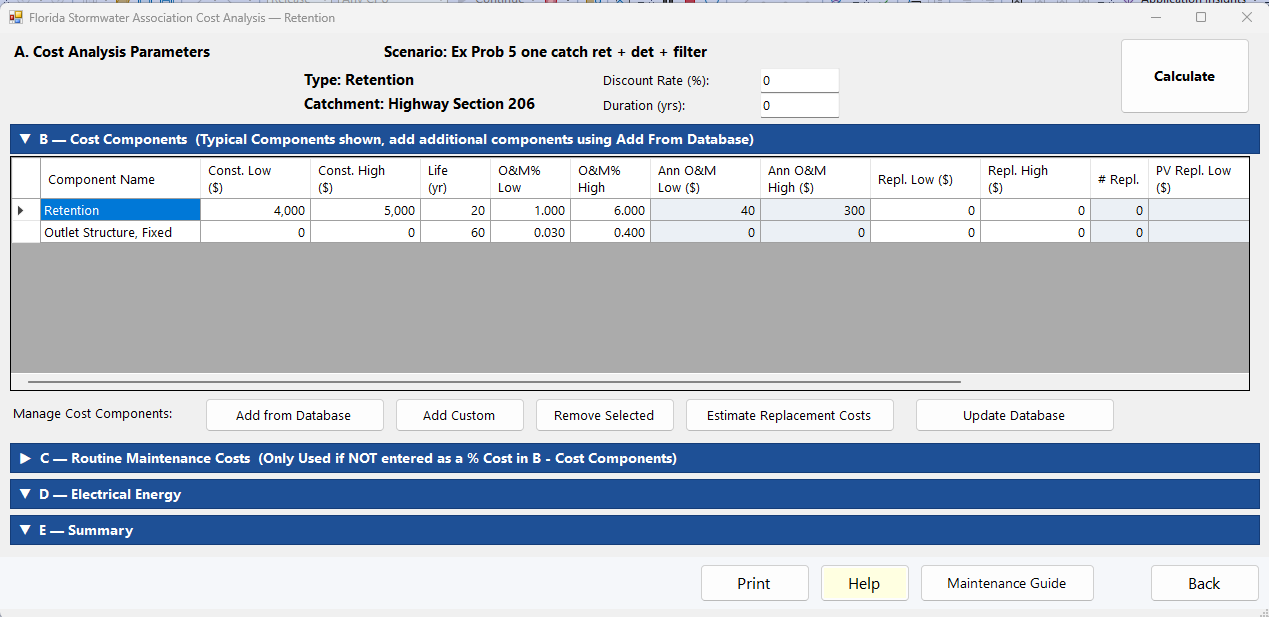
The capital items of the BMP. The first time a BMP is opened, BMPFast fills in the typical components for its type (for example Retention: Retention and Outlet Structure, Fixed; Wet Detention: Detention, Outlet Structure, Adjustable and Overflow Gate Structure; Surface Discharge Filter: Biosorption Activated Media, Underdrain, Outlet Structure, Fixed and Overflow Gate Structure). The standard components carry a service life and O&M percentages but no construction cost — enter your own.
| Column | Units | What it means |
|---|---|---|
| Component Name | — | Editable. |
| Const. Low ($), Const. High ($) | $ | Construction cost in current dollars. If High is 0, Low is used for the high estimate. |
| Life (yr) | years | Expected service life. The component is replaced every Life years within the project duration; 0 means site-specific (no replacement counted). |
| O&M% Low, O&M% High | % of construction cost per year | Annual operation and maintenance as a percentage of the construction cost. |
| Ann O&M Low ($), High ($) | $/yr | Calculated: construction cost × O&M% / 100. |
| Repl. Low (current $), Repl. High (current $) | $ | What one replacement would cost today (a present value, in current dollars). Leave it blank to use the construction cost. The cost at the time of each replacement is not typed: BMPFast estimates it with the BMP Inflation Rate (%) at the top of the screen (blank = the discount rate, which means replacements are not discounted): Repl. × (1 + inflation)^(k × Life). The reports show it. 0 and blank both mean the construction cost; for a component that is never replaced, set its Life to the analysis period or longer. |
| # Repl. | — | Calculated: number of replacements that fall strictly within the project duration. |
| PV Repl. Low/High ($), PV O&M Low/High ($) | $ | Calculated present worth of the replacements and of the annual O&M. |
| DB ID | — | The component’s number in the cost database; 0 for a custom component. |
| Button | What it does |
|---|---|
| Add from Database | Opens a list of the components in the capital cost database (with life and O&M Low); tick all you want and click Add. |
| Add Custom | Adds a blank “Custom Component” row and starts editing its name. |
| Remove Selected | Removes the selected row. |
| Fill Replacement Costs | Sets every blank Repl. Low/High to the component’s construction cost, so the value used can be seen and edited. Values you have entered are kept. |
| Update Database | Saves these components (name, life, O&M %, construction costs) into your capital cost database, adding custom ones with a new number, so they can be picked for other BMPs and projects. |
C — Routine Maintenance Costs
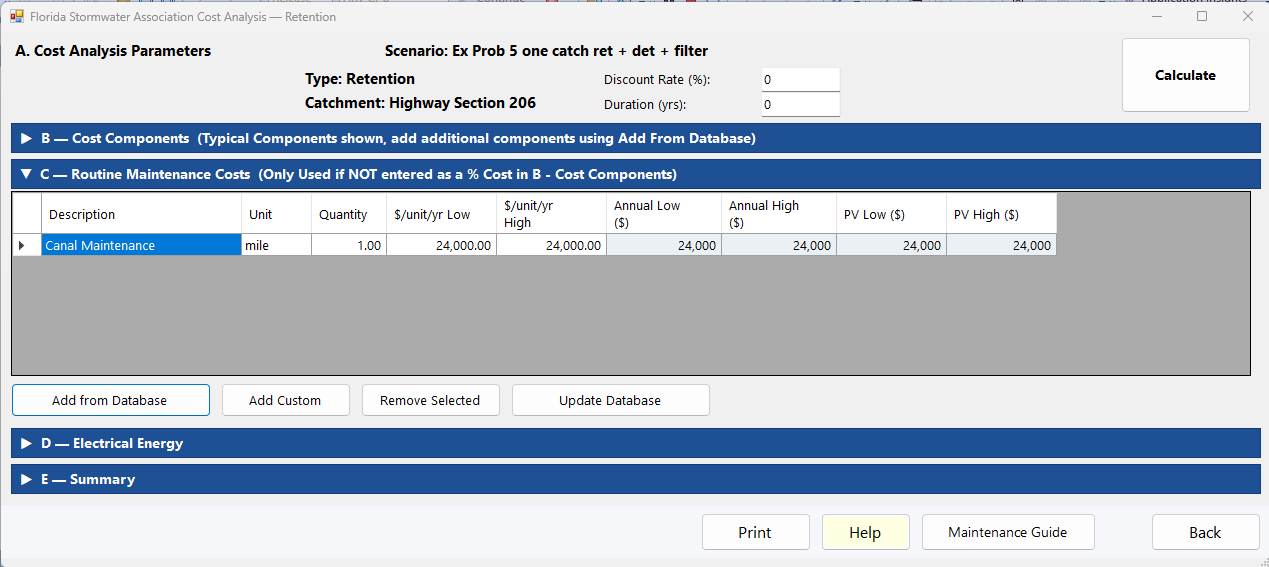
Annual items priced per unit (mowing, structure cleaning, canal or STA maintenance, …). The section’s title on the screen reads “added to any O&M % in B; do not enter the same maintenance twice”.
Maintenance can be entered in two places, and BMPFast adds both. Section B holds the up-front costs: construction, and the replacement of each component at the end of its life. Each component can also carry an O&M %, an annual maintenance cost taken as a percentage of its construction cost. Section C holds maintenance entered item by item. Enter each maintenance task in one place only: if a component’s O&M % already covers, say, mowing and sediment removal, do not add mowing and sediment removal again in section C, or that cost is counted twice. Use section C for maintenance the O&M % does not cover, or set the O&M % to 0 and enter all of the maintenance in section C.
| Column | Units | What it means |
|---|---|---|
| Description, Unit | — | What the item is and what it is counted in (each, acre, mile, MGY …). |
| Quantity | units | How many units a year. |
| $/unit/yr Low, High | $ per unit per year | Unit cost. If High is 0, Low is used. A credit (revenue) is entered as a negative value. |
| Annual Low/High ($), PV Low/High ($) | $/yr, $ | Calculated: quantity × unit cost, and its present worth over the project. |
| DB ID | — | The item’s number in the maintenance database; 0 for a custom item. |
The buttons are as in section B: Add from Database (with each item’s unit and typical cost; credits are marked “(credit)”), Add Custom (a “Custom Routine Cost” row, unit “each”, quantity 1), Remove Selected and Update Database. Item 160, Stormwater Resale (a credit per million gallons a year), is offered only for a Stormwater Harvesting BMP, and its quantity is filled from the BMP’s harvested water supply.
D — Electrical Energy
| Input | Units | What it means |
|---|---|---|
| Annual Electrical Energy (kWh/yr) | kWh/yr | Energy used by pumps or other equipment. |
| Cost per kWh ($/kWh) | $/kWh | Utility rate; default 0.115. |
The line below shows the Annual Cost and its PV Cost as you type. The energy cost is added to O&M, the same in the low and high estimates.
E — Summary
Low and High estimates of: Construction Cost; PV of Replacement; PV of O&M (components, routine items and energy); Total Present Worth; Annualized Cost ($/yr); and $/lb TN removed and $/lb TP removed (a dash when the BMP removes none). The cost per pound is the present worth over the pounds removed in the analysis period, not the annualized cost over the pounds per year; a note under the table says so (see Cost Analysis Methodology).
Buttons
| Button | What it does |
|---|---|
| Calculate | Reads all sections, recalculates and refreshes the calculated columns and the summary. |
| Recalculates and opens this BMP’s cost report in the Report Viewer. | |
| Help | Opens this page. |
| Maintenance Guide | Opens the Maintenance Activity Reference for this BMP type — typical maintenance activities and their frequency (source: FSAEF BMP Life-Cycle Cost Tool 2025, for planning only). For a Multiple BMP, one for each BMP in the series. |
| Back | Saves the entries and returns. |
Equations
Methodology. Cost Analysis Methodology explains these calculations step by step: replacements, present values, present worth, annualized cost and cost per pound, with a worked example that matches the program.
i = discount rate / 100,  N = project duration (yr),  f = inflation rate / 100 (the discount rate if none was set)
Annual O&M ($/yr)            = Construction cost x O&M% / 100
Number of replacements n     = ceiling(N / Life) - 1   (0 when Life >= N or Life = 0)
Replacement cost R           = Repl. (current $), or the construction cost when blank
Cost at replacement k (FV)   = R x (1 + f)^(k x Life)
PV of replacements           = sum over k = 1..n of  FV_k / (1 + i)^(k x Life)
PV of an annual cost A       = A x ((1 + i)^N - 1) / (i x (1 + i)^N)
Total Present Worth          = Construction + PV of replacements + PV of O&M (components + routine items + energy)
Annualized Cost ($/yr)       = Total Present Worth x i (1 + i)^N / ((1 + i)^N - 1)
$/lb removed                 = Total Present Worth / (mass removed (lb/yr) x N)
The mass removed is the BMP’s nitrogen or phosphorus load in minus its load out (kg/yr × 2.205). With a discount rate of 0, the present worth of an annual cost is A × N and the annualized cost is Total Present Worth ÷ N. The per-BMP report and the Full Cost Report print this replacement method, with the inflation and discount rates used, under the component table.
Source reference
BMPFast method (BMP.CalculateComponentCosts; Ron, 2026-10-10 and 2026-10-13): replacement costs entered in today’s dollars, grown at the inflation rate and discounted at the discount rate, and the cost per pound as present worth over the pounds removed in the period, are BMPFast’s choices.
Cost Data Editor
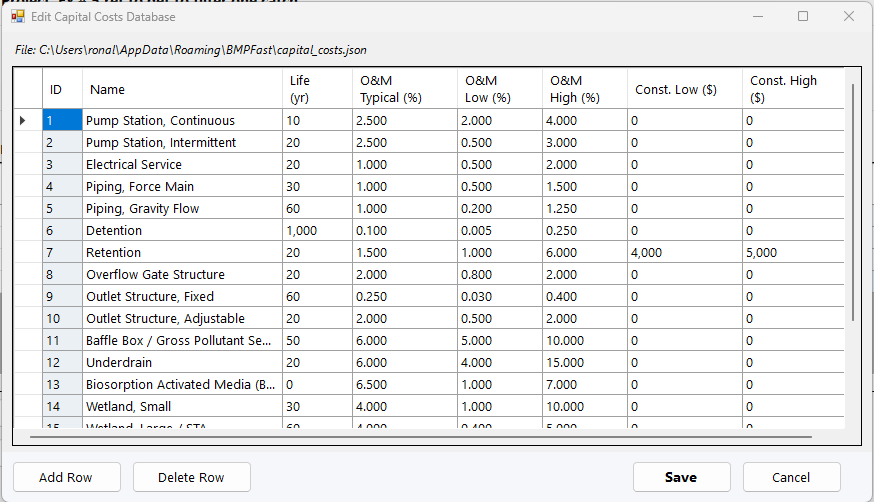
Opened from the hub with Edit Capital Costs Data… or Edit Maintenance Costs Data…. It edits the lists that “Add from Database” offers. BMPFast starts from built-in lists; the first time you save, your own copy is written to %AppData%\BMPFast\capital_costs.json or maintenance_costs.json (the path is shown at the top) and used from then on. Changing the database does not change BMPs already costed.
| List | Columns |
|---|---|
| Capital costs | ID (not editable), Name, Life (yr), O&M Typical (%), O&M Low (%), O&M High (%), Const. Low ($), Const. High ($). |
| Maintenance costs | ID (not editable), Description, Unit, Typical Cost, Typical Cost Low, Typical Cost High, Is Credit (a credit is entered as a positive cost here and becomes negative when added to a BMP). |
Add Row adds an entry with the next free number (capital items from 19, maintenance items from 200). Delete Row removes the selected entry; deleting a built-in entry (capital 1–18, maintenance 100–160) asks first, because it will no longer appear in the picker. Save writes the list; Cancel discards the changes.
References of Direct Citations and Use in Florida
Florida Department of Environmental Protection, Applicant’s Handbook, Vol 1. Section 12.3.5, June 28, 2024.
Florida Stormwater Association, BMP Life Cycle Costing Tool (updated 2025). FSA Research or (www.Florida-stormwater.org/research).
Florida Stormwater Association, FSAEF BMP Life Cycle Costing Tool Presentation, Cunningham, Annual Meeting, June 2024.
Sample problems
Worked problems solved in BMPFast, each with every input, the steps with screen captures, the program’s results, a hand check and the project file to download. Captures are for demonstration only. All of them: BMPFast sample problems.