The challenge and the preview
4 Challenge
4 Challenge sets what a player is asked to do: the words at the top of the page, the money they may spend on fixes, and what each fix costs. A player builds a plan within the budget, runs a traffic test, and submits it for a score out of 100.
What you need to do here: the title and the budget — and both start with a value. Everything else is optional.
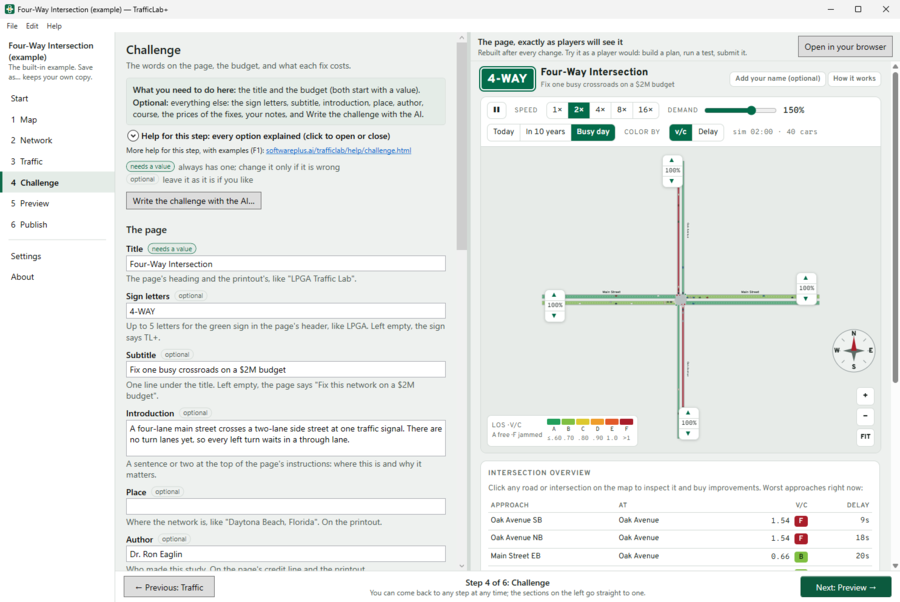
The page's words
| Box | What it does |
|---|---|
| Title | The heading of the page and the printout. |
| Sign letters | Up to five letters in the green sign at the top left of the page, like LPGA. Left empty, the sign says TL+. |
| Subtitle | One line under the title. Left empty, the page says "Fix this network on a $X budget". |
| Introduction | A sentence or two at the top of the page's instructions: where this is and why it matters. |
| Place, Author, Course | Printed on the printout ("Study by …"); the author is also in the page's credit line. |
Budget for a plan
The money, in millions of dollars, a player's plan may spend. The score rewards money left over, and a plan over budget has its score halved. LPGA's is $5 million: enough for a few real fixes, not everything.
What each fix costs
In millions of dollars; the page adds these up as a player builds a plan.
- Adding a through lane each way — a fixed part per road widened, plus a part per mile of road widened.
- Making a road one-way — signs and markings.
- A left-turn lane, A right-turn lane — each for one approach.
- Retiming a signal — a new cycle length or split at one signal: an engineer's time, no construction.
- A protected left-turn phase — a green arrow at one signal.
- Turning a signal into a roundabout — the whole intersection rebuilt.
Use the LPGA example's prices puts every price back to the LPGA Traffic Lab's. To rule a fix out, price it above the budget.
Write the challenge with the AI (optional)
Describe the challenge you want — the class, how hard, what players should learn (for example, "A sophomore lab: a tight budget so only two or three fixes fit, roundabouts too expensive, and a Race Week button at 150%"). The AI proposes the title, introduction, budget, prices and demand buttons, each with its reason, and you apply the ones you want. See The AI.
Your notes
Anything you want to remember. Kept in the study file, never put on the page. A study made from the map starts with its list of things to check.
5 Preview
5 Preview shows the page full size, exactly as it will be published — the same file. Nothing here changes your study, so the step can be skipped, but it is the best way to check your work. Try it as a player: read the instructions, press Start, raise the demand, click a red road or intersection, buy a fix, press Run traffic test, then Submit plan to see the printout (The page players see explains each part).
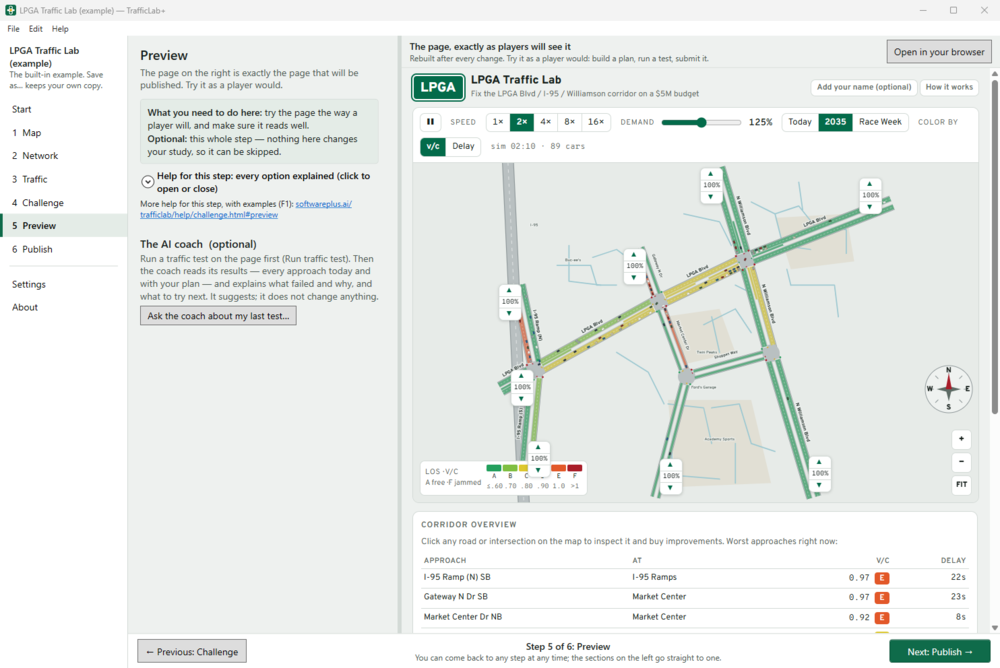
Things to check:
- Is the page's goal clear from its title and introduction?
- Is the budget enough for a few fixes but not everything?
- Is there something worth fixing — orange or red roads, at least on the busier demand buttons?
- Are the names the ones people use?
Open in your browser (above the page, on every step) shows the same page in Edge or Chrome, as a visitor sees it.
The page is rebuilt after every change you make in the other steps. When it is, the line above the page says so — Rebuilt at …, after your change — a plan you were trying on the page starts again. — so finish trying a plan before you change the study. Inside TrafficLab+ the page never asks "Leave site?"; the published page does, if a player has a plan on it and closes the tab.
Ask the coach about my last test… (optional, uses the AI): run a traffic test on the page first, then the coach reads its results — every approach today and with your plan — and explains what failed and why, and what to try next. It suggests; it does not change anything.