
The Rain Garden Analysis Worksheet is where you describe a rain garden that treats one catchment’s runoff and see how much nitrogen and phosphorus it removes. Choose whether the rain garden works as Retention (it infiltrates) or Detention (it has an underdrain), choose a media mix if one is used, enter the storage in the soil/media and above it, enter any cover crop credit, and press Calculate.
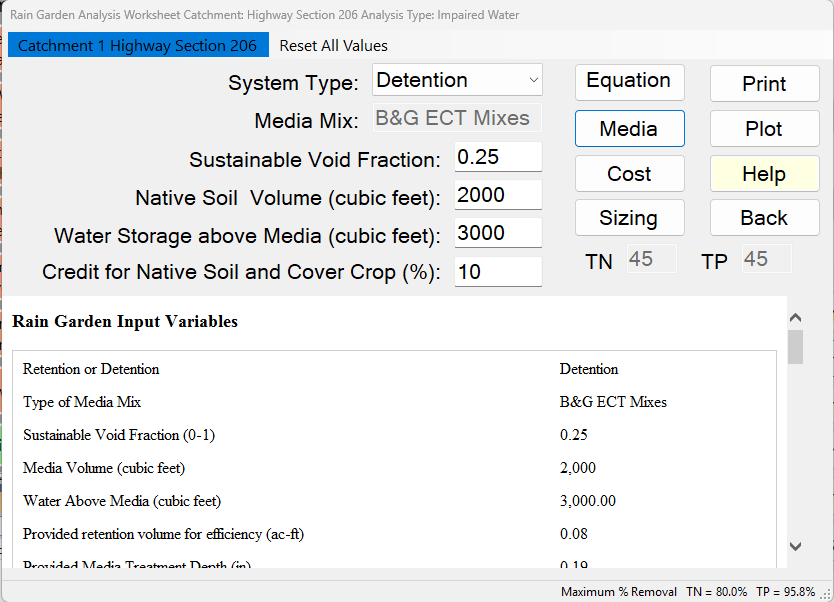
Description
Rain gardens are retention or detention areas that are integrated into a site’s landscaping. They are usually in a shallow constructed depression that has a cover crop, typically deep-rooted Florida-Friendly or native plants. Sometimes they include walkways or parking areas. They are located in the landscape or within parking lot islands to receive runoff from hard surfaces such as:
- Roofs
- Sidewalks
- Driveways
- Parking areas
Sometimes they are called planter boxes if located close to a building. The term Green Stormwater Infrastructure (GSIs) is frequently used.
For design, the water holding capacity of the soil or media includes:
- A sustainable void or porosity within the soil/media
- Water storage above the soil/media
Plant selection is done so that water storage above the rain garden ground level does not destroy the plants.
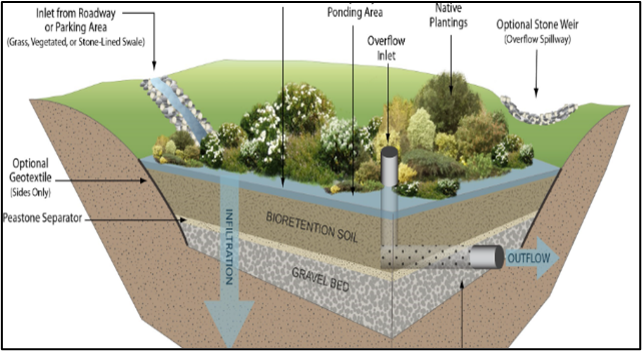
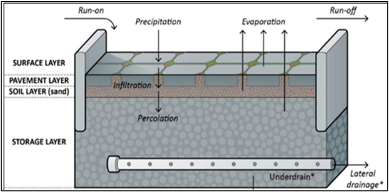
In situations where the Seasonal High Groundwater Table (SHGWT) is high, a rain garden is classified as a detention system and an underdrain is used. However, they do not function like a wet pond and therefore do not receive wet detention pond credit.
When a cover crop is used, credit for removal of TN and TP is assigned and must be documented to establish:
- Maintenance plan
- Ownership
- Credit assignment
When sorption media is used, a separate credit is assigned and must be documented to establish service life.
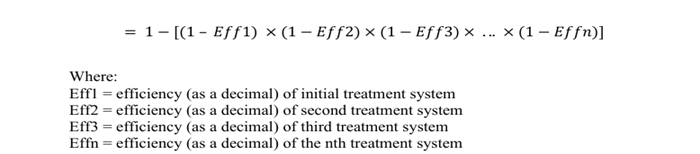
Credits are applied as if the remaining concentration and mass are being treated (series treatment). The general series removal equation is found in the Applicant’s Handbook Vol 1 (June 28, 2024).
Applicant’s Handbook reference
Appendix O, Table 1 (BMP Efficiencies), Green Stormwater Infrastructure Efforts (Rain gardens): “Use appropriate retention or detention calculation for volume captured then add an additional removal based on plant, soil and media selections in a treatment train configuration”; BMPFast adds the cover crop credit and the media this way.
Section 9.5.1 Treatment Train Nutrient Reduction (Equation 9-5): removals in series are combined as 1 − [(1 − Eff1) × (1 − Eff2) × …]; each credit acts on what the step before it leaves, as in the examples below.
How BMPFast calculates the removal
The System Type decides the calculation.
Retention. The water stored in the soil/media voids and above the media gives a Treatment Depth over the area draining to the rain garden. The hydraulic capture is read from the retention efficiency curves for that depth. The cover crop credit is then applied to what is not captured. The media mix does not add to the surface removal for Retention; it is used in the groundwater analysis (the captured water passes through the media before reaching the groundwater).
Applicant’s Handbook reference
Appendix O, Raingarden/Bioretention Cell: “The nutrient reduction capability of these systems can be calculated in the same way as Dry Retention System”; BMPFast does this for System Type Retention.
Appendix O, Dry Retention Systems: removal is read from the mean annual mass removal tables by zone, non-DCIA curve number, DCIA and retention depth (inches over the catchment), and the treatment volume must be recovered within 72 hours; BMPFast reads the same tables at the Treatment Depth but does not check the 72-hour recovery (its 48-hour media surface area is a design check only).
Detention. No volume is retained, so the hydraulic capture is 0 and all the runoff leaves as surface discharge. As Appendix O orders it, the media mix removes its share first, then the cover crop credit is applied to what is left: removal = media reduction + (100 − media reduction) × credit / 100. (The result is the same in either order.) With no media mix the removal is the credit alone.
Applicant’s Handbook reference
Appendix O, Detention with Engineered Media and Filtration: efficiency = (detention efficiency for the volume detained) + (volume filtered and not detained × treatment efficiency of the media); BMPFast takes no volume as detained, so the removal is the cover crop credit followed by the media’s reduction on all the runoff.
Section 2.0 Definitions and Terms, “Detention with filtration”: storage of stormwater with gradual release “through an appropriately-sized engineered media or filter system”, which is the Detention option here.
Source reference
BMPFast method (RainGarden.Calculate; Ron, 2026-10-01): for Detention there is no capture; the cover crop credit is applied first and the media treats what is left. The credit itself must be documented for the site; the program gives no default.
Example calculation of series removal
Assume 100 kg/year input mass.
- Retention with a 10 % cover crop credit: 60 % is removed by infiltration (retention), leaving 40 kg/year. Overall removal = 60 + 0.10(40) = 64 kg/year (64 %).
- Detention with a 10 % cover crop credit and a media that removes 75 %: the credit removes 10 kg/year, leaving 90 kg/year; the media removes 0.75(90) = 67.5 kg/year. Overall removal = 10 + 67.5 = 77.5 kg/year (77.5 %).
Inputs
The labels below are as they appear on the worksheet; the names in brackets are those used in the report, on the Equations page and in Sizing.
| Input | Units | What it means / how it is used |
|---|---|---|
| System Type | — | Retention (the rain garden infiltrates) or Detention (an underdrain carries the treated water away, for example where the SHGWT is high). A fixed list; hover over it for a summary of each calculation. [Retention or Detention] |
| Media Mix | — | The media mix in the rain garden, shown read-only. Set it with the Media button. Retention: used for the groundwater analysis. Detention: its N and P reduction treats what the cover crop credit leaves. |
| Sustainable Void Fraction | 0–1 | The long-term void (pore) fraction of the soil/media above the SHGWT that holds water. Multiplies the soil volume to give the storage in the voids. Sustainable void fractions have been determined over long periods of time and eliminate safety factors based on clean water porosity testing; for most media, 0.25 is recommended (Sizing starts at 0.25). [Sustainable Void Fraction] |
| Native Soil Volume (cubic feet) | cf | Volume of the soil or media in the rain garden above the SHGWT. [Media Volume] |
| Water Storage above Media (cubic feet) | cf | Volume of water held above the soil/media surface (the ponding depth times its area). [Water Above Media] |
| Credit for Native Soil and Cover Crop (%) | % | The documented N and P removal credit for the cover crop (and native soil). Retention: applied to the runoff that is not captured. Detention: applied after the media, to what the media leaves. Enter 0 for no credit. [Credit for Native Soil and Cover Crop] |
| TN, TP | % | The media mix’s N and P reduction. Filled in from the chosen mix and read-only; editable only when the mix is User Defined, where you type your own values. |
The area draining to the rain garden (the Contributing Area) is taken from the catchment: its post-development area less the BMP area. The curve number, DCIA percent, rainfall zone and rainfall also come from the catchment and the General Site Information.
Equations
Methodology. With System Type Retention, BMPFast treats this BMP as retention. Retention BMPs compares how every retention BMP calculates its Treatment Depth, and Retention Methodology explains the retention curves it is read on.
With System Type Detention, see Media and Filtration Methodology.
Storage Volume (cf) = Void Fraction x Media Volume + Water Above Media
Treatment Depth (in) = Storage Volume x 12 / (43560 x Contributing Area (ac))
Minimum Media Surface Area (sf) = 12 x Storage Volume (cf) / (2 days x 24 h/day x Media Rate (gpm/sf) x 96.25 (in/hr per gpm/sf))

Retention:
Hydraulic Capture (%) = retention curves (Treatment Depth, non-DCIA CN, DCIA %, rainfall zone)
N removal (%) = P removal (%) = Capture + Cover Crop Credit / 100 x (100 - Capture)

Detention:
Hydraulic Capture (%) = 0
N removal (%) = Cover Crop Credit + (100 - Cover Crop Credit) x media N reduction / 100
P removal (%) = Cover Crop Credit + (100 - Cover Crop Credit) x media P reduction / 100
The report also lists the Provided retention volume for efficiency (ac-ft) = Contributing Area x Treatment Depth / 12, and the Provided Media Treatment Depth (in), which equals the Treatment Depth.
Minimum media surface area (a design check). The report and the Equations page also give the Minimum Media Surface Area to drain the storage in 48 hours (sf): the media surface needed to pass the stored volume through the media in two days at the media mix’s rate. 1 gpm/sf is 0.13368 cf per minute per square foot, or 96.25 inches per hour, so the media passes Rate x 96.25 x 48 inches in 48 hours, and the area is the storage (cf) divided by that depth in feet. Compare it with the surface area of the media in your design; the worksheet does not ask for that area, so BMPFast does not check it. With no media mix (no rate) the value is 0.
Source reference
BMPFast method (RainGarden.cs): the 48-hour minimum media area and the 0.25 sustainable void fraction recommended for most media (Ron, 2026-10-09) are BMPFast’s design checks and starting values, not handbook values.
Example: Retention Rain Garden with Media
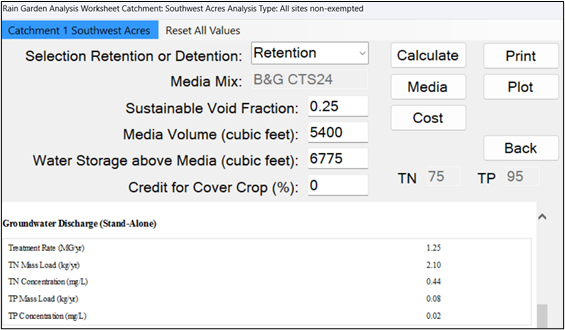
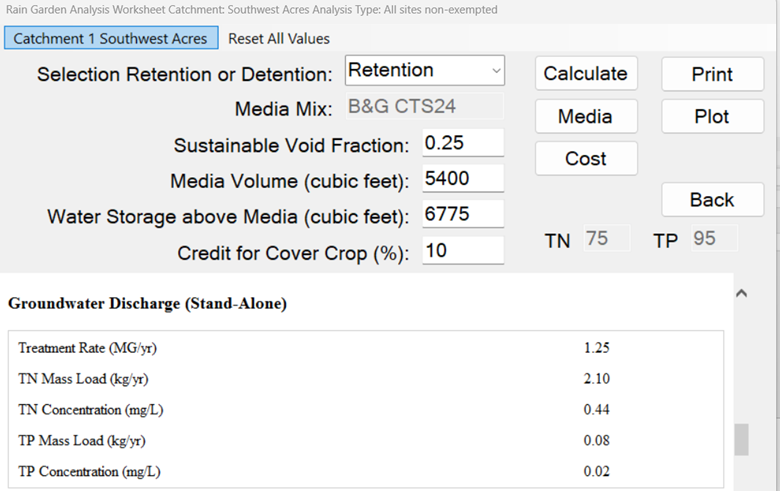
Retention, B&G CTS24 media, void fraction 0.25, 5400 cubic feet of soil/media and 6775 cubic feet of water above it: storage = 0.25 x 5400 + 6775 = 8125 cf. For this catchment the hydraulic capture, and so the average annual removal, is 77.2 %. The media (TN 75 %, TP 95 %) does not change this; it is used in the groundwater analysis.
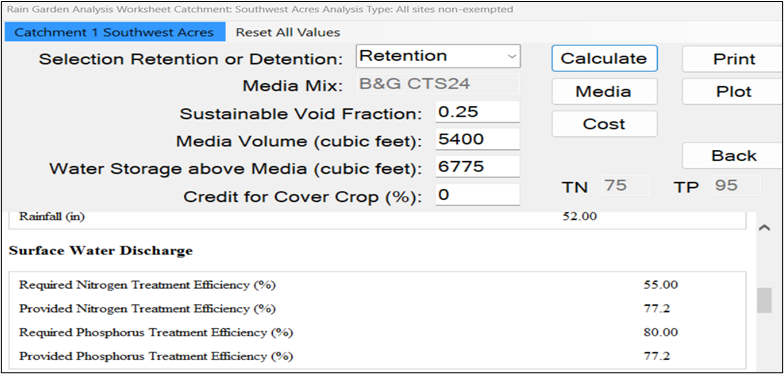
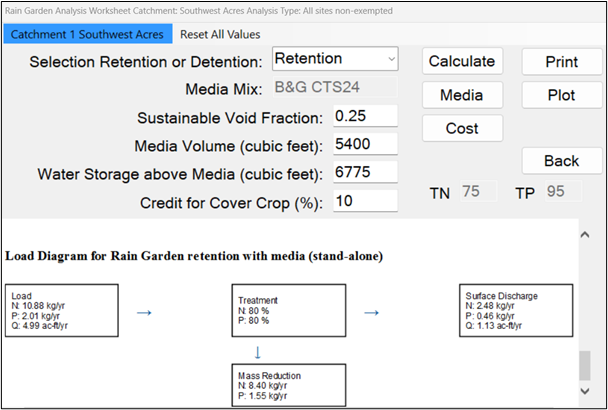
With Additional 10% Cover Crop Credit:
77.2 + 0.10(22.8) = 79.5%
Rounded to one decimal place: 79.5%
Rounded to nearest whole number: 80%
Results
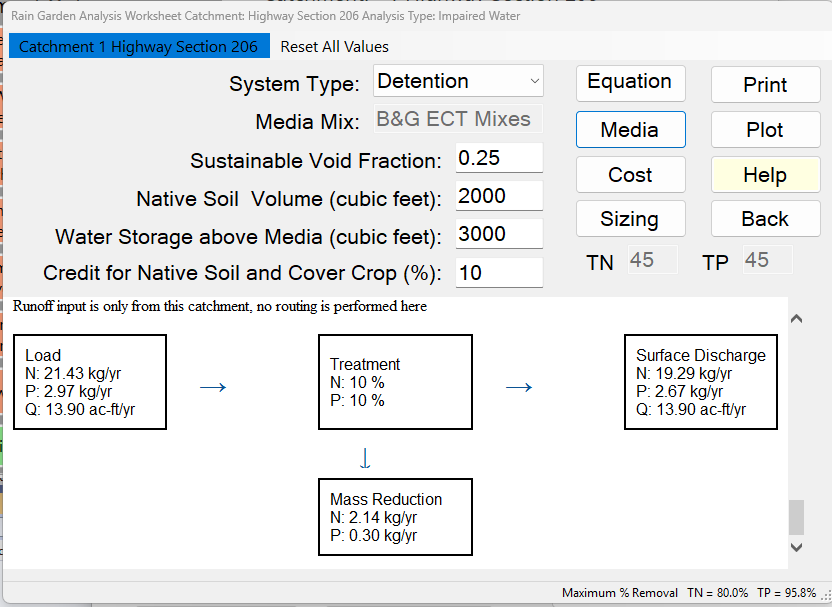
- Rain Garden Input Variables — System Type, media mix, Sustainable Void Fraction, Media Volume (cubic feet), Water Above Media (cubic feet), Provided retention volume for efficiency (ac-ft), Provided Media Treatment Depth (in), Credit for Native Soil and Cover Crop (%) and Minimum Media Surface Area to drain the storage in 48 hours (sf).
- Watershed Characteristics — Watershed Area (acres), Contributing Area to BMP (ac), Watershed Non-DCIA Curve Number, Watershed DCIA Percent, Rainfall Zone and Rainfall (in).
- Surface Water Discharge — Provided Nitrogen and Provided Phosphorus Treatment Efficiency (%). A value of 100 % or more is shown as 99 %.
- Media Mix Information and Groundwater Discharge (Stand-Alone) — shown when a media mix is chosen or Conduct Groundwater Discharge Analysis is Yes (see below).
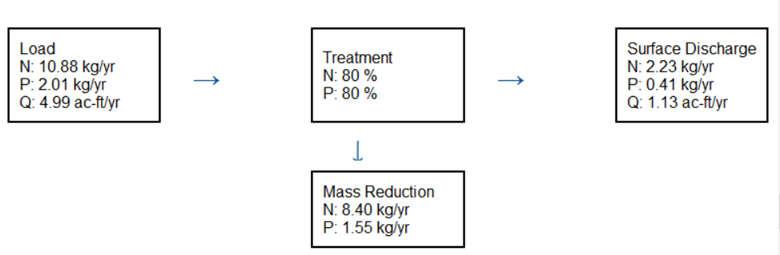
- Load Diagram — Load in (N and P in kg/yr, Q in ac-ft/yr), Treatment (N and P removal, %), Surface Discharge (N, P and Q leaving the rain garden) and Mass Reduction (kg/yr), for this catchment’s runoff alone. For Detention the surface Q equals the runoff in.
The report title reads “Rain Garden retention” or “Rain Garden detention”, with “with media” when a mix is chosen. The strip at the bottom of the worksheet shows the project’s Maximum % Removal for TN and TP.
Buttons
| Button | What it does |
|---|---|
| Calculate / Equations / Report | One button with three jobs. After you change an input it reads Calculate: it calculates with the values entered and shows the report. Once the report is current it reads Equations and shows the Equations page; it then reads Report and takes you back. |
| Media | Its tooltip: “Select the media mix: groundwater analysis (Retention) or removal after the cover crop (Detention).” Opens the media mix form: choose the mix, answer “Is the media design residence time more than 2 hours?” (answering No gives B&G ECT Mixes and SAT a lower removal of 25 %), and see its TN and TP Reduction. Choosing User Defined opens the media mix library, where you can pick or create your own mix. |
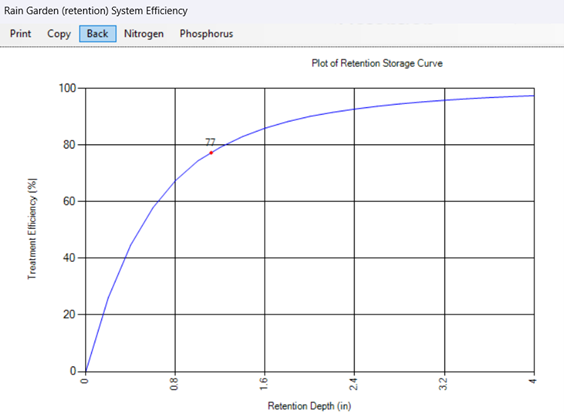
| Plot | Shows the retention efficiency curve (capture against Treatment Depth) for this catchment, with the rain garden’s current Treatment Depth marked. It shows the hydraulic capture only, without the cover crop credit, and applies to Retention only: for Detention the button is off and reads “Plot (Retention only)” (there is no capture curve). It calculates with the values in the boxes first, so the mark is current. |
| Cost | Opens the Life-Cycle Cost Analysis for this rain garden (construction, replacement and maintenance costs, present worth and cost per pound of N and P removed). |
| Sizing | Retention only. Opens the Sizing form: change Sustainable Void Fraction, Media Volume, Water Above Media and Credit for Native Soil and Cover Crop with arrows and see the N and P removal against the targets on a chart. Apply keeps the values; Cancel discards them. With System Type set to Detention, BMPFast says “Sizing applies to the Retention configuration of a Rain Garden. Set System Type to Retention first.” See Sizing. |
| Opens what is showing (report or Equations page) in the Report Viewer, where it can be printed or saved. | |
| Help | Opens this page. |
| Back | Saves the values, calculates, and returns to the previous screen. |
Plot Option (Discovery Tool)
The plot option can be used for discovery analysis. It shows the marginal change in annual capture efficiency and allows optimization of design based on:
- Cost
- Performance
- Site constraints
The Equations page
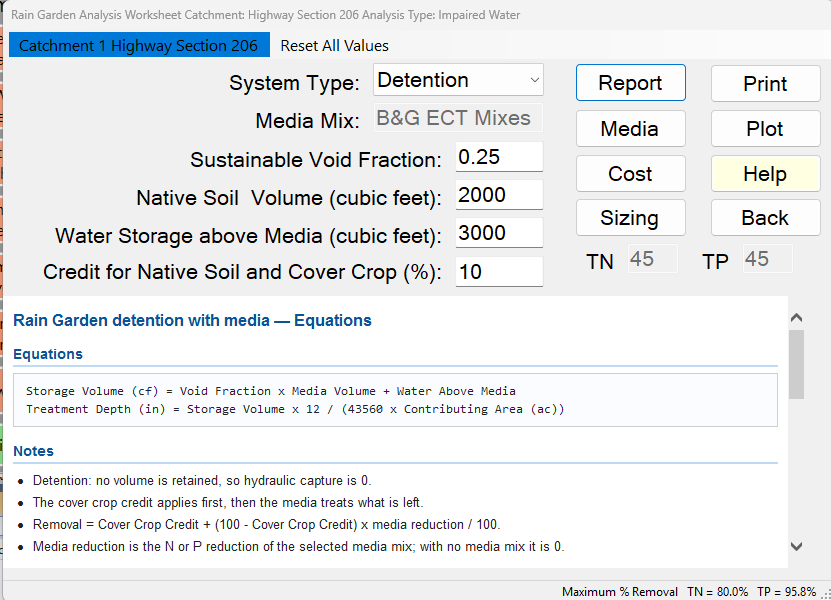
The Equations page shows the storage and Treatment Depth equations, notes on how the removal is calculated for the System Type in use (the formulas above), and a Values table: Sustainable Void Fraction, Water Above Media, Media Volume, Credit for Native Soil and Cover Crop, then Contributing Area, Watershed Area, Non-DCIA Curve Number, DCIA Percent, Rainfall Zone, Treatment Depth, Hydraulic Capture (%), Treatment Rate (gpm/sf of the media mix, or “(no media mix)”) and N and P removal (%).
Groundwater Discharge Analysis
When using retention with media, groundwater loading and recharge volume can be determined by specifying a groundwater discharge analysis when setting the performance surface discharge standard on the General Site Information worksheet. The groundwater tables also appear whenever a media mix is chosen. The water captured carries its N and P load into the media, and the media’s TN and TP reduction is applied before it reaches the groundwater. For Detention nothing is captured, so the groundwater loads are 0.
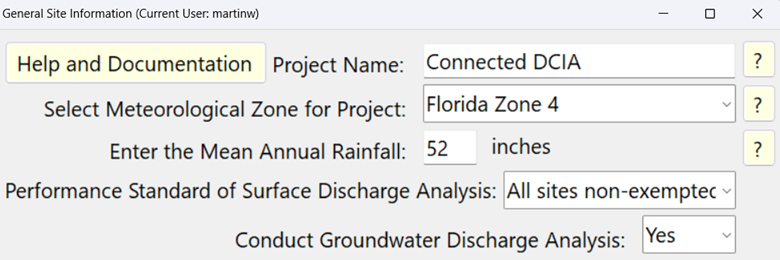
The resulting groundwater discharge and loadings for this example are shown as:
Notes and limits
- A rain garden normally treats only the runoff from its own catchment: flows routed from upstream catchments bypass it and go on, untreated, to the next catchment, and the routing report notes it. Should one of them be designed to treat the upstream runoff too, untick Bypass upstream runoff on this catchment’s Routing screen (BMPFast asks once when a catchment is first routed into it).
- In a Multiple BMP series, a rain garden set to Retention counts as a retention BMP; one set to Detention does not.
References
Chang, N.B., Wanielista, M., and Henderson, D. (2011). Temperature effects on functionalized filter media for nutrient removal in stormwater treatment. Environmental Progress and Sustainable Energy, 30(3), 309–317.
Hossain, F., Chang, N.B., and Wanielista, M. (2010). Modeling kinetics and isotherm of functionalized filter medium for nutrient removal in stormwater dry ponds. Environmental Progress and Sustainable Energy, 29(3), 319–333.
Sample problems
Worked problems solved in BMPFast, each with every input, the steps with screen captures, the program’s results, a hand check and the project file to download. Captures are for demonstration only. All of them: BMPFast sample problems.