The four stages
Each stage is its own page of steps.
- Establish outcomes and measuresOnce for a course: start its record, write its course outcomes, choose its program, map each outcome to a program outcome, and decide how each will be measured.
- Collect measuresEach semester: add the offering, then its grade distribution and how many students met each measure — typed, or read from your gradebook export.
- Analyze the data and give inputRead each outcome's result against its target, compare with earlier semesters, write the four narratives, and run the course reports you need.
- Send it to the programThrough the shared department folder, or as a submission (.ciasub) or offering (.ciaoff) file.
What you will need
- Your course's code and title, and its course outcomes — from the syllabus or the master course description.
- The program it counts toward (its exact title, such as BSIT), and that program's outcomes. If you share the department folder, your coordinator has usually set them up already; if not, ask them.
- Each semester, your gradebook export (a spreadsheet from Brightspace, Canvas or your learning management system) — or just the counts, to type in.
- Optional: a course export (
.imscc) for the reports that read the course's content, and an AI key for the reports that need one (AI and privacy).
Where it happens
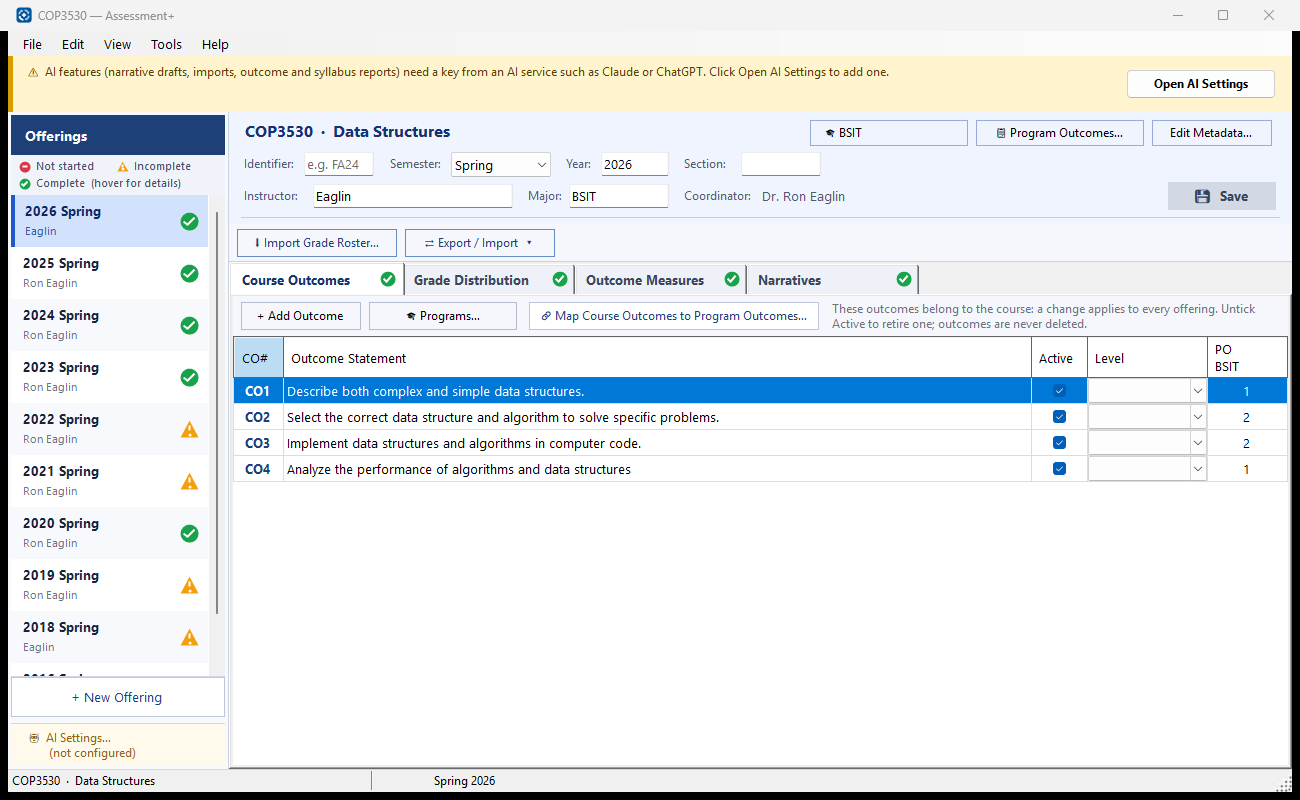
Faculty work starts at 📚 Courses in the tree. Each course holds its 📝 Faculty Course Evaluations — one offering per semester — and opens in the course editor, a window with four tabs: Course Outcomes, Grade Distribution, Outcome Measures and Narratives.